 Zoho
Solutions
 Ecommerce
Development
 Web
Development
 AI
Solutions




- What Is a WordPress RFP and When Do You Need One?
- WordPress RFP Template You Can Copy
- Part 1: Business Context and Project Scope
- Part 2: WordPress Requirements and Acceptance
- Part 3: Agency Response and Commercial Details
- How to Adapt the WordPress RFP Template for a Small Project
- Turn Business Goals Into Clear WordPress Requirements
- Specify WordPress Migration and Ongoing Costs Before Asking for Quotes
- Ask Every Agency to Use the Same Response Format
- How to Compare WordPress Development Quotes Fairly
- Evaluate Delivery Fit Alongside Price
- Confirm Acceptance, Launch and Handover Responsibilities
- Frequently Asked Questions
- Do I need a WordPress RFP for a small website project?
- What should a WordPress website RFP include?
- What is the difference between a WordPress RFP and an agency proposal?
- Should I specify exact WordPress plugins in the RFP?
- How do I compare WordPress development quotes with different inclusions?
- How should I describe CRM integration and lead form requirements?
- What should WordPress website handover and post launch support include?
- Your Next Step With a WordPress RFP
Quick Answer
A WordPress RFP (Request for Proposal) is a document you write that tells every agency the same things: what you need, what you’ll supply, and how to format the answer. Every quote then arrives in the same shape, so you can compare 12-month totals and delivery fit instead of guesses.
|
When you need the full RFP
|
When a one-page brief is enough
|
Short version: define your business problem, mark unknowns as unknown, and ask every agency to answer in one format. This guide gives you a copy-ready template, a requirements table and a scorecard to compare quotes fairly.
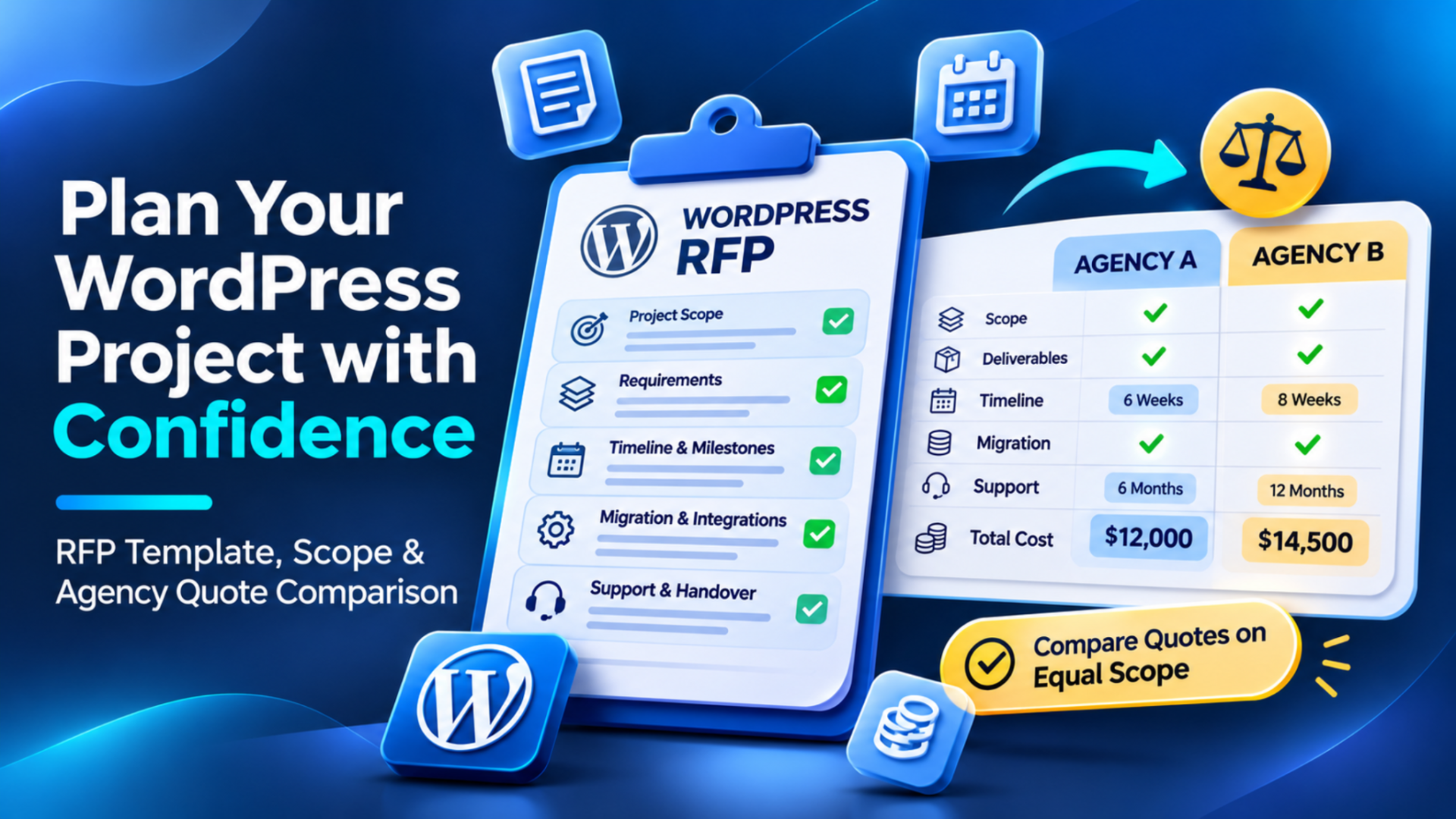
Two agencies quote you for the same WordPress site. One says $12,000. The other says $14,500. Easy choice, right?
Not so fast. Most of the time, that gap has nothing to do with quality. One agency assumed you’d handle content migration. The other priced it in. One skipped a year of support; the other didn’t. You’re not comparing prices at that point. You’re comparing guesses.
A WordPress RFP takes the guessing out. RFP stands for Request for Proposal. It’s a document you write that tells every agency the same things: what you need, what you’ll supply, and how you want the answer laid out. Every proposal then lands on your desk in the same shape.
You don’t need to be technical to write one. You just need to know your business problem. After a quick definition, you’ll find a full template you can copy, then we’ll go through how to fill it in and how to judge the quotes that come back.
What Is a WordPress RFP and When Do You Need One?
A WordPress RFP is a written request from a business to WordPress agencies. It describes the website project, the requirements, the budget or timeline, and the format you want in reply. You write it. The agency answers with a proposal.
People mix up three documents all the time, so here’s the split.
| Document | Purpose | Who owns it |
|---|---|---|
| WordPress RFP | Asks agencies to quote against full requirements, using one response format | You, the buyer |
| WordPress project brief | Summary of goals, scope, timing and budget for a smaller project | You, the buyer |
| Agency proposal | The agency’s approach, price, timeline and assumptions | The agency |
Do you need the full RFP? Not always.
A formal one makes sense when several people sign off on the decision, when you’re sending the same request to multiple agencies, or when the site connects to a CRM, a store or an old site that needs migrating. Procurement teams usually want it on paper anyway.
For a small brochure site with one decision maker, a one-page brief does the job. There’s a short version of the template further down for exactly that case.
WordPress RFP Template You Can Copy
Here’s the template. Paste it into a Google Doc, a Word file or an email. Replace anything in [square brackets]. If you don’t know an answer yet, write “unknown, needs discovery.” That’s a fair answer, and it beats a guess.
One hard rule: never put passwords or API keys in this document. Ever. Access gets shared later, through a proper channel, after you’ve picked an agency.
If you want a second opinion on what to include, Codeable’s help center has a short guide on describing your project details. It covers goals, audience, timing, and budget.
Part 1: Business Context and Project Scope
Start here. These fields give agencies the “why” before they think about the “how.”
Not sure what to write for budget? Our breakdown of WordPress website development costs gives you a sense of the ranges. And “unknown” is still allowed.
WORDPRESS RFP: [Project name]
Issued by: [Company name]
Date issued: [date]
Questions go to: [name and email]
Questions accepted until: [date]
Proposals due: [date, time and time zone]
Decision maker: [name and role]
1. BUSINESS CONTEXT
About us and our audience: [what we do, who we serve]
Current website: [URL, or “none”]
Problems with the current site: [what’s broken, slow, hard to edit or not converting]
Business goal: [e.g. more qualified leads, easier publishing, online sales]
Baseline today: [current numbers, or “unknown, needs discovery”]
2. PROJECT SCOPE
Project type: [new build or rebuild]
Page types and approximate volume: [e.g. home, services, blog, about; roughly [number] pages and [number] posts]
Must have features: [list]
Optional features: [list, we’d like these quoted separately]
Content owner: [who writes and approves copy]
Design owner: [who approves design, and any brand files we’ll supply]
Budget range: [amount and currency, or “unknown, needs discovery”]
Target launch date: [date]
Dependencies: [e.g. new branding due in [month], CRM upgrade, legal review]
Part 2: WordPress Requirements and Acceptance
This is where a generic website questionnaire stops, and a real WordPress RFP starts. You’re describing how the site should work for your team, not just how it looks.
3. WORDPRESS REQUIREMENTS
Editing experience: [who edits, how often, what they need to change without a developer]
User roles: [e.g. admin, editor, contributor, and what each can do]
Theme or design system: [existing theme, design files, or “agency to propose”]
Existing plugins: [keep: [list]. Replace: [list]. Unsure: [list]]
CRM and other integrations: [tool name and what should happen]
Migration inventory: [number of pages, posts, products, media files; anything not moving]
SEO responsibilities: [e.g. keep current URLs, redirects, metadata, who handles what]
Accessibility expectations: [e.g. keyboard use, form labels, color contrast checks]
Performance expectations: [target pages, devices and how we’ll measure]
Staging, hosting and backups: [who provides hosting, who owns staging, who owns backups and restore]
Security responsibilities: [who manages updates, user access and monitoring after launch]
Running a store? Add your catalog size, product variants, payment methods, shipping rules and any order system connections. For a store build, agencies offering WooCommerce development services will need those details to quote properly.
Then comes the part most RFPs skip: a requirement table. A feature list alone leaves room for different readings. This table doesn’t. Fill in one row per important requirement.
| Requirement | Priority | Owner | Acceptance Evidence | Dependencies |
|---|---|---|---|---|
| Lead form sends submissions to the CRM | Must have | Agency builds the form and connection. Client approves the field mapping. | A test lead appears in the CRM with the agreed fields and source. A failed send triggers an alert to a named contact. | Client supplies CRM access and a mapping approver. |
| Marketing editors publish and schedule blog posts without developer help | Must have | Agency configures roles. Client names the editors. | Two named editors create, schedule, and update a post. They can’t change plugins or site settings. | Client supplies the editor list and permission rules. |
Here’s how to read those two example rows. Priority tells agencies what can’t be cut. Owner shows who’s on the hook, and it’s often shared. Acceptance evidence is the proof you’ll check before you sign off. Dependencies are the things that can slow everything down, usually something on your side.
Part 3: Agency Response and Commercial Details
Now tell agencies exactly what to send back. This is what makes proposals comparable.
4. WHAT YOUR PROPOSAL MUST INCLUDE
Proposed approach: [how you’d build this]
Named roles: [who’ll work on it and what each person does]
Relevant verified work: [examples we can check]
Itemized deliverables: [what we get, listed]
Timeline and dependencies: [milestones and what you need from us]
Assumptions and exclusions: [what you’ve assumed, what’s not included]
Build cost: [itemized]
Recurring fees: [hosting, support, monitoring, if any]
License renewals: [plugin and theme licenses, with renewal dates]
Change request process: [how scope changes get priced and approved]
Testing and acceptance: [what you’ll test and how we sign off]
Training and handover: [what we receive and when]
Optional work: [quote separately]
Unknowns: [flag anything you can’t price yet]
5. LOGISTICS
Send questions to: [contact name and email] by [date]
Proposals due: [date, time and time zone]
Format: [PDF or document, plus any file size limits]
How to Adapt the WordPress RFP Template for a Small Project
Got a small site? Don’t send all that. Use a short brief, but keep these six things. Skip any one and you’re back to guessing.
WORDPRESS PROJECT BRIEF: [Project name]
Goal: [one sentence on what the site must achieve]
Essential scope: [pages, features and anything that must work on day one]
Who does what: [content, design approvals, access, decisions]
Budget: [range and currency, or “needs discovery”]
Timing: [target launch date]
Acceptance: [how we’ll know it’s done]
A brief should stay in proportion to the project. No magic page count triggers an RFP, and no rule about how many quotes you need. It also works when you’re talking to individual specialists. If that’s your route, you can hire WordPress developers and use the same brief to scope the work.
Turn Business Goals Into Clear WordPress Requirements
“We need a contact form that works with our CRM.” Sounds clear. It isn’t.
Works how? Which fields? What happens when it breaks at 2 a.m.? Two agencies will read that one line and price it very differently.
Here’s the same requirement written so it can be tested. The company in this example is hypothetical, a B2B software firm.
The lead form on the Contact page collects name, work email, company, message and traffic source. On submit, it creates a lead in the CRM with those fields, notifies the sales inbox, and shows the visitor a success message. The sales operations manager approves the field mapping. The client provides CRM access through a secure channel, never inside the RFP. To test it, the agency submits a test lead, and the client confirms it appears correctly. If a submission fails, the site logs the error and emails a named contact.
See the difference? Nobody has to argue later about what “works” means.
The same trick applies everywhere. Take a goal like “faster publishing” and turn it into who, what and how you’ll check it. Any agency offering custom WordPress development services should be able to tell you how they’d build and test requirements written this way. If they can’t, that tells you something.
Specify WordPress Migration and Ongoing Costs Before Asking for Quotes
Migration and running costs are where quotes drift apart the most. So spell them out before anyone prices anything.
Migration details to list:
- Number of pages, posts and media files moving over
- Anything you’re leaving behind
- Whether URLs are changing
If URLs change, you’ll need a map from old to new and permanent redirects. Google’s site move guidance explains the thinking. Not every redesign needs the Change of Address tool, though. That’s mainly for domain moves.
Then the recurring stuff. Premium plugin and theme licenses usually renew every year. Hosting has a monthly or annual fee. Support may or may not be bundled. Ask agencies to price each one separately and say who pays whom. A site with no ongoing care gets stale fast, so decide early who’s handling updates, backups and fixes. That’s what WordPress maintenance and support plans are for.
Selling products? Add product and variant counts, payment and shipping rules, and any order connections to accounting or a warehouse. Skip this if you don’t have a store.
Watch out: describe outcomes first, tools second. “Orders sync to our accounting system” is a requirement. “Use Plugin X” is a guess that might lock you in.
And please don’t turn this into a pricing guide. It’s a scoping step. Your only job here is to make sure every agency prices the same list.
Ask Every Agency to Use the Same Response Format
Here’s a small thing that saves hours. Give every agency the same answer sheet.
Without one, you’ll get a slide deck from one, a PDF from another, and a three-line email from a third. Good luck lining those up. A shared format fixes it, and Part 3 of the template already has most of it. Here’s the checklist boiled down:
- Confirmation that they understood the scope
- Proposed solution
- Deliverables and exclusions
- What they need from you
- Milestones
- Testing and acceptance
- Cost breakdown
- Licenses and access
- Post-launch responsibilities
Two extra rules. Ask agencies to flag anything they couldn’t price. And ask for optional work as separate line items, so it doesn’t sneak into the total.
Honestly, an agency that pushes back on a clear format isn’t always a red flag. But one that can’t answer the questions in it probably is.
How to Compare WordPress Development Quotes Fairly
Back to our two agencies. Let’s put them on the same basis. Everything below is fictional. The amounts are in USD, exclude tax, and cover the first 12 months. All other scope and fees are assumed equal, only for this example. These aren’t Elsner prices or market averages.
| Line item | Agency A | Agency B |
|---|---|---|
| Quoted build price | $12,000 | $14,500 |
| Content migration | Excluded, quoted at $2,000 | Included |
| First year care | Excluded, quoted at $1,200 | Included |
| Total for 12 months | $15,200 | $14,500 |
The math for Agency A: $12,000 + $2,000 + $1,200 = $15,200. Agency B stays at $14,500. The cheaper-looking quote is actually $700 higher.
One catch. In real life, an agency might not tell you what the exclusions cost. When that happens, don’t type $0. Write “unknown” and ask. An unknown cost isn’t a free one.
Evaluate Delivery Fit Alongside Price
Money isn’t the whole story. A cheap quote from a team that doesn’t understand your CRM setup can cost you more later.
First, check the must haves. If a proposal misses one, flag it before you score anything. A bid that skips a must have isn’t a bid for your project.
Then score what’s left on a 1 to 5 scale, using only evidence you can compare. These weights are illustrative. Change them to match your priorities, but make them add up to 100%.
| Criterion | Weight | What you’re scoring |
|---|---|---|
| Scope fit | 30% | Does the proposal cover every must have and your acceptance evidence? |
| Delivery approach | 25% | Milestones, testing, dependencies and how they handle changes |
| Relevant experience | 20% | Verified work similar to your project |
| Communication and support | 15% | Clear answers, named people, post launch plan |
| Normalized cost | 10% | The 12 month total after adjusting for exclusions |
A quick hypothetical. Say Agency A scores 3, 4, 4, 3 and 3 across those rows. That’s 18 + 20 + 16 + 9 + 6, or 69 out of 100. Agency B scores 4, 4, 3, 4 and 4, which is 24 + 20 + 12 + 12 + 8, or 76. Cost only carries 10%, so B wins mostly on scope fit and communication.
Cheapest doesn’t mean it meets your requirements. That’s the whole point of the scorecard.
Confirm Acceptance, Launch and Handover Responsibilities
Launch day shouldn’t be the first time anyone asks “who owns backups?” Settle it before you sign.
Here’s a checklist to put in the agreement, with an owner next to each item:
- Form and CRM tests, or checkout tests for a store, using real test submissions
- Agreed mobile and browser checks, listed by name
- Content and migration approval before go-live
- Redirects checked, where URLs changed
- Staging site kept out of search results, then a check of the live site’s robots directives, noindex settings and canonicals after launch
- Backup and rollback owner, named
- Training for the people who’ll edit the site
- Admin access, and repository access if code is involved
- License terms and renewal dates
- A bug fix period with a start and end date
- A separate maintenance agreement
On backups, be specific. WordPress’s own documentation on backing up your site explains that both files and the database need protecting. Write down who does it, how often and who restores. A backup policy by itself doesn’t promise a recovery.
Performance needs the same care. Don’t just write “fast.” Say which pages, which devices and how you’ll measure. Google’s Core Web Vitals guidance is based on real user experience. A Lighthouse score is a lab test, run once under set conditions. They aren’t the same thing, so decide which one counts.
Accessibility works the same way. Basic keyboard, form label and error message checks, like those in W3C’s preliminary accessibility checks, are a decent first pass. They’re preliminary. They don’t prove full WCAG conformance.
Last one. Keep the bug fix period and the maintenance plan apart. Bug fixes cover problems with what was built. Maintenance covers ongoing updates and monitoring. Check which one a quote actually includes. If the work you need is more about getting found than getting built, ongoing SEO is a separate job from technical launch checks, and WordPress SEO services handle that side.
Have a WordPress build or rebuild in mind? Share your project goals, essential features and target timeline with Elsner to discuss the scope and next steps.
Frequently Asked Questions
Do I need a WordPress RFP for a small website project?
Usually not a formal one. A one-page brief with your goal, essential pages and features, who supplies content, budget or discovery need, timing and acceptance is enough. Use the full RFP when several people approve the decision, or when CRM, store or migration work is involved.
What should a WordPress website RFP include?
Business goals, current site problems, must have and optional features, editing needs, integrations, migration scope, hosting and backup responsibilities, acceptance criteria, timeline and budget range. Add the response format you want, a deadline and a contact for questions. Leave passwords and API keys out.
What is the difference between a WordPress RFP and an agency proposal?
The RFP comes from you. It describes what you need and how you’ll judge answers. The proposal comes from the agency. It shows how they’d do the work, what it costs and what they’ve assumed. One asks the question and the other answers it.
Should I specify exact WordPress plugins in the RFP?
Only when there’s a real reason, like a license you already own, a tool your team uses daily or a system that has to stay. Otherwise, describe the outcome, such as “editors can schedule posts,” and let agencies propose the tool. List any plugins you want kept or replaced.
How do I compare WordPress development quotes with different inclusions?
Put every quote on the same basis: same currency, same tax treatment, same 12 months. Add the cost of anything excluded, like migration, licenses, hosting or support. If an exclusion has no price, ask for it. Don’t count it as zero. Then score delivery fit, not price alone.
How should I describe CRM integration and lead form requirements?
Name the form fields, the CRM, who gets notified and what the visitor sees after submitting. Say who provides CRM access and who approves the field mapping. Define a test, such as a test lead appearing with the right source, and say how failures are logged or alerted. Never include credentials.
What should WordPress website handover and post launch support include?
Admin access, repository access if relevant, license details, training, backup and rollback ownership, and a stated bug fix period. Keep maintenance separate. It’s an ongoing agreement for updates, monitoring and backups, and it isn’t the same as fixing launch bugs.
Your Next Step With a WordPress RFP
You don’t need a perfect document. You need the essentials: scope, unknowns marked as unknown, and one response format for everyone.
Fill in Part 1 today. Add the requirements table when you’ve got a few hours. Then ask each agency to answer the same way, and compare the 12-month totals before you look at anything else.
Clear scope won’t guarantee a cheaper project, a smooth launch, more leads or better rankings. What it does is make every quote easier to read. That’s worth the effort.