- How to Implement Zoho Desk
- Follow the information before designing the form
- Agree on who picks up the request
- Check what a customer update can change
- Make the failed attempt part of the specification
- Test the calendar and the changeover
- Check the edition and the estimate together
- What would count as an improvement?
- Bring one ticket journey to Elsner
- Frequently Asked Questions
- What is a Zoho Desk implementation?
- How do I integrate Zoho Desk with Zoho CRM?
- Which records sync between Zoho Desk and Zoho CRM?
- Should the Zoho Desk and Zoho CRM sync be one-way or two-way?
- Which Zoho Desk automation feature should I use for assignment, reminders, and approvals?
- Can Zoho Desk remind a customer after 48 hours without a reply?
- Which Zoho Desk edition do I need for CRM integration, Blueprint, and custom functions?
- How do I test a Zoho Desk setup before launch?
- What should I check before migrating existing tickets and customers into Zoho Desk?
- How long does a Zoho Desk implementation take, and what does it cost?
Quick Guide
How to Implement Zoho Desk
A Zoho Desk implementation sets up ticket ownership, automation, SLAs, and Zoho CRM sync so each request reaches the right team with information agents can trust. Plan the data and ownership first, then configure rules, and prove the setup in a pilot before launch.
Zoho Desk implementation in 7 steps
- 1
Map the information. Decide where order, customer, and shipment details live, and which system owns each one. - 2
Assign ownership. Route every request type to a team that actually handles it, and give the fallback queue an owner. - 3
Match automation to the job. Use assignment rules for owners, workflow rules for events, SLAs for commitments, Supervisor Rules for elapsed time, and Blueprint for required stages. - 4
Set the Zoho CRM sync rules. Choose one-way or two-way sync, name who may edit each record, and decide how duplicates, deletions, and older customers are handled. - 5
Plan for failed lookups. Define what agents see when an order lookup or external action fails, and check for completed work before any retry. - 6
Run a pilot. Test business-hour SLAs, the fallback queue, reopened tickets, and the changeover before agents go live. - 7
Check the edition and measure results. Confirm your Desk edition covers the features you need, then track first response time, SLA breaches, reopened cases, and failed syncs.
Short version: configure Zoho Desk around the agent handling the request on a busy afternoon, and test the failure cases before launch. The guide below follows one example order through each decision.
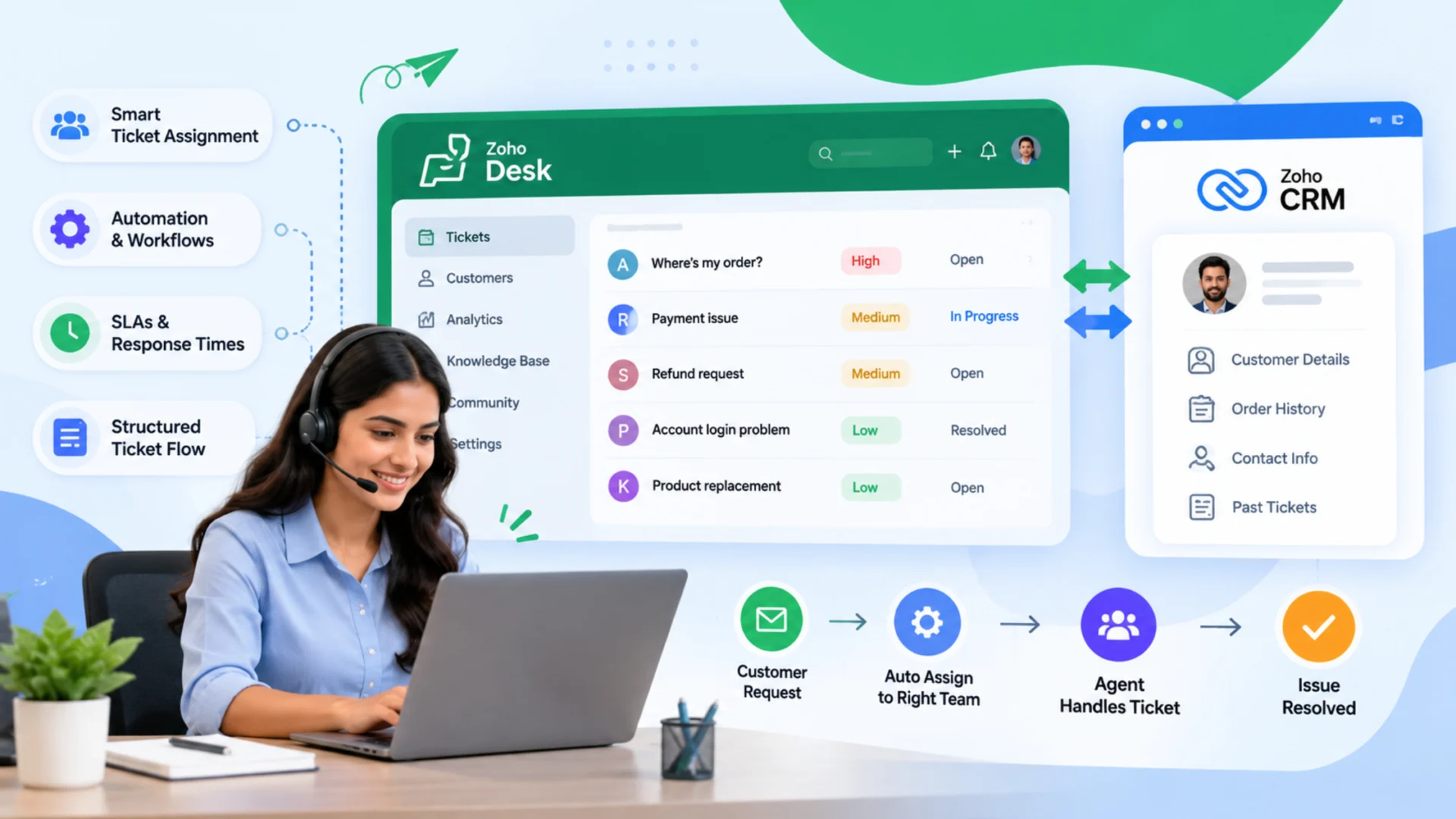
How will support answer “Where’s my order?” once the new system is running? I’d bring that question to a Zoho Desk implementation discussion. If answering still means searching the store and chasing a warehouse contact, both steps belong on the process map.
An inbox connection is a beginning. The interesting questions come afterwards: who owns the request, what information they can trust, and how they get a stalled case moving again. The configuration has to work for the person handling that enquiry on a busy afternoon.
Order 7842 is the illustrative example used here. Assume the business has an online store and Zoho CRM. Adapt the proposed designs to your own service policies and test them before launch.
Follow the information before designing the form
Where would the agent look up that shipment today?
If the answer is the store or an ERP, include that application in the discussion. Installing the Desk–CRM connection won’t, by itself, answer every question about an order.
Contacts, Accounts, and Products are the records covered by native synchronization.
Showing Desk tickets inside CRM is a separate capability. A warranty in a custom CRM module, a finance invoice, or a shipment event needs its own requirements check. The integration FAQs describe the supported scope.
If someone changes a customer’s phone number in Desk, should it overwrite CRM?
That answer tells you something about data ownership. For this example, CRM could maintain customer identity, Desk the support conversation, and the order system shipment confirmation. Agree on permitted editors and update direction while those choices are still easy to change.
You’ll also know which fields the customer can reasonably complete.
An order number is fair to ask for. The underlying cause of a product fault probably isn’t known until someone investigates. Requiring it on the submission form gives your reports an answer, but the answer may be guesswork.
Agree on who picks up the request
“Delivery enquiry” should lead to a team that actually handles deliveries. Submit a request under “Other” as well and ask who would pick it up. If nobody can answer, the fallback queue needs an owner before you go further.
Here’s how the main automation choices relate to that work:
For an event-triggered action, look at workflow rules and their supported triggers and criteria. A reminder after a waiting period needs a time-based design.
Suppose you want to remind a customer after more than 48 calendar hours without a reply. One proposed design uses “Hours since agent responded,” a waiting status set when information is requested, and a flag to stop the reminder being sent twice. A reply must change the conditions. A new waiting period must reset the flag.
The timing has limits. Supervisor Rules run hourly, use whole-number hour conditions, and consider tickets with a customer response in the preceding 30 days. Test that older case as well as a fresh ticket. A requirement for an exact-minute reminder would need another approach.
Could a second automation undo the assignment you just tested? Check that before adding more rules. The administrator should be able to trace an owner change back to a documented trigger and action.
Check what a customer update can change
CRM-to-Desk synchronization may suit records maintained by sales. If support should update those records too, discuss two-way synchronization and the editing policy before enabling it.
Neither option sorts out duplicate contacts or an email address used by several people. Inspect those records first. Labels can match while field types or allowed values differ. Put an actual source record beside the destination and check what each field means.
What would your team expect after deleting a contact? With Zoho’s Never Delete preference, the corresponding record remains but its mapping is removed. Try that with sample data, especially if someone expects the association to survive.
Include an older customer in the import sample. Zoho documents an initial-sync window involving records created or modified within the previous year. The Desk CRM integration guide explains the settings. Agree on how any history outside that window will be handled.
After launch, put failed records on somebody’s regular checklist. An authorized connection doesn’t establish that every record arrived successfully.
Make the failed attempt part of the specification
Back to order 7842. The routing rule can get it to the right team. For the shipment lookup, ask which connector or custom integration will contact the order system, and how it will verify the customer’s access to the result.
Would the lookup accept a mistyped reference? Would it expose somebody else’s order? What would the agent see if the order system were unavailable? Each case should leave support with an actionable ticket and an internal explanation. A lookup failure shouldn’t become an invented delivery update.
Returns need another layer of control. Blueprint can require stages and information before an agent proceeds. An illustrative path would be:
→
Eligibility review
→
Authorized
→
Completion confirmed
→
Closed
The authorization transition could require an order reference, return reason, review outcome, and an appropriate transition owner.
Where would the agent find proof that a refund was issued? Keep the payment application’s confirmed reference with the process. Say an external system creates return authorization RMA-0192, but its reply never reaches Desk. The call appears to have failed. Would pressing retry find RMA-0192, or could it create a second authorization? Ask the developer to walk through that example and show how completed work is recognized before another attempt.
Test the calendar and the changeover
For the pilot, I’d enter a Friday-afternoon enquiry. In this example, support works 9 am to 5 pm on weekdays, no holiday intervenes, and the response target is four business hours:
Does the configured deadline agree?
Use similarly clear pass conditions for the rest of the pilot:
Can an agent still open an attachment after the sample import? Is an old customer’s ticket attached to the right record? Include those cases, plus an open conversation still receiving replies, when checking the export and supported import method. Agree on who watches the old inbox and new queue during cutover.
Let agents work through these examples during training. Then ask somebody who didn’t build the setup to follow the handover notes. Can they tell who to call when an order lookup fails? Can they trace the rule that changed a ticket’s owner? Those are useful checks on the documentation itself.
Check the edition and the estimate together
Use the current plan comparison against the proposed process:
With Zoho One, ask to see the capabilities in the provisioned Desk account as well.
Ask each bidder the same questions:
- Who supplies clean source data, and who validates the import?
- Is the store lookup included, or is that a separate integration project?
- Will agents work through the pilot cases during training?
Ask to identify licenses, third-party subscriptions, and recurring maintenance separately from the implementation fee. Once those boundaries are clear, the proposed schedule is easier to assess. A single queue and a rollout across several brands and an ERP won’t involve the same work.
What would count as an improvement?
First response time is one useful comparison. I’d also want to know whether old tickets are accumulating, how often the team breaches an SLA, and whether cases keep reopening. Failed syncs deserve a place in the review too. Comparing business-hour response times with the old system’s calendar-hour figures won’t tell you much.
Read some tickets alongside the dashboard. If closure gets faster but reopening rises, investigate the cases. If requests keep changing teams, check whether the category wording is confusing customers before writing another rule.
Bring one ticket journey to Elsner
Which enquiry sends your team through the most manual steps? Bring that one to Elsner’s Zoho team, along with the applications it passes through. It is a useful starting point even if you haven’t written a full specification yet.
For related project context, Elsner’s Hocco CRM case study describes CRM automation using Flow and Forms, including case creation and reporting.
In the discussion, explain where the request gets stuck and who gets involved. The team can then discuss the required configuration and whether a separate integration or custom workflow needs scoping.
Frequently Asked Questions
What is a Zoho Desk implementation?
A Zoho Desk implementation is the work of setting up the help desk so requests reach the right owner, stay on track, and carry the customer context agents need. It goes beyond connecting an inbox. A complete project covers ticket ownership, automation, SLAs, Zoho CRM sync, any lookup into your store or order system, and a pilot test before launch.
How do I integrate Zoho Desk with Zoho CRM?
A Desk administrator opens Setup > Marketplace > Zoho > Zoho CRM and follows the on-screen steps, with a Zoho CRM administrator available to complete the connection. Agree on the sync direction and review the field mappings before you start, then check a few sample records once the first sync finishes.
Which records sync between Zoho Desk and Zoho CRM?
Native synchronization covers Contacts, Accounts, and Products, including their custom field data. Duplicates are checked using the contact’s email address, the account name, and the product name. Records in a custom CRM module, such as a warranty module, sit outside the native sync and need their own requirements check, often handled with a custom function.
Should the Zoho Desk and Zoho CRM sync be one-way or two-way?
With one-way sync, CRM is the parent database and its contacts, accounts, and products flow into Desk. With two-way sync, changes made in either system are shared. Decide who may edit what before you enable two-way sync, because a phone number changed by an agent in Desk could overwrite the CRM record. Zoho lets you switch from one-way to two-way later, so starting one-way is a workable option.
Which Zoho Desk automation feature should I use for assignment, reminders, and approvals?
Use assignment rules to give a ticket an owner, workflow rules to act when a supported event and its conditions match, and SLAs and escalations to apply response or resolution commitments. Supervisor Rules handle checks on elapsed time, while Blueprint requires particular stages, evidence, and owners. Review how these rules interact, because a second automation can undo an assignment you have just tested.
Can Zoho Desk remind a customer after 48 hours without a reply?
Yes, with a time-based Supervisor Rule built on a condition such as “Hours since agent responded.” Pair it with a waiting status set when information is requested and a flag that stops the reminder going out twice, and reset the flag for each new waiting period. Supervisor Rules run once an hour, read whole-number hour conditions, and check only tickets with a customer response in the previous 30 days. Their actions are limited to alerts, tasks, and field updates, so a reminder at an exact minute needs another approach.
Which Zoho Desk edition do I need for CRM integration, Blueprint, and custom functions?
According to Zoho’s plan comparison, native Zoho CRM integration starts at the Standard edition, Blueprint and round-robin ticket assignment start at Professional, and custom functions in workflows need Enterprise. If you use Zoho One, check these capabilities in the Desk account provisioned for you. Plan features change, so confirm them against the current comparison before you scope the project.
How do I test a Zoho Desk setup before launch?
Run a pilot with realistic cases that have clear pass conditions. Include a ticket that matches no routing rule, an absent assigned agent, a customer reply that arrives before a reminder runs, a response to a closed ticket, an external action that returns an uncertain result, and a deleted CRM record. Also enter a ticket late on a Friday to confirm the SLA deadline respects your business hours. Zoho’s plan comparison lists a sandbox on the Enterprise edition if you want a separate place to try changes.
What should I check before migrating existing tickets and customers into Zoho Desk?
Start with a sample that includes an older customer, an attachment, and a conversation that is still receiving replies. Check that attachments open, that each old ticket is attached to the right record, and that history outside Zoho’s initial-sync window is handled the way you agreed. Decide who watches the old inbox and the new queue during cutover. Zoho’s plan comparison also lists migration support for teams moving from Zendesk or Freshdesk on its paid plans.
How long does a Zoho Desk implementation take, and what does it cost?
There is no fixed figure, because scope drives both. A single queue with native CRM sync is a smaller job than a rollout across several brands, an ERP, and a data migration. Ask each bidder for a phase-wise schedule that includes the pilot and cutover, and ask for licenses, third-party subscriptions, and recurring maintenance to be listed separately from the implementation fee. Also confirm who supplies and validates the data and whether the store lookup is included.
Get Your Zoho Desk Implementation Right the First Time
Share the support journey that takes the most manual steps, and Elsner will help you plan the ticket automation, Zoho CRM integration, and custom workflows it needs, from configuration to rollout.