- What is the Model Context Protocol, and why does it matter for Odoo?
- How Odoo MCP integration actually works
- Native Odoo AI vs custom API integration vs MCP: how to actually tell them apart
- Where Odoo MCP integration earns its keep day to day
- Security and governance: the part teams skip, then regret
- Elsner’s Odoo MCP Pro: an AI agent server built for this
- Getting started: a realistic path, not a sprint
- The bottom line
- See Odoo MCP Pro in action
- Frequently Asked Questions
- What is Odoo MCP integration?
- Is Odoo MCP different from Odoo’s native AI features?
- Is it safe to give an AI agent access to Odoo?
- Which AI tools work with Odoo MCP Pro?
- Do I need Odoo Enterprise to use MCP integration?
- How long does it take to set up Odoo MCP integration?
Most teams running Odoo did not set out to connect it to an AI agent. They started with a question someone asked Claude or ChatGPT, realized the answer lived inside Odoo, and ended up copying data back and forth by hand. That gap, between where your AI tools live and where your business data actually sits, is exactly what the Model Context Protocol was built to close.
This guide is written for the people deciding whether to connect AI agents to their ERP: IT leaders, operations heads, and Odoo admins who want a real answer, not a sales pitch. It covers what MCP actually is, how Odoo MCP integration works under the hood, where it earns its keep day to day, what governance has to look like, and how Elsner’s own Odoo MCP Pro module fits into that picture.
Quick Answer
Odoo MCP integration connects AI assistants like Claude, ChatGPT, and Cursor to your Odoo ERP through the Model Context Protocol, an open standard from Anthropic that lets AI tools discover and use defined data and actions without a custom integration built for every single workflow. It allows teams to query records, summarize data, and trigger approved actions inside Odoo using plain language.
What is the Model Context Protocol, and why does it matter for Odoo?
A year ago, connecting Odoo to an AI tool meant a developer writing a custom script for one specific task, hard-coding the API calls, and hoping it survived the next Odoo upgrade. That approach still exists. It is also slow to build, expensive to maintain, and breaks more often than anyone would like.
MCP changes the shape of that problem. Instead of wiring up each function, create a lead, check stock, send a reminder, as its own bespoke connection, an MCP server exposes a defined set of tools that any MCP-compatible AI client can discover on its own. Add a new tool to the server, and the AI picks it up automatically. No new code required on the client side.
That matters more for Odoo development specifically than for most other systems, because Odoo touches nearly every department a business runs: sales, accounting, inventory, HR, support. A protocol that scales across all of them instead of needing a separate integration per department is a genuinely different proposition, not just a new buzzword.
How Odoo MCP integration actually works
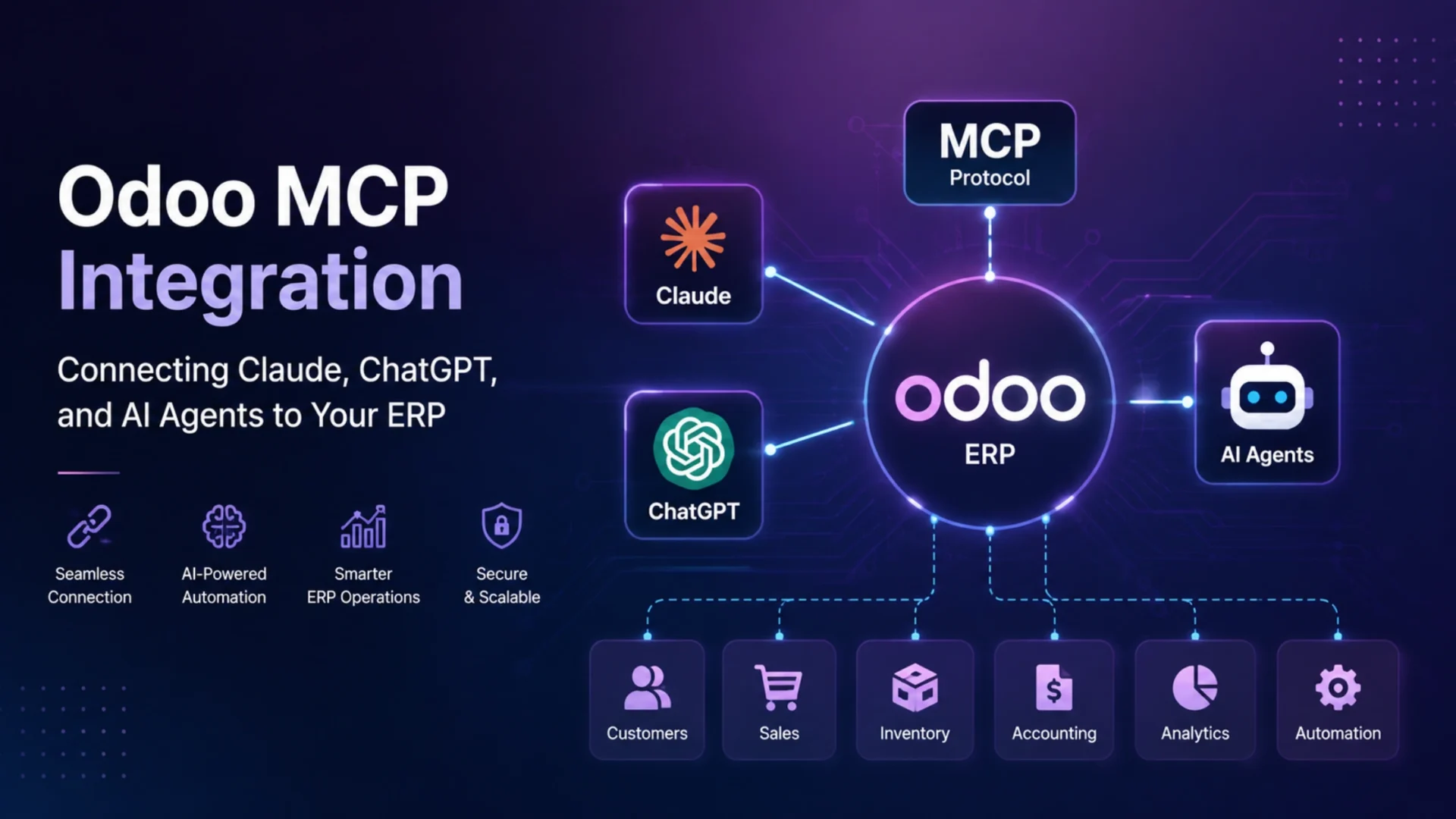
At a structural level, three pieces are talking to each other every time someone makes a request.
The AI client is where someone types a request in plain language, whether that’s Claude Desktop, Claude.ai, ChatGPT, or Cursor.
The MCP server sits between the AI and Odoo, translating natural language into structured Odoo API calls, typically through Odoo’s JSON-RPC or the newer JSON/2 API, while enforcing whatever access rules have been set.
Odoo itself remains the actual source of truth: sales orders, partner records, invoices, stock levels, helpdesk tickets, all of it.
When someone asks Claude something like “show me all unpaid invoices over five thousand dollars from last quarter,” the AI does not guess. It calls a defined tool on the Odoo MCP Connector, which queries Odoo’s accounting models, applies the permissions tied to that user, and returns structured data the AI can summarize back in plain English.
Write actions follow the same path, just with more guardrails. A request like “create a lead for Acme Corp with fifty thousand in expected revenue” triggers a tool call that creates the record, usually behind an approval step if it touches anything sensitive, like a financial posting or a customer-facing message.
Native Odoo AI vs custom API integration vs MCP: how to actually tell them apart
Most explanations of this stop at “MCP is powerful” and leave it there. The more useful question is what actually separates these three approaches, because the right one depends on what you are trying to do.
| Approach | What it is | Best for |
|---|---|---|
| Native Odoo AI | Built into Odoo 18.3 and 19, productivity assistance inside the interface itself | In-app drafting, suggestions, basic automation |
| Custom API integration | A developer-built bridge between Odoo and one specific AI provider | A single fixed workflow, tightly scoped use case |
| MCP integration | A standardized protocol exposing multiple Odoo tools to any compatible AI client | Cross-department, evolving, multi-tool AI access |
Odoo’s native AI is genuinely good for what it covers. It just stays inside the product. The moment a team wants Claude or ChatGPT, the tools people are probably already using daily, to actually query or act on Odoo data, that is integration territory. MCP is simply the cleaner, more durable way to build that integration today, because it does not need to be rebuilt every time a new workflow comes up.
Where Odoo MCP integration earns its keep day to day
Theory aside, here is where this actually shows up in a working business, not as a demo, but as something someone uses on a Tuesday afternoon.
Sales and finance follow-ups
A manager asks Claude to pull every overdue invoice above a threshold, rank the riskiest accounts, and draft, not send, reminder emails. A forty-minute spreadsheet exercise becomes a two-minute conversation.
Inventory checks
“Do we have enough stock of this SKU for Thursday’s order? If not, check vendor lead times.” The AI queries inventory and purchase models directly instead of someone digging through three Odoo screens.
Support and helpdesk routing
Unassigned tickets get summarized and suggested for routing to the right technician based on issue type, with a human confirming the assignment rather than the AI deciding alone.
CRM hygiene
Meeting notes get parsed and turned into a properly tagged CRM lead attached to the right company record, instead of sitting unread in someone’s inbox until Friday.
None of this replaces the Odoo interface for complex configuration work. It is a faster second interface for the quick lookups and bulk questions that quietly eat up time without ever needing the full UI open.
Security and governance: the part teams skip, then regret
Giving an AI agent access to your ERP is not a small decision, and treating it casually is how things go wrong. A handful of items are not optional.
Scoped API keys, not blanket access
Each key should map to specific tools and a specific user. A key that can touch everything is a liability waiting for a bad day.
Role-based permissions, no exceptions
The AI should only see and do what that user’s Odoo role already allows. Carving out a special “AI-only” exception defeats the point of role-based access entirely.
Approval gates on sensitive actions
Posting journal entries, sending customer-facing emails, or changing pricing should require a human confirmation step, at least until the pattern has proven itself reliable.
Full audit logging
Every tool call, by user, IP address, timestamp, and arguments, should be logged. If something goes wrong, tracing exactly what happened needs to take minutes, not days.
An AI agent that can call message_post or trigger an invoice send will, eventually, do it at the wrong moment if nothing is stopping it. Build the fence before you need it, not after.
Elsner’s Odoo MCP Pro: an AI agent server built for this
Elsner Technologies built and published Odoo MCP Pro on the official Odoo Apps Store specifically to solve this integration cleanly, instead of leaving teams to stitch together a stack of custom scripts that breaks with every Odoo upgrade.
It connects Claude, ChatGPT, and other MCP-compatible AI agents to an Odoo instance through a properly governed MCP server, not a loose API bridge held together by good intentions. A few things separate it from a quick do-it-yourself connector:
- Production-grade security with role-based access and configurable permissions per tool.
- Full audit logging on every AI-initiated action, not just the write operations.
- Multi-company support for businesses running more than one Odoo database.
- Coverage across CRM, Sales, Inventory, Accounting, and Helpdesk models out of the box.
- Standard MCP transport, so it connects to Claude Desktop, Claude.ai, ChatGPT, and Cursor without custom wiring on your end.
It is easy to underestimate the cost of building this from scratch until you have tried it. Maintaining a hand-rolled bridge between Odoo and an LLM provider, keeping it patched, keeping permissions tight, keeping it working after every Odoo point release, is a real ongoing expense. A maintained module removes most of that burden, and it is the kind of work that sits squarely inside Elsner’s AI agent development practice.
Getting started: a realistic path, not a sprint
Teams that get the most out of this tend to follow roughly the same sequence, and skipping ahead is where most of the regret comes from.
1. Start read-only. Let the AI query data, summarize, and answer questions, with no write access yet. This builds trust quickly and surfaces any permission gaps before they matter.
2. Add draft writes with approval. The AI can prepare a lead, draft a reminder email, or suggest a record update, but a human confirms before anything actually posts.
3. Expand carefully. Move into automated, low-risk actions only once the pattern has proven reliable for weeks, not days. Going straight to unsupervised writes on financial or customer-facing data is rarely worth the risk it carries.
The bottom line
MCP is not a gimmick layered on top of Odoo. It is a genuinely cleaner way to let the AI tools your team already uses actually work with the data your business already runs on, without rebuilding the bridge every time a new use case shows up.
Get the governance right, start read-only, add approvals before automation, and choose a module that was built to be maintained rather than assembled in a weekend, and the rest tends to follow. The teams that get real value out of this are not the ones that moved fastest. They are the ones that built the fence before they needed it.
See Odoo MCP Pro in action
Elsner Technologies built Odoo MCP Pro as a verified, production-ready module on the official Odoo Apps Store. If your team wants Claude, ChatGPT, or other AI agents working directly with your Odoo data, securely and with proper governance, this is the module built for exactly that.
Frequently Asked Questions
What is Odoo MCP integration?
Odoo MCP integration connects AI assistants like Claude and ChatGPT to your Odoo ERP through the Model Context Protocol, an open standard that lets the AI discover and use defined tools to read data or trigger actions, without a custom integration for every individual function.
Is Odoo MCP different from Odoo’s native AI features?
Yes. Native Odoo AI, such as Ask AI and AI server actions, works inside the Odoo interface itself. MCP integration connects external AI tools, like Claude or ChatGPT, to Odoo data and actions from outside the application entirely.
Is it safe to give an AI agent access to Odoo?
It can be, with the right setup. That means scoped API keys, role-based permissions, approval gates on sensitive actions, and full audit logging. Skipping these steps is where the risk creeps in, not the underlying technology itself.
Which AI tools work with Odoo MCP Pro?
Odoo MCP Pro supports Claude Desktop, Claude.ai, ChatGPT, Cursor, and other MCP-compatible AI clients through standard MCP transport, without requiring custom wiring on the client side.
Do I need Odoo Enterprise to use MCP integration?
No. MCP servers, including Odoo MCP Pro, can be installed on Odoo instances without requiring Enterprise-only AI features, though specific module compatibility should always be checked against your Odoo version first.
How long does it take to set up Odoo MCP integration?
A basic read-only setup can often be running within a day. A fully governed rollout with role-based permissions, approval workflows, and audit logging typically takes longer, depending on the complexity of the Odoo instance involved.