- What Retail AI Vision Automation Actually Means
- Loss Prevention Was Just the On-Ramp
- The Operational Intelligence Layer Is Where the Real Value Sits
- Why Real-Time Changes Everything
- What the ROI Actually Looks Like
- The Part Vendors Skip: Privacy and Compliance
- Build, Buy, or Integrate?
- A Realistic Rollout Roadmap
- Where Retail Vision AI Is Heading
- Final Take
- Thinking About Retail AI Vision Automation for Your Stores?
- Frequently Asked Questions
- What is retail AI vision automation?
- Is retail AI vision automation only for theft detection?
- Does retail vision AI use facial recognition?
- Is it legal to use AI cameras in US retail stores?
- How much does retail AI vision automation cost?
- Can it work with existing store cameras?
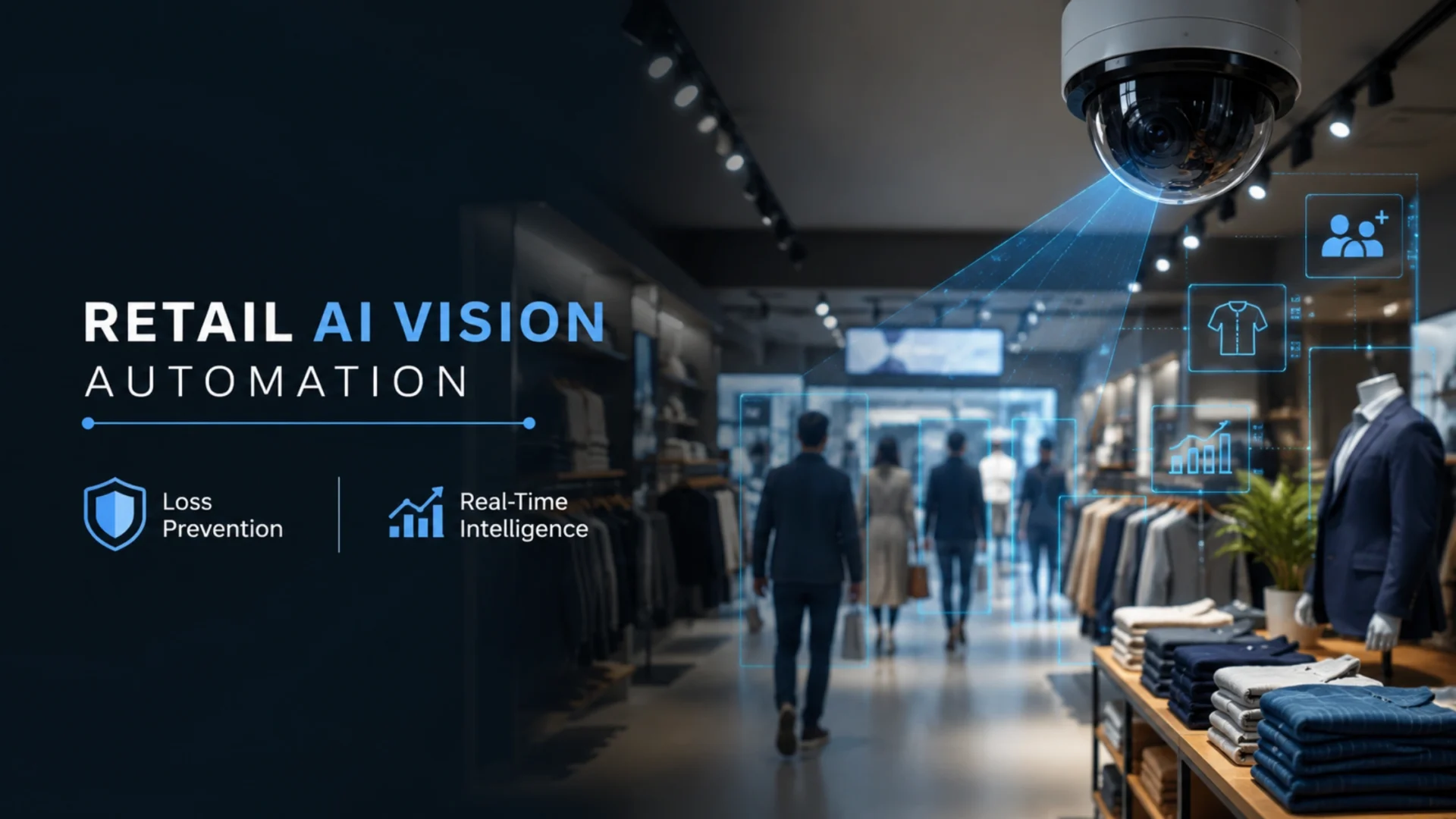
A single ceiling camera over a self-checkout lane can do three jobs at once. It can flag the bag that left without a scan. It can notice the lane backing up before a customer walks out. And it can see the endcap that’s been empty since the morning restock never happened. Same feed, three outcomes. That quiet shift is what retail AI vision automation really is, and most stores are still only using it for the first job.
For years, the pitch was simple: point smart cameras at the exits, catch the thieves, protect the margin. Useful, sure. But it sells the technology short. The camera stopped being a witness a while ago. It became a sensor. One that reads what’s happening on the floor in real time and tells someone while they can still do something about it.
Quick answer: Retail AI vision automation uses computer-vision models to read live camera feeds and turn them into immediate action. It started with loss prevention, catching theft and self-checkout walkouts, but the bigger payoff is operational: spotting empty shelves, long queues, blocked exits, and traffic patterns the moment they happen, so staff can react instead of reading about it in a report the next day.
What Retail AI Vision Automation Actually Means
Strip away the jargon and the stack is short. Cameras you mostly already own feed video into vision models. Those models recognise objects, people, and events. A decision layer turns recognition into something useful: an alert, a dashboard tile, a trigger that pings the floor team’s handheld. That’s it.
The “automation” part is the bit people skip over. Old camera setups recorded everything and analysed nothing until something went wrong. A modern system watches continuously and acts on its own, escalating only what a human needs to see. Nobody sits staring at a wall of monitors hoping to catch the one frame that matters.
The plain-English version: traditional CCTV answers “what happened?” after the fact. Retail AI vision automation answers “what’s happening right now, and who needs to know?”
Loss Prevention Was Just the On-Ramp
Shrink is where the money came from first, and it’s easy to see why. It’s a line item executives already track and already hate. Organised retail crime and self-checkout losses gave the technology an obvious, fundable reason to exist.
So the early wins were all defensive. Detect the unscanned item. Match the basket to the receipt. Catch the ticket-switch at the register. Honestly, those still matter. Shrink is real money walking out the door.
On the numbers: the National Retail Federation’s annual security survey has reported total retail shrink running well above $100 billion in recent years, with external theft and organised retail crime taking a growing share. [Verify and insert the latest NRF shrink figure before publishing. Turn on web search and I’ll pull the current number.]
Here’s the trap, though. If a store buys vision AI only to fight shrink, it’s paying for a powerful sensor network and using maybe a fifth of it. The cameras are already watching the whole floor. The models can already tell a person from a pallet, a full shelf from an empty one. Narrowing all that down to theft alone leaves the rest of the value sitting idle.
The Operational Intelligence Layer Is Where the Real Value Sits
This is the part worth slowing down on. Once the cameras are reading the floor, the same feed can run a handful of operational jobs that used to depend on someone walking the aisles and noticing things by luck. The heavy lifting here is ordinary AI and machine learning development, just pointed at video instead of spreadsheets.
|
1
|
Shelf and planogram monitoringAn empty shelf is a sale you’ll never see in your data. The customer just leaves. Vision models flag out-of-stocks and misplaced product against the planogram as they happen, not at the end of a shift. For high-velocity categories, that gap between “shelf went empty” and “someone refilled it” is pure lost revenue, and it’s the easiest win to measure. |
|
2
|
Queue length and checkout flowThree people in a line is fine. Seven, and someone abandons a full cart. The system counts heads at the registers and triggers a “open another lane” alert before the line tips into walkouts. Quiet, specific, and it pays for itself in recovered baskets faster than people expect. |
Foot traffic and zone heatmaps are a different kind of value, slower but strategic. By tracking where shoppers actually go (anonymised, no identity needed), you learn which displays pull people in, which aisles get skipped, and how a layout change moves behaviour. Merchandising decisions stop being guesswork and start being measured. This is where it overlaps neatly with proper retail business intelligence, because the camera data becomes one more clean input into the same dashboards your team already reads.
Safety and compliance
A spill on aisle six, an exit blocked by stock, a back-of-house door propped open. These are the events that turn into injury claims and failed audits. Vision models catch them in seconds and route the alert to whoever’s closest. For multi-store operators, that’s risk reduction you can actually point to.
Notice the pattern. None of these need a new camera. They need a smarter layer reading the cameras you’ve got.
Why Real-Time Changes Everything
A report that lands tomorrow tells you what you lost. An alert that fires now lets you save it. That’s the whole difference, and it’s bigger than it sounds.
A shoplifter you identify on Tuesday’s footage is gone. A lane you open while the line is still forming keeps the sale. Speed isn’t a feature here. It’s the entire point.
What the ROI Actually Looks Like
Three buckets carry most of the return: shrink avoided, labour spent better, and sales recovered from stockouts. The first one is the easiest to sell to finance. The third one is usually the biggest, and almost nobody models it up front. It’s the same pattern we’ve run into on past computer-vision work, including an AI-based image recognition build shipped for real production use.
Labour’s the quiet one. When the system tells staff exactly where to be (restock that shelf, open that lane, clean that spill), you’re not adding headcount. You’re aiming the headcount you have. In a tight hiring market, that matters more than another body on the floor.
A fair warning on the numbers, because this is where deals go sideways:
Vendor case studies aren’t your store
A “40% shrink reduction” headline came from a specific format, layout, and customer base. Treat it as a ceiling someone else hit, not a forecast for you. Ask for the assumptions behind any number before you build a business case on it.
Alerts nobody owns are alerts nobody acts on
The technology can be flawless and the ROI still zero if no one’s responsible for responding. Decide who owns each alert type before go-live, or the system just generates noise.
Camera coverage gaps cap the upside
Bad angles and blind spots quietly limit accuracy. An honest coverage audit early on saves you from blaming the model for a hardware problem later.
Build the case on conservative numbers, layer the operational savings on top, and it tends to hold up. Build it on a vendor’s best-day slide, and you’ll be explaining a miss in six months.
The Part Vendors Skip: Privacy and Compliance
This section gets glossed over in most pitches, and that’s a mistake. How you handle camera data is a legal question, not just a technical one, and the rules are sharper in some states than others.
The big one is Illinois. Its Biometric Information Privacy Act (BIPA) carries statutory damages of $1,000 per negligent violation and $5,000 per intentional one, and courts have read “per violation” aggressively. Any system touching faceprints or biometric identifiers in Illinois needs written consent and a real retention policy. Texas and Washington have their own biometric statutes, and California’s CCPA/CPRA treats this data as personal information with its own obligations.
The practical line most retailers should hold:
- Favour anonymised analytics (counting, dwell time, queue length, heatmaps) over facial recognition. You get the operational value without holding biometric data you’d rather not hold.
- If you do use identification, get consent right and post clear signage. Don’t improvise this.
- Set retention rules early. “We keep raw footage for X days, then it’s gone” is a sentence your legal team will want to see before launch, not after.
None of this is legal advice, so get your counsel involved early. But a system designed around anonymised metrics from day one sidesteps most of the exposure, and it usually delivers the operational wins anyway. That’s the version worth building.
Build, Buy, or Integrate?
There’s no single right answer here. It depends on how many stores you run, what cameras you already have, and how unusual your floor is. Three broad paths:
Whatever the path, the unglamorous part decides whether it lasts: keeping models accurate as seasons, stock, and store layouts change. Models drift. A planogram detector trained on summer ranges gets confused by the holiday reset. That’s a data engineering and MLOps discipline, not a one-time install, and it’s the difference between a system that’s sharp in year three and one that quietly stopped being trusted by month four.
If you’re weighing a custom or hybrid build, remember the model is only part of the job. Pipelines, retraining, monitoring, and clean integration into your existing systems matter just as much. That’s usually what separates a slick demo from something still trusted on the floor three years later.
A Realistic Rollout Roadmap
Skip the big-bang launch. The teams that get this right start small, prove it, then scale. Here’s the sequence that tends to work.
|
1
|
Pick one pilot store and baseline itMeasure current shrink, stockout rate, and queue abandonment before you change anything. No baseline, no provable ROI later. |
|
2
|
Audit your camera coverageAngles, blind spots, resolution, frame rate. Find the gaps now. This single step quietly determines how accurate the whole system can ever be. |
|
3
|
Choose the approach and the first use casesDon’t try to do everything at once. Two or three high-value detections, say shelf gaps and queue length, beat ten half-tuned ones. |
|
4
|
Tune on your store’s realityOut-of-the-box accuracy is a starting point. A few weeks of tuning against your actual lighting, layout, and product mix is what makes alerts trustworthy instead of annoying. |
|
5
|
Wire it into the systems you already runPOS, inventory, and workforce tools. Alerts that land in the channel staff already check get acted on. Alerts in a separate app get ignored. This is also where AI agents earn their keep. Not just flagging an empty shelf, but routing the right task to the right person automatically. |
|
6
|
Roll out, then watch for driftExpand store by store once the pilot proves out, and keep monitoring accuracy as conditions change. A system left unattended slowly stops being right. |
Where Retail Vision AI Is Heading
The near-term direction is less about better detection and more about better decisions. Models are getting multimodal, reading video alongside POS and inventory data, so an alert can carry context, not just a flag. “Shelf 7 empty” becomes “Shelf 7 empty, top seller, last restock four hours ago, suggest immediate refill.”
Pair that with predictive analytics and the floor starts running a little ahead of itself, staffing for the rush before it forms, restocking before the gap appears. That’s the trajectory. Not cameras that watch better, but stores that anticipate.
Final Take
Loss prevention got vision AI through the door, and it still earns its place. But treating theft detection as the whole job is like buying a smartphone to make calls. The real return shows up when the same cameras start running operations: flagging the empty shelf, the long line, the blocked exit, the layout that isn’t working.
Get the boring parts right and it holds up: conservative ROI math, anonymised data by default, clear ownership of every alert, and someone watching for model drift after launch. Skip those, and you’ve bought an expensive camera upgrade. Nail them, and you’ve turned a cost centre into an operational edge.
The shift in one line: stop asking your cameras what went wrong yesterday, and start asking them what needs fixing right now.
Thinking About Retail AI Vision Automation for Your Stores?
We help retailers move past theft-only camera systems into real-time operational intelligence, with the data engineering, model tuning, and privacy-first design that keep it accurate and compliant. Let’s scope what’s realistic for your floor.
Frequently Asked Questions
What is retail AI vision automation?
It’s the use of computer-vision models to read live store camera feeds and turn them into real-time action. Beyond catching theft, it detects empty shelves, long checkout queues, blocked exits, spills, and shopper traffic patterns the moment they happen, then alerts the right staff member. The cameras you already have become operational sensors instead of passive recorders.
Is retail AI vision automation only for theft detection?
No. That’s just where it started. Loss prevention was the first fundable use case, but the same camera feeds can monitor stock levels, queue length, store layout performance, and safety hazards. For most retailers, the operational value (recovered sales from stockouts, better-aimed labour) ends up larger than the shrink savings.
Does retail vision AI use facial recognition?
It can, but most operational use cases don’t need it. Counting, dwell time, queue length, and heatmaps all work on anonymised data with no identity attached. Given laws like Illinois’ BIPA, many retailers deliberately avoid facial recognition and still get the full operational benefit. Designing around anonymised metrics is usually the safer call.
Is it legal to use AI cameras in US retail stores?
Generally yes, but it depends on what data you collect and where. Biometric data triggers strict rules in states like Illinois (BIPA), Texas, and Washington, while California’s CCPA/CPRA applies broadly. Anonymised analytics carry far less exposure than facial recognition. Set retention policies and signage early, and involve legal counsel before launch. This isn’t a step to improvise.
How much does retail AI vision automation cost?
It varies widely with store count, existing camera quality, and whether you go off-the-shelf, custom, or hybrid. SaaS tools run on a per-store subscription; custom builds carry higher upfront cost but lower long-term dependency. The number that matters is total cost of ownership against the value recovered. Measure shrink, stockouts, and labour efficiency at a pilot store first, then scale on proven returns rather than a vendor’s best-case slide.
Can it work with existing store cameras?
Often, yes. That’s a big part of the appeal. Many systems run on standard IP camera feeds without new hardware. The catch is coverage and quality: bad angles, blind spots, or low resolution cap accuracy regardless of how good the models are. An honest camera audit early on tells you whether you can use what you’ve got or need targeted upgrades.