WordPressWordPress

Best AI Plugins for WordPress in 2026: Features, Pricing & Use Cases

  • Published: Dec 22, 2025
  • Updated: Jul 16, 2026
  • Read Time: 12 mins
  • Author: Pankaj Sakariya
wordpress AI plugin list

Quick Answer

The best WordPress AI plugins in 2026 cover four jobs: content (Jetpack AI, Bertha AI), SEO (Rank Math AI, Yoast AI), design (Elementor AI, Divi AI), and support (Tidio, ChatBot AI for WP). Pick based on your builder and stack rather than chasing every AI-labelled plugin, install one tool at a time, and keep a human reviewing the output.

In 2026, using AI on a WordPress website is no longer optional, it is a practical necessity. From generating blog drafts and improving SEO to automating product descriptions and handling customer queries, AI plugins for WordPress are changing how websites are built and managed. Whether you run a blog, an eCommerce store, or a business website, the right WordPress AI plugin can save hours of work every week. This guide covers the best AI plugins for WordPress in 2026, including features, pricing, real use cases, and honest limitations.

This shift isn’t about replacing people. It’s about reducing repetitive work and improving efficiency. Bloggers, agencies, ecommerce brands, and developers are increasingly relying on WordPress AI plugins to scale their workflows without expanding their teams.

This guide breaks down the best WordPress AI plugins for 2026, focusing on what actually matters for real websites and real businesses. You’ll learn what these plugins do well, where they fall short, how much they cost, and which use cases they genuinely support. No hype, no vague promises, just practical insight into AI-powered WordPress plugins you can realistically use.

Many businesses also work with a WordPress development company to implement and customize AI plugins properly, especially when performance and scalability matter.

What Are WordPress AI Plugins?

In simple terms, AI plugins for WordPress are tools that use machine learning or large language models to automate or enhance tasks on your website. Instead of doing everything manually, these AI automation tools help you:

  • Generate content faster
  • Improve on-page SEO
  • Automate repetitive admin tasks
  • Power chatbots and customer support
  • Assist with design, layouts, and images
  • Personalize user experiences

They exist because WordPress users face the same recurring problems: content takes too long to create, SEO optimization is inconsistent, chatbots feel robotic or useless, too many tasks are still manual, design workflows slow teams down, and engagement and conversions plateau.

AI-powered WordPress plugins don’t replace people. They reduce friction. That distinction matters.

Why Does WordPress Need AI in 2026?

WordPress has always been flexible. AI makes it efficient. Here’s why adoption has accelerated across blogs, agencies, and businesses.

Key Benefits of Using AI Plugins for WordPress

  • Faster content creation: AI content plugins help generate outlines, drafts, FAQs, and meta descriptions in minutes, not hours.
  • Stronger on-page SEO: AI SEO plugins analyze keywords, readability, internal links, and schema suggestions in real time.
  • Automated website tasks: From bulk product descriptions to internal linking, automation plugins reduce repetitive work.
  • Smarter chatbots: Modern AI chatbot plugins understand intent better and improve support response times.
  • Higher conversions: Personalized content, product recommendations, and faster support directly impact engagement.
  • Better user experience: AI helps sites feel responsive instead of static.
  • Time and cost efficiency: Smaller teams can now manage bigger workloads without burning out.

How We Selected These WordPress AI Plugins

Not every AI plugin deserves space on your site. Our selection is based on feature depth and real-world usefulness, accuracy and output quality, stability and update frequency, compatibility with popular themes and builders, transparent pricing, consistent user feedback, and minimal performance impact.

Top Best WordPress AI Tools for 2026

Below is a practical list of AI-powered WordPress plugins that stand out this year.

Jetpack AI Assistant logo
Bloggers & Content Teams
$8–$10/month

What it does: Jetpack AI Assistant brings content generation directly into the WordPress editor.

Key Features

  • Blog post and page generation
  • Tone adjustment and rewriting
  • Grammar and clarity improvements
  • Built-in WordPress editor integration

Pros

Seamless UX

Good for short and medium-length content

Cons

Limited advanced SEO control

Usage limits on lower plans

Why it’s good for 2026: it reduces friction. No dashboards. No learning curve.
Elementor AI Logo
Designers & Agencies
Included in Elementor Pro

What it does: Elementor AI assists with content, layout suggestions, and code snippets inside the Elementor builder.

Key Features

  • AI-generated copy for sections
  • Custom CSS and HTML generation
  • Layout suggestions
  • Image text prompts

Pros

Deep Elementor integration

Useful for rapid prototyping

Cons

Elementor-only

Requires a paid Elementor plan

Why it’s good for 2026: design speed matters more than ever.
DIVI AI Logo
Divi Users, Multi-Client Sites
Included in Divi Plans

What it does: Divi AI generates content, images, and layouts inside the Divi ecosystem.

Key Features

  • AI text generation
  • AI image generation
  • Layout content optimization

Pros

Consistent with the Divi workflow

Saves time on client drafts

Cons

Not builder-friendly

Why it’s good for 2026: all-in-one builder + AI workflow.
rankmath AI SEO Logo
SEO Professionals
Free + ~$6/month

What it does: Rank Math’s AI helps optimize SEO content directly inside WordPress.

Key Features

  • AI content suggestions
  • Keyword optimization
  • Schema recommendations
  • Content scoring

Pros

Strong SEO accuracy

Easy to scale

Cons

AI credits can add up

Why it’s good for 2026: SEO is no longer optional, or manual.
Yoast logo
Beginners, Small Sites
Yoast Premium

What it does: Yoast AI assists with SEO titles, meta descriptions, and readability.

Key Features

  • AI meta descriptions
  • Readability improvements
  • SEO guidance

Pros

Beginner-friendly

Trusted SEO framework

Cons

Limited automation

Why it’s good for 2026: simple SEO support without complexity.
Meow Apps AI Engine logo
Developers, Advanced Users
Free + Paid Add-ons

What it does: A flexible AI framework that connects WordPress with OpenAI-style APIs.

Key Features

  • Custom AI prompts
  • Chatbot creation
  • Content generation
  • API integrations

Pros

Extremely flexible

Developer-friendly

Cons

Requires configuration

Why it’s good for 2026: customization beats one-size-fits-all.
Bertha AI logo
Marketers, Bloggers
~$20/month

What it does: Content-focused AI writing assistant for WordPress.

Key Features

  • Blog drafts
  • Product descriptions
  • FAQs and CTAs

Pros

Clean UI

Marketing-friendly tone

Cons

Needs human editing

Why it’s good for 2026: great for marketing workflows.
TIDIO AI logo
Ecommerce & Service Sites
Free + Paid Plans

What it does: AI-powered live chat and chatbot solution.

Key Features

  • AI chat responses
  • Live chat
  • Automation flows

Pros

Improves support speed

Easy setup

Cons

Advanced features are paid

Why it’s good for 2026: customer experience is everything.
chatbot for wordpress logo
Support-Heavy Sites
Varies by Provider

What it does: Standalone AI chatbot plugin for WordPress.

Key Features

  • Knowledge-based chatbot
  • Custom training data
  • Lead capture

Pros

Focused chatbot use case

Cons

Limited non-chat features

AI Image generator plugin
Content Creators & Designers
Credit-Based Pricing

What they do: Generate images from text prompts.

Use Cases

  • Blog visuals
  • Featured images
  • Social previews

Pros

No design skills or stock photos needed

Generates images in minutes, saving hours of stock photo hunting

Cons

Results often need editing to match brand style

Credit costs can add up with high-volume use

Woo AI Logo
Online Store Owners
Plugin-Dependent Pricing

What it does: Automates product descriptions and categorization.

Key Features

  • Bulk product content
  • SEO-friendly descriptions
  • Attribute generation

Pros

Huge time savings on large catalogs with hundreds of SKUs

Generates SEO-friendly copy at scale directly in the WordPress dashboard

Cons

Descriptions usually need manual editing for brand voice

Quality varies depending on which underlying AI plugin you choose

Why it’s good for 2026: scaling stores without scaling teams.

Quick Reference: AI Plugins at a Glance

Here’s a fast side-by-side view of every plugin covered above.

Jetpack AI Assistant

Bloggers, content teams

Core use: Content writing

Features: Draft generation, rewriting, grammar fixes

$8–$10/month
Easy

Elementor AI

Designers, agencies

Core use: Design + copy

Features: Section copy, layout help, CSS/HTML generation

Included in Elementor Pro
Medium

Divi AI

Divi users

Core use: Design + visuals

Features: AI text, AI image generation, layout content

Included in Divi plans
Medium

Rank Math AI SEO

SEO professionals

Core use: SEO optimization

Features: Keyword analysis, content scoring, schema suggestions

Free + ~$6/month
Medium

Yoast AI SEO

Beginners, small sites

Core use: SEO assistance

Features: AI meta titles, descriptions, readability help

Yoast Premium
Easy

AI Engine (Meow Apps)

Developers, advanced users

Core use: Custom AI workflows

Features: Chatbots, custom prompts, API integrations

Free + paid add-ons
Advanced

Bertha AI

Marketers, bloggers

Core use: Marketing content

Features: Blogs, product descriptions, CTAs

~$20/month
Easy

Tidio AI Chatbot

Ecommerce, service sites

Core use: Customer support

Features: AI chatbot, live chat, automation flows

Free + paid plans
Easy

ChatBot AI for WP

Support-heavy sites

Core use: Chat automation

Features: Knowledge-based chatbot, lead capture

Varies by provider
Medium

AI Image Generator Plugins

Content creators

Core use: Image generation

Features: Text-to-image generation

Credit-based
Easy

Woo AI / AI for WooCommerce

Online stores

Core use: Ecommerce automation

Features: Bulk product descriptions, SEO-friendly content

Plugin-dependent
Medium

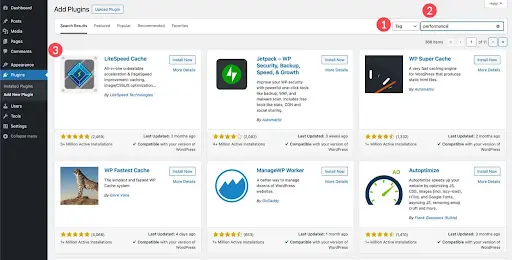
How to Install an AI Plugin in WordPress?

  • Go to Plugins → Add New
  • Search for the plugin in the page’s search bar.

AI Plugin Installation in WordPress

  • Click Install: Click Install Now only once. Multiple clicks can cause database errors.
  • Activate

AI Plugin Installation in WordPress

  • Configure settings: The newly installed plugin will appear on your list. Configure according to your requirements.

Real Use Cases of AI Plugins

AI plugins sound impressive in feature lists. Their real value shows up in everyday workflows.

1. Automated Blog Creation (Without Killing Quality)

Many WordPress AI content plugins are now used as drafting partners rather than full writers. A common workflow looks like this:

  • AI generates an outline based on keywords
  • Draft sections are filled in quickly
  • A human editor refines tone, structure, and accuracy

This cuts content creation time by half while keeping brand voice intact. The sites that struggle are usually the ones publishing raw AI output without oversight.

2. AI-Powered SEO Optimization

AI SEO plugins for WordPress don’t magically guarantee rankings. What they do well is consistency. They catch missing metadata, suggest internal links, flag weak headings, and improve readability scores. For large blogs or ecommerce sites, this kind of automation prevents small SEO mistakes from piling up over time.

3. Chatbots That Handle Real Questions

Older chatbots followed scripts. Modern AI chatbot WordPress plugins work more like trained assistants. They can answer FAQs based on site content, route complex queries to humans, and capture leads outside business hours. For service businesses and online stores, this often reduces support tickets rather than replacing support teams.

4. WooCommerce Product Automation

Store owners are using AI automation tools for WordPress to generate bulk product descriptions, rewrite manufacturer content, and optimize titles for search intent. This is especially useful for stores with hundreds, or thousands, of SKUs where manual editing isn’t realistic.

5. AI-Assisted Design and Layout Work

Tools like Elementor AI and Divi AI don’t design entire websites on their own, but they speed up the boring parts: placeholder copy, section descriptions, and layout suggestions. Designers still make decisions. AI just removes the blank-page problem.

6. Image Generation for Content and Commerce

AI image generator WordPress plugins are increasingly used for blog headers, concept visuals, and ecommerce placeholders. They’re not always brand-perfect, but they reduce dependency on stock libraries for non-critical visuals.

Get a Free Consultation

Need custom plugins or AI workflows aligned for your business?

Challenges and Limitations of AI Plugins

AI plugins are useful. They’re not flawless. Ignoring the downsides usually creates more work later.

Over-Dependence on AI Content

The biggest risk isn’t bad writing, it’s lazy publishing. Search engines and readers can both spot content that hasn’t been reviewed or contextualized.

Fix: Use AI for structure and speed. Keep humans responsible for the final output.

Accuracy Isn’t Guaranteed

AI can confidently produce outdated or incorrect information, especially in technical topics, legal or medical niches, and pricing or feature comparisons.

Fix: Fact-check anything that matters. Always.

Plugin Compatibility Issues

Stacking too many WordPress automation plugins can cause conflicts with caching tools, editor lag, and unexpected layout issues.

Fix: Choose fewer, better-integrated tools instead of installing everything AI-powered.

Rising Costs Over Time

Many plugins rely on usage-based AI credits. Costs can quietly increase as content volume grows.

Fix: Track usage monthly and set limits where possible.

Performance and Speed Impact

Some AI plugins load external scripts or APIs that affect page speed.

Fix: Test performance after installation and avoid running AI tasks on the frontend unless necessary.

Best Practices for Using AI on WordPress

The most successful WordPress sites in 2026 aren’t the most automated, they’re the most intentional.

Use AI as an Assistant, Not an Author

AI works best when it supports decisions rather than makes them. Drafts, outlines, and suggestions are ideal. Final judgment stays human.

For more complex setups, many businesses choose to hire WordPress developers to ensure AI plugins are implemented correctly without impacting performance, security, or scalability.

Build Repeatable Workflows

Instead of random AI usage, use AI for first drafts, use SEO AI for optimization checks, and use chatbots for common queries only. Consistency matters more than novelty.

Don’t Overload Your Stack

More plugins don’t mean more productivity. Each new AI tool should replace something, not just add to it.

Monitor Output Quality Regularly

Review AI-generated content periodically to ensure it still matches your standards.

Combine AI with Analytics

AI tells you what to create. Analytics tell you what actually works. Use both.

Conclusion

The right WordPress AI plugins reduce friction, speed up workflows, and help teams focus on decisions that actually require human judgment. Choose tools based on real needs. Test them properly. Keep humans in the loop. When AI is implemented with intention, WordPress becomes faster and smarter.

FAQs

What are the best AI plugins for WordPress in 2026?

The best plugin will depend on your requirements. Jetpack AI, Rank Math AI, Elementor AI, and Tidio are widely used.

How to use AI on WordPress?

Using AI on WordPress usually starts with installing an AI plugin, configuring its basic settings, and integrating it into your existing workflow.

What are WordPress AI assistant plugins?

WordPress AI assistant plugins are tools that work alongside you inside the dashboard or editor. They help with tasks like writing content, optimizing SEO, generating layouts, answering customer queries, or suggesting improvements.

Can I use AI plugins to automate WordPress tasks?

Yes, particularly product content and descriptions.

Interested & Talk More?

Let's brew something together!

GET IN TOUCH
WhatsApp Image