- What This Guide Covers:
- What is n8n Automation?
- Why n8n is Gaining Popularity in Business Automation?
- Key Features of n8n Automation
- Visual Workflow Builder
- n8n Integration With APIs And Webhooks
- Custom Node Creation
- Error Handling and Execution Logs
- Scalability for Enterprise Workflows
- n8n Marketing Automation Features 2026
- How n8n Automation Works?
- Triggers and Actions
- Workflow Structure and Data Flow Between Apps
- Top n8n Automation Use Cases for Businesses
- Marketing Automation
- eCommerce Automation
- Sales Automation
- Operations Automation
- Step-by-Step Guide to Automate Workflows Using n8n
- Setting Up n8n — Cloud vs Self-Hosted
- Creating Your First Workflow
- Connecting Apps
- Testing and Deployment
- n8n vs Other Workflow Automation Tools
- Benefits of Using n8n for Business Workflow Automation
- Cost efficiency.
- Flexibility.
- Data control.
- Scalability.
- Challenges and Limitations of n8n
- Best Practices for n8n Workflow Automation
- Keep workflows modular.
- Error handling belongs on every critical node.
- Look at execution logs more often than feels necessary.
- Write notes inside the workflow while you’re building it.
- Future Trends in Workflow Automation
- AI-driven automation
- Hyperautomation
- AI-powered personalization
- Looking to Automate Your Business Workflows?
- Conclusion
- FAQs
- What is n8n automation used for?
- n8n vs Zapier: Is n8n better than Zapier?
- How do I automate workflows using n8n?
- Can n8n be used for marketing automation?
- Is n8n suitable for enterprise businesses?
Nobody sits down and decides to build a manual, repetitive workflow. It just happens. A form goes live, someone starts copying submissions into a spreadsheet, and six months later that’s just “how it works.” The ops manager’s Monday email becomes a ritual. The inventory update after every delivery becomes someone’s actual job responsibility. Small inefficiencies that compound quietly until they’re eating real hours every week.
That’s the specific problem n8n automation was built for. Not big strategic decisions or creative work. The stuff that runs identically every single time and genuinely doesn’t need a human in the loop.
What This Guide Covers:
Instead of going through scattered information, here’s a clear breakdown of everything you need to understand n8n and start using it effectively:
- What is n8n automation and how it actually works in real workflows
- Key features of n8n that make it powerful for business automation
- Real-world use cases where businesses are actively using n8n workflows
- n8n vs other tools like Zapier and Make – what really changes
- Step-by-step workflow automation without spending weeks on documentation
What is n8n Automation?
n8n (say “n-eight-n”) is an open-source workflow automation platform built around a visual, node-based canvas.
Each node does exactly one thing:
- trigger a workflow
- process some data, or
- execute an action in a connected app
Chain them together and you’ve got a workflow.
But here’s what actually makes it worth talking about . Unlike most workflow automation tools, n8n gives you real control. Run it on your own server. Write JavaScript logic inside nodes when built-in options don’t cover your needs. Connect to any service with an API, even obscure internal tools.
People often call n8n automation tool no-code. Low-code is more accurate. Most workflows don’t need a single line of code. But when you hit the edge of what point-and-click configuration can do, the door is open. That matters more than you’d expect.
Why n8n is Gaining Popularity in Business Automation?
Cost comes up first, almost every time.
Zapier’s per-task pricing model works fine at a small scale. Run a few light automations, pay a manageable monthly bill, move on. But CRM syncs, order notifications, multi-step lead workflow executions multiply fast.
A team processing thousands of tasks a month starts doing uncomfortable math. n8n’s self-hosted version costs nothing beyond your server. The difference, at volume, is substantial.
Then there’s the data question, which doesn’t get enough attention. Standard cloud automation tools route your data through their infrastructure by default. For any business handling sensitive customer information or anything with compliance implications, that’s a real concern.
Self-hosting workflow automation using n8n keeps your data exactly where you put it. For healthcare, legal, and finance teams exploring compliant technology infrastructure, Elsner’s digital transformation services offer a structured path to modernizing operations without compromising on data governance.
A few other reasons n8n workflow automation keeps coming up:
- No waiting on a vendor roadmap to get an integration you need.
- Custom nodes connect internal or proprietary systems that aren’t on any standard integration list.
- On-premise deployment works for healthcare, legal, finance, and industries where data residency isn’t optional.
Key Features of n8n Automation
Visual Workflow Builder
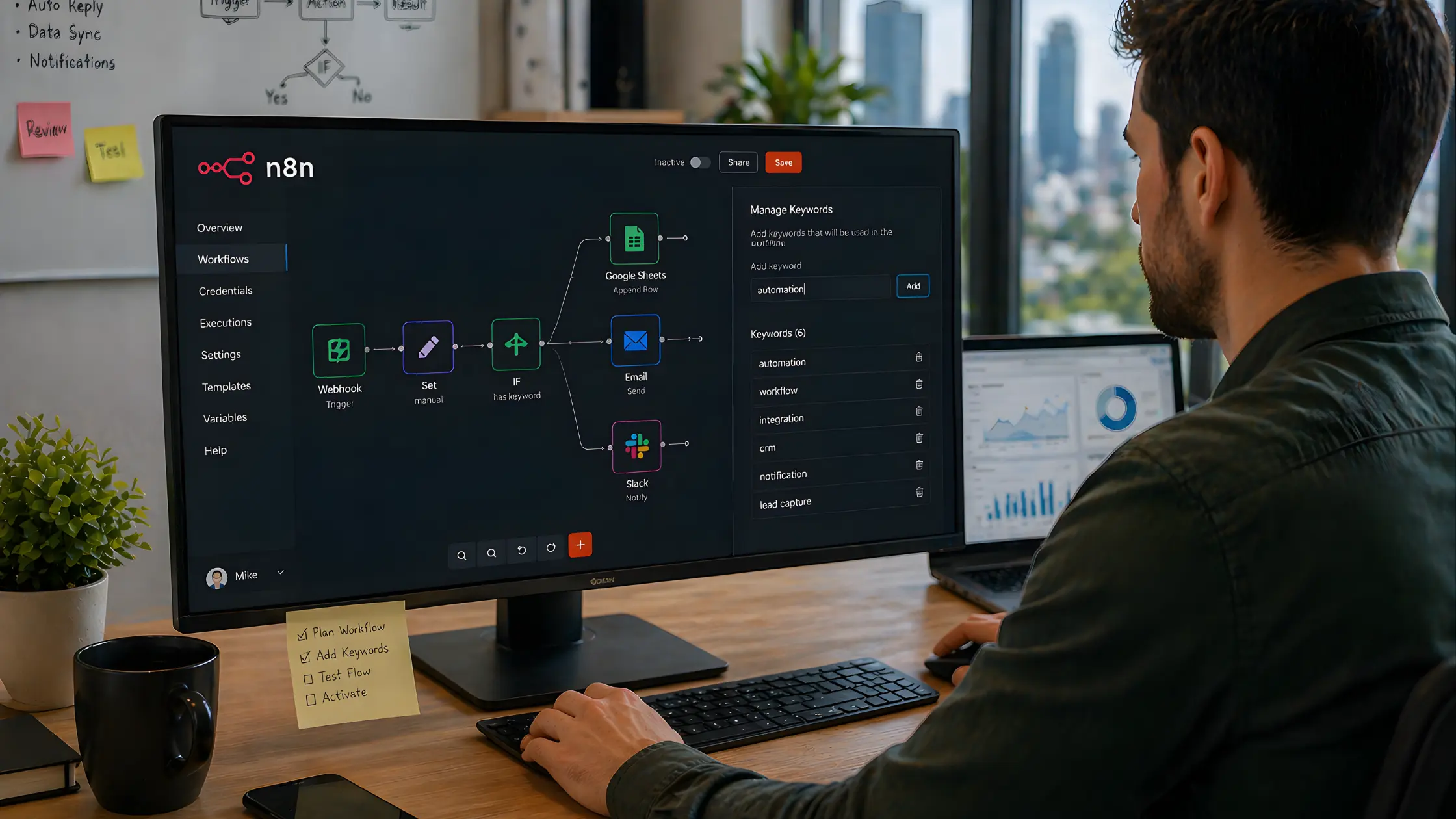
The canvas editor is drag-and-drop. You lay out nodes visually, configure each one in a side panel, and can see the entire workflow at a glance. When something breaks, you see where immediately rather than hunting through abstract logs.
Handing a workflow off to a teammate is also easy this way. A visual n8n workflow automation layout explains itself in ways that code rarely does.
n8n Integration With APIs And Webhooks
Over 400 native integrations ship with n8n. Anything beyond that connects through REST APIs or webhooks manually. Enterprise tools, niche platforms, internal systems that never make a commercial integration list. They all work here.
Custom Node Creation
This is the feature that gets overlooked in surface-level comparisons. When no native integration exists to automate business workflows, you write a custom node in JavaScript.
For companies with proprietary platforms or internal tools built specifically for their operations, this isn’t a nice bonus. It’s the reason they picked n8n over everything else on the shortlist.
When n8n’s native nodes aren’t enough, our Custom Software Development fills the gap.
Error Handling and Execution Logs
Every workflow run is logged in full. You can trace exactly what data entered each node, what came out, and precisely where something failed. Retry logic is configurable.
Errors can route to Slack or email so nothing dies quietly in the background for three days before anyone realizes the data pipeline stopped working.
Scalability for Enterprise Workflows
No execution caps tied to pricing tiers. Enterprise teams running dozens of concurrent, high-frequency workflows won’t hit the kind of arbitrary ceiling that makes other tools frustrating once you’re past a certain volume. The workflow automation using n8n scales with usage rather than penalizing it.
Already using WooCommerce? Our WooCommerce Development Services help you build a store that’s ready to automate.
n8n Marketing Automation Features 2026
What marketing teams are building inside n8n right now is more sophisticated than the platform tends to get credit for. Multi-branch conditional logic for segmentation, native integrations with Mailchimp, ActiveCampaign, and Brevo, AI node connections that plug directly into LLM APIs for dynamic content generation mid-workflow.
Full lead nurturing sequences, behavioral scoring, campaign triggers tied to live CRM events. Teams that were previously stitching together four or five tools to make this work are consolidating it all into n8n and finding it handles the load without complaint.
How n8n Automation Works?
The business process automation structure never changes. A trigger starts the workflow. Action nodes handle everything that follows. Simple concept but the power is in how flexibly those pieces connect.
Triggers and Actions
A trigger tells n8n when to start. Options include:
- A webhook — an external service posts data to n8n and the workflow fires immediately
- A schedule — runs at a fixed time or on a recurring interval
- A manual execution — useful while you’re building and testing
- An app event — a new row in Google Sheets, an incoming email, or a CRM stage change
Once it fires, each subsequent node takes the data from the node before it, does something with it, and passes it forward. The chain runs until the last node completes.
Workflow Structure and Data Flow Between Apps
Picture this. A customer fills out a contact form on your site.
Without n8n:
- someone checks the form submissions,
- copies the details into the CRM,
- manually adds the right tag, and
- hopefully remembers to add them to the email sequence,
- maybe they get a Slack message out to the right sales rep, maybe they don’t.
With an n8n workflow, that same form submission triggers this automatically:
- New contact created in the CRM
- Tagged based on the submitted form
- Added to the appropriate email sequence
- Slack notification sent to the assigned sales rep
Seconds. Every time. Nobody touching it. And once you watch that running live, it’s genuinely difficult to justify doing it manually ever again.
Top n8n Automation Use Cases for Businesses
Marketing Automation
Most businesses start here and it’s easy to see why. n8n marketing automation handles the accumulated manual work that marketing teams absorb over time without fully accounting for the hours it takes.
Here are some n8n marketing automation use cases:
- Lead capture automation: Inbound submissions from forms, ads, and landing pages flow directly into the CRM with correct tagging applied. No manual entry, no steps dependent on someone remembering to check a dashboard.
- n8n email marketing automation: Sequences trigger based on actual user behavior such as form submissions, page visits, CRM status changes, or completed purchases instead of fixed schedules.
- CRM sync: Email platforms, CRM, and internal databases stay continuously aligned. The weekly manual export routine becomes unnecessary and outdated data issues are eliminated.
For teams running simultaneous campaigns across multiple channels, eliminating the copy-paste work between platforms frees up time that was invisible before because it was spread across everyone’s day in small chunks.
Drive more traffic to the store you’re automating. Check out our eCommerce SEO Services.
eCommerce Automation
n8n automation for eCommerce workflows handles the operational side of things that doesn’t need human judgment.
Just consistent execution:
- Orders sync automatically to fulfillment systems, accounting software, and internal team channels as soon as they come in
- Stock alerts are triggered when inventory drops below a set threshold, before it becomes a customer-facing problem
- Post-purchase emails, shipping updates, and review requests are sent automatically for each order without manual intervention
If your store is already on Shopify, pairing automation workflows with a solid Shopify development Services ensures the underlying architecture can handle the real-time data demands that n8n workflows place on it.
Sales Automation
- Inbound leads are routed to the right sales rep based on territory, deal size, or lead source without a coordinator in the middle
- Follow-up tasks are triggered automatically when a CRM stage hasn’t moved for a set number of days
- Deal stages update automatically when emails are opened, meetings are booked, or contracts are signed
Operations Automation
- Tasks are automatically created in project management tools based on incoming emails or submitted forms
- Approval requests are routed to the right person in the appropriate system
- Internal reports are compiled and distributed automatically on a schedule
The small coordination work that typically lands on whoever has bandwidth gets handled whether or not anyone has bandwidth.
Step-by-Step Guide to Automate Workflows Using n8n
Setting Up n8n — Cloud vs Self-Hosted
First decision: where is this running?
Self-hosting runs on Docker. Most setups finish in under 30 minutes with the official documentation if you have basic server familiarity. No server experience? Start with the cloud version and move to self-hosted later if and when it makes sense.
Creating Your First Workflow
Open the editor and add a trigger node. A Schedule Trigger or Webhook Trigger is the most practical starting point. The schedule trigger needs no external configuration at all. The webhook trigger generates a URL immediately. Point any service at it and the workflow starts firing.
Connecting Apps
Drop action nodes in after the trigger. Search for the app, authenticate your account inside the node settings panel, configure the action you want it to take. It walks you through field by field. Less intimidating than it looks from the outside.
Testing and Deployment
Hit Execute Workflow for a test run. n8n displays the exact data that passed through every node. If something’s wrong, you’ll see it without guessing. Once everything looks right, activate the workflow. It runs automatically from that point forward without anyone needing to think about it.
n8n vs Other Workflow Automation Tools
Zapier is faster to set up and genuinely easier for non-technical users. If your workflows are simple and the per-task pricing stays manageable, it works well. But once volume increases, complexity grows, or data privacy becomes a real requirement, n8n is the stronger tool. Most teams that go through the setup don’t switch back.
Benefits of Using n8n for Business Workflow Automation
Cost efficiency.
No per-task charges means costs stay flat. Running 500 executions a day or 50,000, the bill doesn’t change. That predictability is useful when you’re planning.
Flexibility.
400+ integrations plus custom node support means the platform adapts to your actual stack. Not a curated list of popular tools, but whatever your business actually uses.
Data control.
Self-hosted means data stays on your infrastructure. Customer records and internal business data don’t route through a vendor’s servers.
Scalability.
High-frequency, high-complexity workflows run without hitting platform-imposed execution limits. And at scale, this becomes the thing that matters most.
Challenges and Limitations of n8n
Being honest here, because glossing over the friction doesn’t help anyone.
The learning curve is real and it’s worth acknowledging upfront. n8n is not as immediately accessible as Zapier. The visual editor is intuitive once you’re working in it — but getting there, especially with self-hosting, requires some technical comfort. Not advanced skills. But not zero either.
Setup complexity is the second consideration. Docker deployment, SSL configuration, environment variables. If you’ve done basic server work before, it’s manageable in an afternoon. If you haven’t, the cloud version removes all of that overhead.
And self-hosted means maintenance is yours. Updates, backups, uptime. That’s the trade-off for the cost savings and data control. Neither cloud nor self-hosted is the wrong choice. It depends on what your team can realistically own.
Best Practices for n8n Workflow Automation
Keep workflows modular.
One workflow per logical process, not one enormous chain that does everything. Smaller, focused workflows are faster to debug and easier to update without accidentally breaking something unrelated.
Error handling belongs on every critical node.
Silent failures are categorically worse than failures you know about. Route errors to Slack or email so someone gets notified when something stops working, not days later when missing data surfaces in a report.
Look at execution logs more often than feels necessary.
APIs change without warning. Auth tokens expire. A workflow that ran without issues for months can start failing quietly, and you won’t catch it unless you’re looking. A quick weekly review is enough.
Write notes inside the workflow while you’re building it.
n8n’s canvas has a sticky notes feature. Two minutes of documentation per workflow saves a lot of confusion six months later, especially when someone else needs to modify it and you’re not available to explain it.
Future Trends in Workflow Automation
The direction is clear and it’s already underway. Self hosted workflow automation tools and AI are converging, and n8n is already positioned in the middle of it.
-
AI-driven automation
Native connections to OpenAI, Anthropic, and other LLM APIs mean workflows can now include steps that actually reason about data:
- generating content,
- classifying inputs,
- summarizing documents,
- making routing decisions based on natural language
Not just moving information from one system to another. Actually doing something with it.
That’s the meaningful shift in what people are calling AI-driven automation, and it’s practical right now, not theoretical.
Businesses looking to go beyond pre-built connectors and build purpose-specific reasoning into their pipelines often find value in dedicated AI agent development that extends what n8n can orchestrate natively.
-
Hyperautomation
Broader than that is the push toward hyperautomation. Connecting enough layers that complete business processes run end-to-end without a human checkpoint. n8n fits this naturally. It can coordinate tools, AI models, and data systems inside a single workflow, which is exactly what hyperautomation requires at the infrastructure level.
-
AI-powered personalization
For teams watching n8n marketing automation trends in 2026, AI-powered personalization with open source automation tools is where things are heading next.
- Dynamic email content generated per recipient
- AI-written follow-ups based on behavioral signals
- Real-time audience segmentation that updates continuously instead of batch processing
Teams are building this today. It stopped being experimental a while ago.
Looking to Automate Your Business Workflows?
Explore Elsner’s automation and integration services to build, deploy, and manage n8n workflows tailored to your business needs. Reduce manual work, improve efficiency, and scale your operations with the right automation setup.
Conclusion
n8n is not the easiest place to start. That’s honest and it’s worth saying plainly. But for businesses that need genuine control, predictable costs, and automation that scales without artificial limits, the upfront investment in setup comes back quickly.
If repetitive manual work is still eating time on your team, or if your automation costs keep climbing alongside your operational volume, n8n workflow automation deserves a real look. Not a quick scan of the homepage but an actual evaluation.
The gap between what you’re spending on per-task tools and what you’d spend running n8n tends to be more surprising than people expect.
FAQs
What is n8n automation used for?
n8n workflow examples for beginners are connecting apps or syncing data between systems. Complex use cases include processing orders, managing leads, sending notifications, running marketing workflows, and eliminating repetitive manual tasks across marketing, sales, eCommerce, and operations. If a process runs identically every time and doesn’t require human judgment, it’s a candidate for n8n.
n8n vs Zapier: Is n8n better than Zapier?
For simple, low-volume workflows with non-technical users, Zapier is faster to get running. For anything high-volume, complex, or with data privacy requirements, n8n is the more capable option. The per-task pricing gap becomes significant quickly once workflow volume picks up.
How do I automate workflows using n8n?
Here’s how to use n8n for business automation:
- Set up n8n (cloud or self-hosted),
- add a trigger node,
- connect action nodes for each step,
- map data between nodes,
- test the workflow, and activate it.
A basic workflow takes under an hour to build and deploy the first time through.
Can n8n be used for marketing automation?
Extensively, yes. n8n marketing automation workflows handle lead capture, CRM syncing, email sequence triggers, segmentation logic, and campaign event tracking. Many marketing teams use it to consolidate work that was previously spread across multiple separate tools.
Is n8n suitable for enterprise businesses?
Yes, particularly self-hosted. Enterprise teams use n8n for high-volume workflows, complex multi-step automations, and processes where data needs to stay on private infrastructure. Custom node support makes it viable for companies whose internal tools don’t appear on any standard integration list.