- How BigCommerce’s API Architecture Works?
- REST Management API.
- GraphQL Storefront API.
- Webhooks.
- What Data Flows Between BigCommerce and Connected Systems?
- Integration Methods: App Marketplace, Middleware, or Custom API
- Native App Marketplace Connectors
- iPaaS Middleware Platforms
- Custom REST and GraphQL API Development
- Integration by System Type: ERP, CRM, Shipping, and Marketing
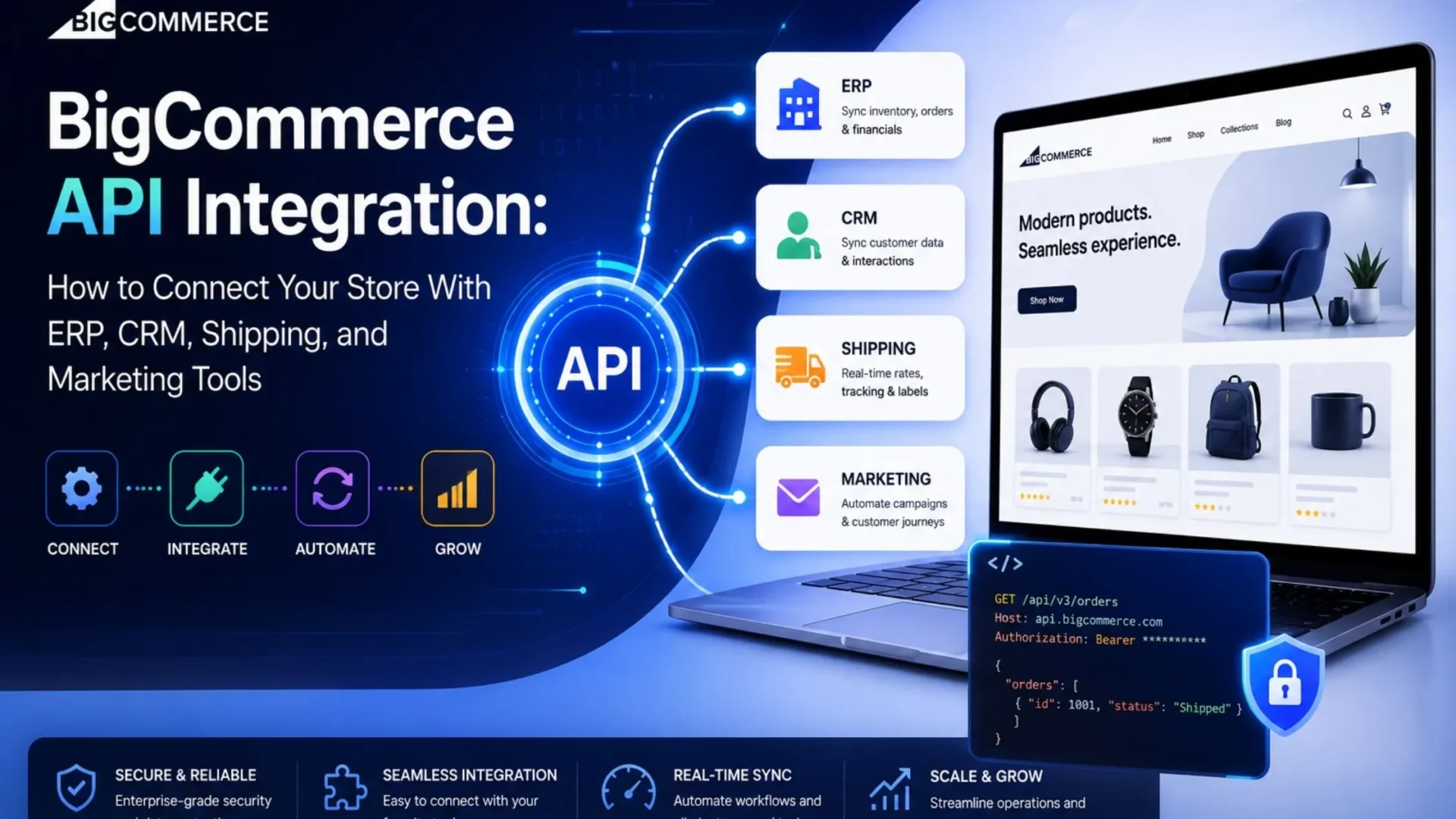
- BigCommerce ERP Integration
- BigCommerce CRM Integration
- BigCommerce Shipping and Fulfilment Integration
- BigCommerce Marketing Automation and Email Integration
- BigCommerce API Rate Limits: What Every Integration Must Account For
- Common BigCommerce Integration Failure Points and How to Prevent Them
- Hidden Costs in BigCommerce Integration Projects
- Data mapping and discovery.
- Middleware platform licensing.
- Webhook monitoring infrastructure.
- Post-launch maintenance.
- UAT and stress testing.
- How to Evaluate a BigCommerce Integration Partner?
- BigCommerce Integration Cost Overview
- Conclusion
Search BigCommerce API integration and you’ll get the same article ten times over. A list of tools (NetSuite, Salesforce, HubSpot, ShipStation, Klaviyo) and a button that says “contact us.”
Not one of them explains how the integration actually works, which approach fits your store’s scale, what breaks under order volume, or what the real bill looks like once you add data mapping, middleware licensing, and the maintenance no one quotes upfront.
This guide skips the tool list. If you’re building your first BigCommerce integration, or you’re tired of explaining to your operations team why orders aren’t syncing, you’ll leave here knowing which method fits your situation, what it realistically costs, and what questions to put to any vendor before you sign anything.
How BigCommerce’s API Architecture Works?
Three things sit underneath every BigCommerce integration. You don’t need to be a developer to understand them. But if you’re approving a scope or evaluating a proposal, you need to know what they are.
REST Management API.
This is the main interface. It reads and writes backend store data: products, orders, customers, inventory, pricing, shipping. ERP and CRM integrations run on this. V3 is current; V2 is being deprecated. Any vendor building against V2 today is handing you technical debt on day one.
GraphQL Storefront API.
Designed for frontend data retrieval: real-time catalog queries, customer data, headless builds. Relevant for marketing personalisation tools and custom storefronts. Most back-office integrations don’t touch it.
Webhooks.
This is how BigCommerce third-party integrations stay current. When something happens in your store (an order placed, inventory updated, cart abandoned), BigCommerce sends an HTTPS POST notification to your registered endpoint.
Here’s the part most integration guides never mention: the payload contains only the event type and a resource ID. Not the full order. Not the full product record. Your system has to make a second API call to retrieve the actual data.
That two-step design requires architecture planning that most BigCommerce integration services underestimate, and it shapes everything else in this guide.
Which of these mechanisms your integration uses and how many API calls it generates determines your method choice, your rate limit exposure, and what it costs to keep running.
What Data Flows Between BigCommerce and Connected Systems?
Before method or tooling, it helps to be precise about what’s actually moving when you connect BigCommerce to ERP. This is the data map at the center of any integration project.
This table is the starting point for any integration project. BigCommerce integration services that skip this step almost always hit data integrity failures after go-live. The cost of cleaning that up is almost always higher than the discovery work would have been.
Integration Methods: App Marketplace, Middleware, or Custom API
This is the decision that determines cost, flexibility, and whether the whole thing holds together twelve months from now. Most guides give you one sentence here. This section gives you the actual framework.
Native App Marketplace Connectors
BigCommerce’s App Marketplace has pre-built connectors for:
- ERPs (Acumatica, NetSuite, Brightpearl),
- CRMs (Salesforce, HubSpot, Zoho), and
- Shipping tools (ShipStation, ShipBob).
Fastest to deploy, lowest upfront cost. For stores with standard data structures and no heavy customisation, they work. The problem is inflexibility. Food example, custom product fields, non-standard pricing logic, or a lightly customised ERP schema.
Any of these and the native connector either breaks silently or forces workarounds that compound over time.
Always test against your most complex order scenarios before committing. Not a simple product sync. Your worst-case order.
iPaaS Middleware Platforms
Middleware platforms include Jitterbit, Celigo, APPSeCONNECT, MuleSoft, and Boomi. They sit between BigCommerce and your other systems.
BigCommerce middleware integration handles:
- data transformation,
- field mapping,
- error handling, and
- retry logic.
Right choice when you’re running multiple back-office systems that all need to talk to each other, or when you’ve outgrown a native connector but don’t want to build and maintain a fully custom integration.
What vendors don’t tell you upfront: annual licensing runs $10,000 to $50,000 or more depending on data volume and connected systems. Always ask for the total annual cost of ownership before you sign. Not just the implementation quote. A $15,000 build with a $30,000/year license is a $45,000 year-one commitment.
Custom REST and GraphQL API Development
Custom BigCommerce API integration is the most flexible option and the most expensive. It’s right when your store has:
- complex B2B pricing,
- heavily customised product configurations,
- unique workflow logic, or
- when no existing connector supports your specific ERP version or data structure.
To hire BigCommerce developers for this path, you need a team that can architect, build, test, and maintain the integration. Done properly, with real error handling, webhook monitoring, and rate limit management baked in from the start, custom integrations have the longest useful life and the best resilience under growth. Done poorly, they’re just expensive fragile prototypes.
Integration by System Type: ERP, CRM, Shipping, and Marketing
BigCommerce ERP Integration
BigCommerce ERP integration is the most technically demanding category. Commonly integrated systems:
- BigCommerce NetSuite integration,
- SAP Business One,
- Microsoft Dynamics 365,
- Acumatica,
- Brightpearl.
What it covers:
- Orders placed in BigCommerce auto-create sales records in the ERP.
- Inventory flows back from the ERP warehouse to BigCommerce in near real-time.
- Customer records, pricing tiers, and invoice data sync bidirectionally.
- B2B stores also need customer-specific pricing and credit terms from the ERP to surface correctly on the storefront. That usually requires custom API logic.
The honest note:
- Legacy ERP schemas are messy: Non-standard field names, flat data models, structures built around physical inventory concepts that don’t map neatly to BigCommerce’s product catalog.
- Custom transformation logic is almost always required: Budget a dedicated data mapping phase before development starts (20 to 40 hours). It’s almost never in an initial agency quote, and skipping it is the single most common reason BigCommerce ERP integrations fail after go-live.
BigCommerce CRM Integration
Commonly integrated CRMs: Salesforce, HubSpot, Zoho CRM, Microsoft Dynamics CRM. A BigCommerce Salesforce integration typically serves B2B account management. It syncs company records, contacts, and purchase history so the sales team has full visibility. BigCommerce HubSpot integration tends toward B2C lifecycle marketing, triggering workflows off purchase behaviour and order frequency.
What BigCommerce CRM integration it covers: customer records sync from BigCommerce to the CRM with purchase history, order value, and segment tags. CRM-triggered automation flows use BigCommerce event data as their input. For B2B stores, buyer portal accounts sync bidirectionally.
The directionality point matters: unlike ERP integrations, CRM integrations typically flow one direction: from BigCommerce to the CRM. Bidirectional sync introduces conflict resolution complexity. Before building, establish a clear system-of-record rule. Skip this and you’ll spend post-launch support hours resolving overwritten customer records.
BigCommerce Shipping and Fulfilment Integration
Commonly integrated tools:
- BigCommerce ShipStation integration,
- ShipBob,
- Easyship,
- Shipwire,
- Direct carrier APIs (FedEx, UPS, DHL).
What it covers:
- Orders flow from BigCommerce to the shipping or 3PL platform automatically.
- Fulfilment status and tracking numbers return to BigCommerce and update the customer-facing order status.
- Real-time carrier rate quotes surface at checkout via the BigCommerce Shipping API.
ShipStation and ShipBob both have native connectors that handle the majority of standard fulfilment workflows without custom development. Custom work is only necessary for proprietary 3PL systems, multi-warehouse routing with complex allocation rules, or conditional carrier selection logic the standard app can’t handle. Start with the native connector, test it at your actual order volume, and only build custom if you hit a genuine gap.
BigCommerce Marketing Automation and Email Integration
Commonly integrated tools: Klaviyo, HubSpot, Mailchimp, Dotdigital, Yotpo.
What it covers:
- Purchase events,
- Cart abandonment data,
- Browse behaviour flow from BigCommerce to the marketing platform,
- Powering segmented email, SMS automation, post-purchase sequences, and loyalty triggers.
Native BigCommerce Klaviyo integration is well-maintained and handles standard marketing data flows without custom development. The complexity comes when B2B customer group data, custom product attributes, or multi-storefront data needs to feed into segmentation.
Sometimes your segmentation logic depends on fields outside BigCommerce’s standard customer record (contract terms, account hierarchies, custom price lists). Plan for custom API work rather than assuming the native connector will stretch to cover it.
BigCommerce API Rate Limits: What Every Integration Must Account For
This is almost entirely absent from competitor guides, and it’s one of the most consequential things a developer or IT lead needs to understand before finalising integration architecture.
These limits look generous until you’re in production. A store processing 500 orders per day with an ERP integration triggering 10 API calls per order burns 5,000 calls daily: fine under normal conditions. During a flash sale when volume spikes tenfold?
Poorly architected integrations hit the ceiling and start returning 429 errors. Orders stop syncing to the ERP. Inventory stops updating on the storefront. And unless you have error monitoring in place, nobody notices.
A production-grade integration needs three things: retry logic with exponential backoff (spacing retries out instead of hammering the same rate), rate limit header monitoring (BigCommerce tells you your remaining requests in each response), and alerts that notify your operations team before data loss occurs. If a proposal doesn’t mention any of this, that’s a meaningful gap in scope.
Common BigCommerce Integration Failure Points and How to Prevent Them
Every failure pattern below is absent from competitor guides. Each one represents a category of post-launch cost that proper upfront scoping avoids.
|
1
|
Webhook auto-deactivation.BigCommerce automatically deactivates webhooks when your endpoint fails to receive delivery for a sustained period. Your server goes down for maintenance, webhooks deactivate, and your integration stops receiving real-time events, silently. Orders place, inventory changes, carts abandon. Nothing gets notified. Prevention: a webhook health monitoring job that verifies all subscriptions remain active on a schedule, with automatic re-registration logic built in. |
|
2
|
Lightweight webhook payload requiring a secondary API call.The webhook tells you something happened and gives you a resource ID. That’s all. Developers who expect the full order record in the payload hit an architecture failure in production, not in testing. Prevention: design every integration from the start to treat webhooks as triggers for a follow-up API call: never as the data source. |
|
3
|
Rate limit breach during peak traffic.Already covered above, but worth naming as a failure pattern too. Integrations polling on a fixed schedule without rate limit awareness will drop records during high-traffic events. Prevention: event-driven architecture using webhooks for real-time triggers, batch processing for catalog updates, explicit rate limit header monitoring, and a dead letter queue for failed records. |
|
4
|
Data field mapping drift after platform updates.BigCommerce ships regular API updates. Field names change. New required fields appear. Integrations built against an older API version break without warning and so do integrations when the connected ERP or CRM releases its own updates. Prevention: a maintenance retainer that covers reviewing release notes and testing in staging after every significant platform update. Not after production breaks. |
|
5
|
Middleware licensing cost escalation.Middleware platforms tier pricing by data volume and connected systems. As your store grows, the bill grows. Sometimes without clear advance notice in the contract terms. Prevention: model three-year data volume growth before committing to a platform, and negotiate a cap or volume discount into the contract before signing. |
|
6
|
Silent integration failures.This one does the most business damage. An order that didn’t sync to the ERP, an inventory update that didn’t reach BigCommerce, a customer record that never made it to the CRM. All of these cause downstream problems before anyone on the operations team notices. |
Prevention: every production integration needs a centralised error log, a dead letter queue for failed records, and alerts that fire when failure rates cross a defined threshold. This isn’t optional infrastructure. It’s the difference between a manageable incident and a data integrity crisis.
Hidden Costs in BigCommerce Integration Projects
Agency quotes routinely exclude these. All of them show up on your invoice eventually.
Data mapping and discovery.
Documenting every field, transformation rule, and sync direction before development starts typically takes 20 to 40 hours and requires your ERP administrator, operations manager, and integration developer in the same conversation. Almost never included as a line item in a standard quote. If the agency skips this phase, expect data integrity failures after go-live and change orders when the real scope emerges.
Middleware platform licensing.
The build fee and the license are separate costs. Jitterbit, MuleSoft, and Boomi can run $15,000 to $50,000+ per year at volume. Ask for the full three-year cost of ownership, build plus licensing plus any overage costs, before signing anything.
Webhook monitoring infrastructure.
A production-grade webhook receiver needs a reliable endpoint, a message queue, retry logic, and alerting. Building and hosting is a separate engineering cost that junior vendors leave out of scope entirely.
Post-launch maintenance.
BigCommerce, ERPs, and CRM platforms all ship updates that can break integrations. Budget a quarterly maintenance retainer that covers release note review, staging environment testing, and deployment of fixes before they hit production. Reactive emergency fixes always cost more.
UAT and stress testing.
Testing the integration under realistic order volume, including peak-traffic simulation, is a billable phase most quotes don’t include. Without it, you find out about rate limit and performance issues the day your next promotional sale goes live.
How to Evaluate a BigCommerce Integration Partner?
Use this list against any proposal before committing. Each question has an unambiguous answer. “We’ll figure that out during development” is not an acceptable response to any of them.
- Does the proposal specify the integration method and explain why that method was chosen for your specific store and systems?
- Is data mapping and discovery in scope, or billed separately? If separately, what’s the estimated cost and timeline?
- How are API rate limits managed? Does the integration include rate limit header monitoring and retry logic with exponential backoff?
- How are BigCommerce webhook integration monitored? Is there an alert for deactivation or delivery failures?
- What error logging and dead letter queue mechanism handles failed sync records?
- Is UAT in scope, and does it include testing under peak order volume?
- What’s the post-launch support window, and how are BigCommerce and connected-system version updates handled after delivery?
- If middleware is proposed, what’s the annual license cost and how does pricing scale with volume growth?
- After delivery, who owns the integration code or workflow configuration?
BigCommerce Integration Cost Overview
These are build costs only. Add data mapping, UAT, webhook monitoring infrastructure, and ongoing maintenance when calculating total cost of ownership. The cheapest option for a store processing 500+ orders per day tends to result in post-launch remediation that far exceeds what a properly scoped integration would have cost from the start. The most expensive integration decision most merchants make is starting with an under-scoped native connector and rebuilding it as a custom integration six months later.
Conclusion
The right BigCommerce integration isn’t the one with the lowest build cost. It’s the one that handles your actual order volume, survives platform updates, and gives your operations team visibility when something goes wrong. Native connectors work for simple, standard setups. Everything more complex requires a partner who understands BigCommerce’s API architecture, rate limit behaviour, and webhook failure patterns, not just its app marketplace.
Elsner’s BigCommerce development team has built custom API integrations connecting BigCommerce stores to ERP, CRM, shipping, and marketing systems for B2B, retail, and manufacturing businesses.
If you want a clear integration scope, an honest method recommendation, and a team that accounts for rate limits and failure handling from day one? Get a free consultation through our BigCommerce development services.