- Why Companies Actually Make This Switch
- NetSuite vs Zoho Books, Side by Side
- What Actually Moves During Migration
- The Migration Process, Step by Step
- Assess what’s actually in NetSuite
- Map the chart of accounts
- Clean the data before it moves
- Run a test migration first
- Transfer everything
- Reconcile every account
- Train the finance team
- Go live, keep NetSuite as a safety net
- A Realistic Timeline
- What This Actually Costs
- Zoho Books licensing
- Simple migration
- Moderate complexity
- Complex migration
- Costs That Don’t Show Up on the Quote
- Where Migrations Go Wrong
- The First 30 Days After Go-Live
- Picking Someone to Do This With You
- Why Businesses Bring Elsner In for This
- Ready to Move From NetSuite to Zoho Books?
- Conclusion
- Frequently Asked Questions
- How long does NetSuite to Zoho Books migration take?
- How much does it cost to migrate from NetSuite to Zoho Books?
- Can historical data be migrated from NetSuite to Zoho Books?
- Will there be downtime during the migration?
- Do I need a developer for this migration?
- Is Zoho Books a real replacement for NetSuite?
- What happens to NetSuite integrations after migration?
Quick Answer
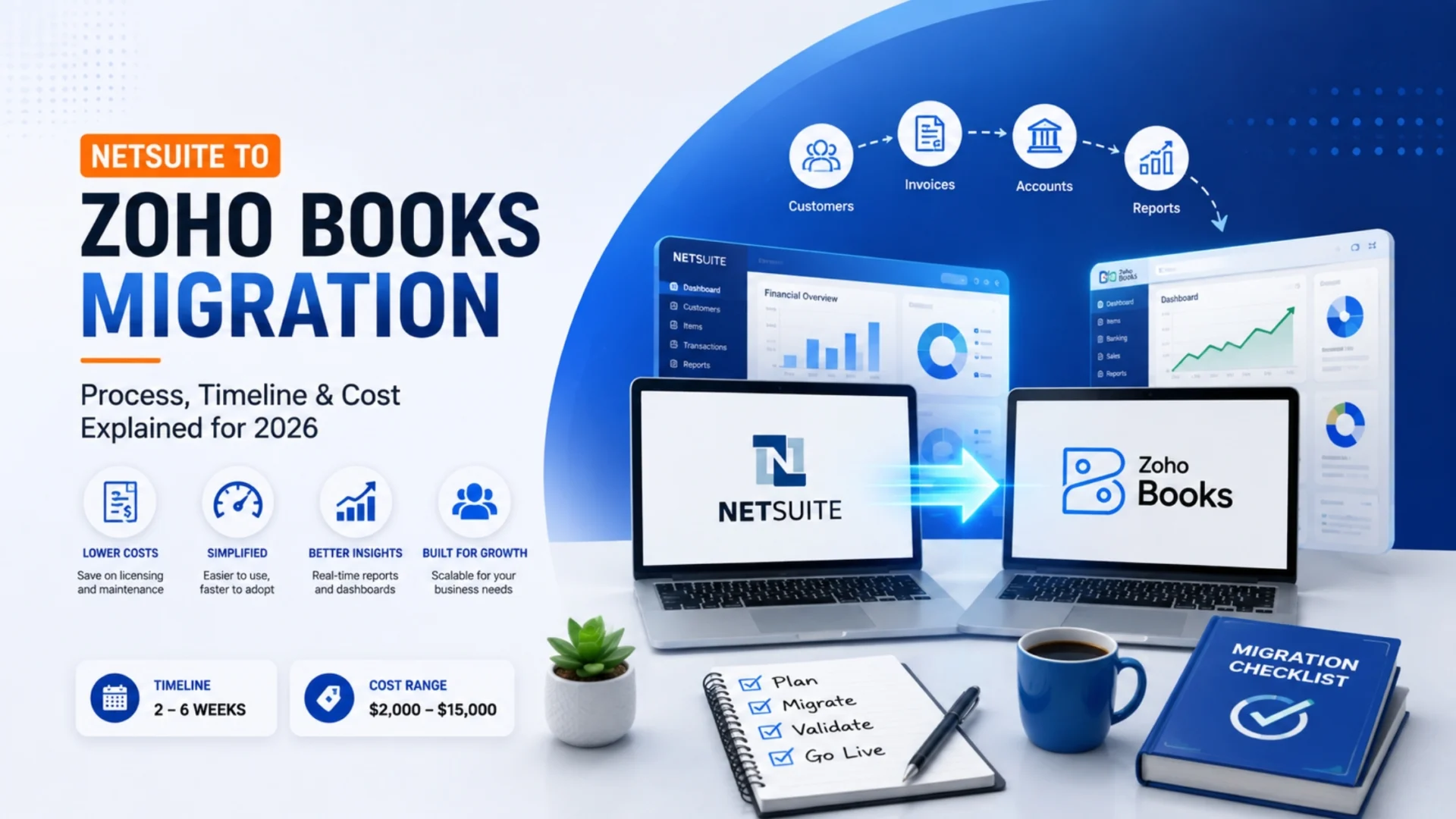
Moving from NetSuite to Zoho Books means transferring your contacts, invoices, payments, and chart of accounts to a lighter accounting platform. Most businesses do it because they bought a full ERP and only ever used the accounting piece. A clean migration usually takes 2 to 6 weeks and runs $2,000 to $15,000, though the number moves a lot depending on how much history you’re carrying over.
|
Migration probably makes sense if
|
Stay on NetSuite if
|
Short version: if you bought an ERP but only ever needed accounting software, this migration usually pays for itself fast. Here’s what the process, timeline, and real cost actually look like.
A lot of businesses end up paying for software they don’t really use. It happens quietly. Someone signs a NetSuite contract three or four years ago because the company was scaling fast and ERP felt like the responsible move. Then growth slows, or a division gets sold off, or it turns out the finance team only ever touched the invoicing and reporting modules anyway.
By the time someone actually looks at the renewal invoice next to what’s being used day to day, the gap is obvious. That’s usually the moment this migration gets seriously considered.
This guide covers what actually happens during a NetSuite to Zoho Books migration in 2026. Not the sales pitch version. The real process, a timeline you can plan around, honest cost ranges, and the mistakes that turn a two-week job into two months.
Why Companies Actually Make This Switch
NetSuite is a good product. That needs saying upfront because a lot of migration content pretends otherwise. It was built for businesses juggling multiple entities, complex order flows, and inventory spread across warehouses and countries. If that’s your business, NetSuite is doing its job.
The mismatch shows up when none of that applies to you. You’re running one entity, one currency, straightforward invoicing, and you’re still paying enterprise-level licensing and keeping someone around who half-knows how to administer NetSuite. That’s the real trigger, more often than any single missing feature.
There’s also a plainer issue: usability. NetSuite has a learning curve that most small finance teams never fully get past. New hires need weeks just to get comfortable. Zoho Books, by contrast, looks and feels closer to what a small finance team actually needs: invoicing, expense tracking, bank reconciliation, without a dedicated administrator babysitting the system.
None of this means Zoho Books is universally better. If you’re consolidating across subsidiaries or running inventory-heavy operations, it isn’t built for that depth, at least not on its own. The decision comes down to whether your actual usage matches what you originally bought, not whether one platform sounds nicer in a sales call.
NetSuite vs Zoho Books, Side by Side
Marketing pages tend to make both platforms sound perfect. A quick side-by-side is more useful.
If you want a more detailed, user-driven comparison beyond this table, G2’s comparison page pulls from thousands of verified user reviews on both platforms, worth a look before you commit either way.
What Actually Moves During Migration
People usually ask this before anything else. Here’s what typically transfers:
- Customer and vendor contacts
- Chart of accounts
- Open and historical invoices
- Bills and payment records
- Bank and credit card transaction history
- Tax rates and settings
- Item and pricing records, where relevant
One decision that gets skipped too often: how far back do you actually need history? Most businesses bring over two to three years for audit purposes and leave the rest archived in NetSuite. Dragging a full decade of granular transaction data into Zoho Books rarely helps anyone. It just adds weeks to a project that didn’t need them.
The Migration Process, Step by Step
A migration done fast tends to break during month-end close, which is about the worst possible time to discover a mapping error. Here’s what a properly run migration looks like.
|
1
|
Assess what’s actually in NetSuiteHow clean is the data, how many years of history matter, and what’s just clutter from an old process nobody uses anymore. |
|
2
|
Map the chart of accountsThis single step decides whether your reports make sense after go-live or whether you’re chasing discrepancies for a month. |
|
3
|
Clean the data before it movesDuplicate customers, invoices that were never properly closed, inconsistent naming. Fix it here, not after it’s already in the new system. |
|
4
|
Run a test migration firstMove a small sample, check that balances tie out, catch mapping problems while they’re still cheap to fix. |
|
5
|
Transfer everythingContacts, invoices, bills, payments, transaction history, all moved based on the mapping you already validated. |
|
6
|
Reconcile every accountNetSuite closing balance against Zoho Books opening balance, line by line. Nobody signs off until this matches. |
|
7
|
Train the finance teamZoho Books is simpler than NetSuite, but simpler still means different. A short walkthrough saves weeks of confused Slack messages later. |
|
8
|
Go live, keep NetSuite as a safety netZoho Books becomes the system of record. NetSuite stays open in read-only mode for a couple of weeks, just in case something needs a second look. |
A Realistic Timeline
You’ll see “migrate in 48 hours” claims out there. Technically possible for a business with almost no transaction history. Not realistic for most real companies. Here’s a breakdown that holds up better:
- Assessment and mapping: 3 to 5 days
- Data cleanup: 2 to 7 days, depending on how messy things are
- Test migration: 2 to 4 days
- Full transfer: 1 to 3 days
- Reconciliation: 2 to 5 days
- Training: 3 to 5 days
- Parallel run: 1 to 2 weeks
Total, most straightforward migrations land at 2 to 4 weeks. If you’ve got years of history, several bank accounts, or a chart of accounts nobody’s touched since 2019, budget closer to 6 weeks. If someone quotes you a full migration in under a week for a business with real transaction volume, ask what they’re skipping. Reconciliation is usually the answer.
What This Actually Costs
Data volume and cleanliness drive cost more than anything else. Here’s a range that reflects real projects, not a rate card.
Zoho Books licensing
Zoho Books prices per organization, not per user, which already sets it apart from NetSuite’s per-user, quote-based model. Plans scale from a free tier for very small businesses up through advanced tiers with multi-currency support, and even the top tier tends to land well below what most businesses were paying for NetSuite alone.
Simple migration
Single entity, clean books, under two years of history. Usually $2,000 to $6,000 for a fully managed migration including mapping, transfer, and reconciliation.
Moderate complexity
Several years of history, multiple bank accounts, or a custom account structure. Typically $6,000 to $15,000.
Complex migration
Multi-entity businesses, or deep inventory and order history coming across. This can run $15,000 to $30,000 or more, especially with custom scripting or additional Zoho modules involved.
Company size isn’t actually the biggest cost driver here. Data quality is. A business that kept its NetSuite books tidy for years will migrate faster and cheaper than a smaller one sitting on a pile of duplicate customers and half-closed invoices.
Costs That Don’t Show Up on the Quote
A few things quietly add up outside the migration invoice itself.
Staff time. Your finance team will spend real hours reviewing balances and learning a new layout, hours pulled from their normal close work.
Overlap licensing. Running NetSuite and Zoho Books side by side for a few weeks means paying for both during that window. Easy to forget, worth budgeting for anyway.
Reconnecting integrations. Anything that was talking to NetSuite, a Shopify store, a payroll tool, needs to be pointed at Zoho Books instead. Usually a small task. Still a task.
- Parallel-run licensing for both systems
- Reconnecting payment gateways and other integrations
- Rebuilding custom reports if NetSuite dashboards were heavily tailored
- Regional tax compliance add-ons inside Zoho Books, if needed
Where Migrations Go Wrong
Skipping the test run. Going straight to a full transfer means mapping errors show up after everything’s already imported, when they’re far more expensive to untangle.
Moving dirty data as-is. Duplicate customers and half-closed invoices don’t disappear in the new system. They just get a nicer interface.
Rushing the chart of accounts mapping. Get this wrong and every report you pull afterward is slightly off, and it’s not always obvious until close.
No real reconciliation step. Assuming the migration tool moved balances correctly, instead of checking, is how a discrepancy sits unnoticed for months.
Cutting NetSuite off day one. Shutting the door immediately leaves no fallback if something needs cross-checking during the first close.
Assuming the team doesn’t need training. Zoho Books is easier, sure. Easier isn’t the same as identical. Give the team a walkthrough before real invoices depend on it.
The First 30 Days After Go-Live
Week 1: expect a handful of “where did this feature go” questions. Normal, and usually sorted within a day or two.
Week 2: the first full invoicing and payment cycle runs entirely inside Zoho Books. Any leftover mapping gaps tend to show up here.
Weeks 3 and 4: the real test, first month-end close. If reconciliation was done properly earlier, this feels close to routine. If it wasn’t, you’ll know fast.
Once that first close goes clean, most teams stop thinking about NetSuite within a month or two. It just fades into “the old system.”
Picking Someone to Do This With You
A short checklist before you commit to a partner:
- Do they ask about your data volume and chart of accounts before quoting a flat number?
- Is there a test migration, or do they go straight for the full transfer?
- Is reconciliation a named deliverable, or something they mention only if you ask?
- Do they stick around through your first close cycle, or is the relationship over at go-live?
Anyone who quotes a fixed price without asking a single question about your books is guessing. That’s fine if you’re comfortable with a guess. Most finance teams aren’t.
Why Businesses Bring Elsner In for This
Elsner has been building and integrating Zoho systems for over 20 years, with certified Zoho consultants handling everything from CRM rollouts to accounting migrations like this one. That range matters specifically here, because moving from NetSuite to Zoho Books touches both ends: the data leaving NetSuite and the structure it needs to land inside correctly.
The team maps the chart of accounts before touching a single record, runs a validated test migration first, and reconciles balances line by line before anyone calls the project done. If your business also runs other Zoho modules like CRM or Inventory, that gets factored into the migration scope from day one instead of treating Zoho Books as its own isolated island.
Not fully sold on leaving NetSuite yet, or want to keep both systems running and just sync the data instead? Our Zoho NetSuite integration guide covers that alternative path in detail.
If you’re coming from a different accounting platform rather than NetSuite, the process looks a little different. We’ve covered that separately in our QuickBooks to Zoho Books migration guide, which walks through a similar process tailored to that switch.
Ready to Move From NetSuite to Zoho Books?
Get a clear picture of your migration scope, timeline, and cost before you commit to anything. No pressure, just an honest assessment from Elsner’s Zoho migration team.
Conclusion
This isn’t a software swap you do over a weekend. It’s a data project with a right way to do it and several shortcuts that look fine until month-end close proves otherwise. The businesses that come out clean are the ones that map the chart of accounts carefully, clean the data before it moves, and actually reconcile before calling anything finished.
Done right, most businesses are fully settled into Zoho Books within a month, paying a fraction of the old NetSuite bill, and running close without needing a dedicated ERP administrator on the payroll.
Frequently Asked Questions
How long does NetSuite to Zoho Books migration take?
Clean data and under two years of history usually means 2 to 4 weeks. More history, multiple bank accounts, or a custom account structure tends to push it closer to 6 weeks once cleanup and reconciliation are done properly.
How much does it cost to migrate from NetSuite to Zoho Books?
Simple single-entity migrations generally run $2,000 to $6,000. Moderate complexity, several years of history or multiple accounts, runs $6,000 to $15,000. Multi-entity or high-volume migrations can go $15,000 to $30,000 or beyond.
Can historical data be migrated from NetSuite to Zoho Books?
Yes. Invoices, bills, payments, and transaction history all transfer. Most businesses bring over two to three years for audit purposes and archive the rest in NetSuite rather than migrating a full decade of data that rarely gets used.
Will there be downtime during the migration?
A properly planned migration avoids meaningful downtime. Running a test migration first and keeping NetSuite open in read-only mode during a short parallel-run window gives you a fallback without interrupting daily operations.
Do I need a developer for this migration?
Straightforward migrations with standard data can often be handled through Zoho’s native import tools and careful mapping. Custom fields, unusual account structures, or connected integrations usually call for a specialist to avoid rework later.
Is Zoho Books a real replacement for NetSuite?
For single-entity businesses with straightforward accounting, yes. For companies running multiple subsidiaries or heavy manufacturing and inventory workflows, Zoho Books on its own generally doesn’t match NetSuite’s ERP depth.
What happens to NetSuite integrations after migration?
Anything connected to NetSuite, an ecommerce platform or payroll tool, needs to be reconnected to Zoho Books separately. It’s a smaller task than the core migration, but it should be scoped into the project from the start rather than discovered afterward.
Weighing the move from NetSuite to Zoho Books and want a straight answer on what your data would actually involve? Talk to Elsner’s Zoho migration team. No pressure, just a clear picture of scope, timeline, and cost.