 Zoho
Solutions
 Ecommerce
Development
 Web
Development
 AI
Solutions




- How Much Does AI Agent Development Cost?
- What Is Included in a Custom AI Agent Build?
- What Changes the AI Agent Development Quote?
- Integrations and Data Readiness
- Actions, Reliability, and Approval Rules
- Agent Architecture and Delivery Scope
- What Does an AI Agent Cost to Run Each Month?
- Calculate Model Usage Across the Whole Task
- Use Cost per Successful Task
- A Worked First-Year Budget for One Business Workflow
- The Scenario and Assumptions
- One-Time Build Budget
- Monthly Operating Cost
- First-Year Total Cost of Ownership
- How Do Custom Builds Compare With an Existing Platform?
- Hidden Costs and Proposal Exclusions to Check
- How to Compare AI Agent Development Quotes
- Is the Workflow Worth the Investment?
- What to Prepare Before Requesting an AI Agent Quote
- Ready to Build Your First AI Agent?
- Frequently Asked Questions
- How much does it cost to build a custom AI agent?
- What is included in an AI agent development quote?
- What monthly costs should I budget after the agent launches?
- Why do CRM and ERP integrations change the development cost?
- Is a platform subscription cheaper than custom AI agent development?
- What information should I provide to get a useful project estimate?
Quick Answer
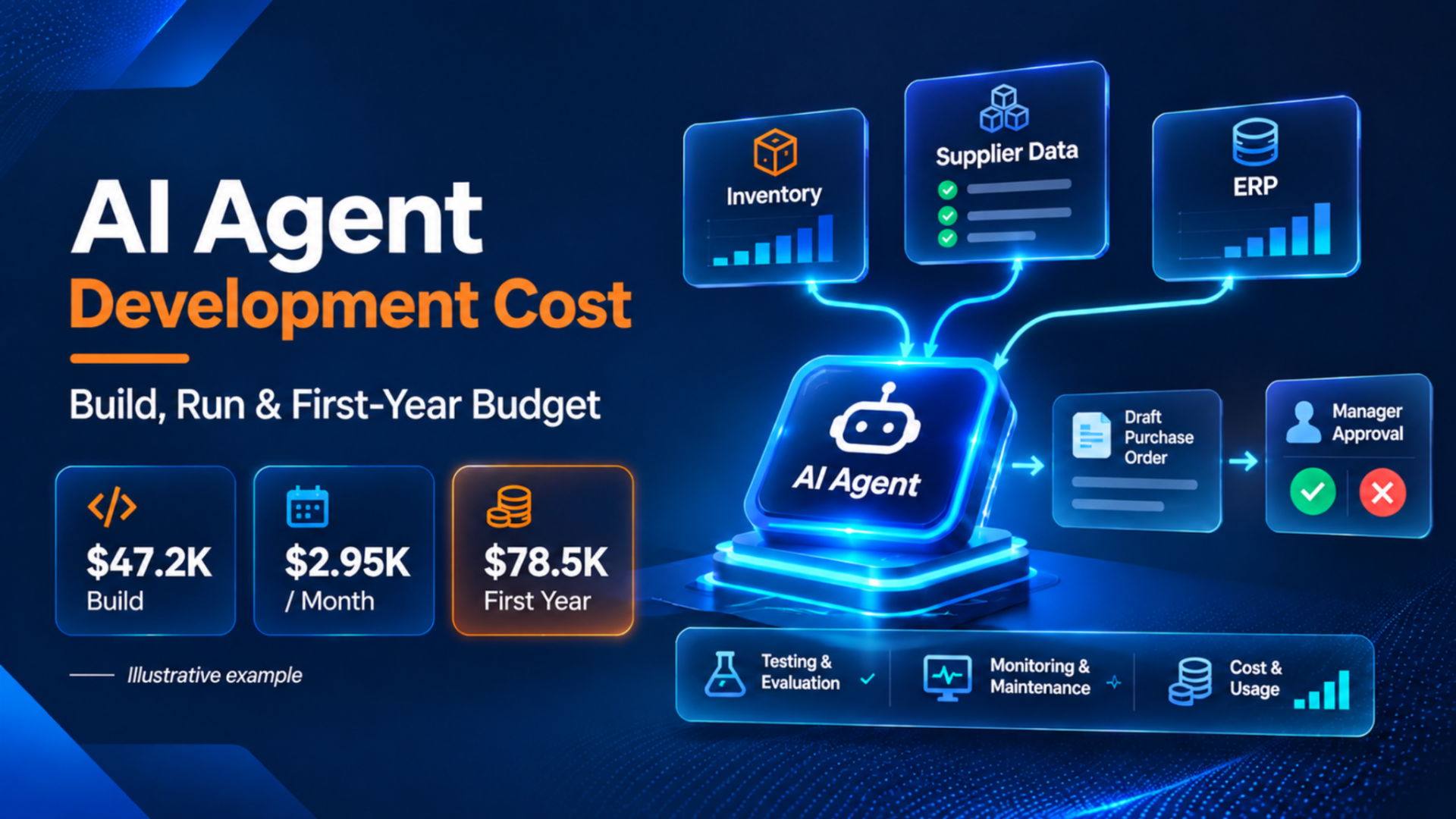
In our worked example, an inventory agent that connects three systems and asks a manager to approve reorders costs about $47,200 to build and $2,950 per month to run, including human review. Nine months of operation and a $4,720 contingency bring the first-year budget to about $78,500. To estimate your own workflow, start with the systems it must connect to, monthly task volume and time spent on approvals.
You ask for AI agent development cost estimates and two quotes land in your inbox. One is nearly double the other. Same workflow, same goal.
So which one’s cheaper? Honestly, you can’t tell yet. Not until you know which systems each agent connects to, what it’s allowed to do on its own, and who pays for running it after launch.
How Much Does AI Agent Development Cost?
Nobody can give you an honest market price without seeing your workflow. Anyone who does is guessing. What we can do is show a scoped example with every number visible, so you can swap in your own.
Later, we budget one hypothetical inventory reorder agent for a made-up US retailer. The result: about $47,200 to build, about $2,950 a month to run, and roughly $78,500 for the first 12 months, contingency included. It’s an illustration built on assumed labor rates, not a market average, an Elsner quote, or a promise.
Here’s how three common scopes differ.
| Scope | Systems and permitted actions | Deliverables | One-time budget basis | Recurring items | Exclusions |
| Feasibility prototype | One or two sources, mostly read-only. Reads and drafts. | Demo on sample data, findings note | Short discovery plus a few weeks of build hours | Little beyond test usage | Live write access, security review, monitoring |
| Production agent, one workflow | Two to four systems. Reads, drafts, and runs limited actions behind approvals. | Integrations, permissions, approval flow, tests, deployment, handover | Hours by workstream (see the worked example) | Model usage, tools, hosting, monitoring, maintenance, human review | Other workflows, systems added after sign off |
| Multi-agent or multi-department | Many systems across teams. Several agents coordinate and escalate. | Orchestration, shared test suite, role permissions, governance | Priced per workstream after discovery | Higher usage, shared monitoring, ongoing tuning | Change management, staff training, data platform work |
A prototype proves an idea can work on sample data. That’s all.
This post covers agents built on existing models. Planning to train or fine-tune your own? That’s a different budget, covered in our guide to broader AI development costs.
What Is Included in a Custom AI Agent Build?
A real build is more than a prompt and a demo. Here’s what normally sits inside the cost to build an AI agent:
- Discovery and workflow mapping. Someone watches how the work really happens, including the odd exceptions nobody wrote down.
- Data access and cleanup. Sometimes a day. Sometimes the biggest line in the quote.
- Tool integrations. Connectors to your inventory, CRM, or ERP, plus credential handling and permission design, set up inside your secure environment. Never email credentials.
- Agent logic. The instructions, the tools it can call, and the rules for when it stops and asks a person.
- Evaluation cases. Realistic test tasks with agreed pass marks.
- Deployment, documentation, and handover.
OpenAI’s guide to evaluating agent workflows describes grading traces and running datasets to find failures at scale. The idea works on any stack. If a proposal has no test cases, you’re paying for hope.
Test runs cost money too. API, tool, and cloud usage during development, testing, and pre-launch evaluations belongs in the one-time budget. It’s small next to labor, but real.
And no, custom doesn’t mean training a foundation model. Most business agents call an existing model through an API. The custom part is the workflow, connections, rules, and tests. That written scope is what good AI agent development services should hand you before work starts.
What Changes the AI Agent Development Quote?
Forget generic hourly-rate tables. Custom AI agent development cost moves with your scope, not a universal rate. This matrix shows the main factors and the question to ask about each.
| Factor | Simple case | More complex case | Ask the developer |
| Integrations | One documented, standard connector | Legacy API, several systems, separate test and live environments | Which systems are in scope, and is access read-only or read and write? |
| Data readiness | Clean, consistent records | Duplicates, missing fields, mixed formats | Who cleans the data, and is that in the quote? |
| Actions | Reads records, drafts a recommendation | Executes changes like refunds or order edits | What can the agent do without a person approving it? |
| Reliability | A wrong answer is cheap to fix | A wrong action is costly, so tests and approvals grow | Which acceptance tests define “done”? |
Integrations and Data Readiness
A standard, well-documented connector is a short job. A legacy API with odd rules is not. Same with data. If the agent must reconcile inconsistent records before it acts, someone has to fix them or work around them.
Environments matter too. A test copy and a live system mean two sets of access and two rounds of testing. Write access raises the stakes again, because a bad write is harder to undo than a bad read.
Credentials and permission design are implementation work too.
Actions, Reliability, and Approval Rules
Reading a record, drafting a recommendation, and executing a refund are three very different jobs.
Reading is cheap to test. Drafting needs quality checks. Executing needs guardrails too:
- a fallback when a tool fails
- protection against duplicate actions (the same refund twice is a bad day)
- human approval for anything risky
- agreed acceptance tests before launch
There’s no universal multiplier here, so be wary of anyone who offers one. Ask each vendor to list the actions and matching tests.
Agent Architecture and Delivery Scope
Extra agents, memory, document retrieval, languages, interfaces, hosting limits, and support obligations all stretch a quote.
One agent with a clear job is the easiest thing to budget and test. Several agents add handoffs, shared state, and more places to fail. Sometimes that’s right, but often not on day one. Our guide to multi-agent architecture and cost considerations goes deeper.
What Does an AI Agent Cost to Run Each Month?
First-time buyers get surprised here. The build invoice ends. The AI agent running costs don’t.
Monthly cost has more pieces than the model bill: model usage, paid tools and external API fees, retrieval and storage, hosting, monitoring and evaluation runs, maintenance, and human review.
Don’t mix up three different purchases: a platform license, a consumer chatbot subscription, and a custom implementation invoice. For every monthly line, ask who pays it and whether your support agreement covers it.
AI agent maintenance cost and monitoring are the lines people forget most. Our guide to monitoring AI agents in production shows what that work involves.
Calculate Model Usage Across the Whole Task
Add up every charge from every call and attempt. Four buckets, and they don’t overlap:
- uncached input tokens
- cache writes, where used
- cache reads, where used
- output tokens
Check how your provider reports totals. Some reports show total input that already includes cached tokens. Price that total at the full input rate, add cache reads again, and you’ve billed the same tokens twice. Then add separately billed tools, like paid web search. Retries count once, so if your log already includes them, don’t multiply by a retry factor on top.
Rates change, so check the provider’s page on budgeting day. This post uses Anthropic’s published Claude Sonnet 5.5 rates, checked November 18, 2026: $2 per million input tokens, $10 per million output tokens, $2.50 per million for 5 minute cache writes, and $0.10 per million for cache reads, per the Claude pricing page. Those are provider usage rates, not a development quote or the cost of the whole project.
Use Cost per Successful Task
A cheap run that fails isn’t cheap. Cost per successful task matches what you actually want.
Define success first. “The purchase order draft was correct and approved without edits” is a definition. “The API returned a response” isn’t. Then divide total cost by successful completions from the same period. Say what’s in the top half too: operating costs only, or operating plus amortized implementation? Both work. Mixing them doesn’t.
Token-only math misses a lot. A run that fails, repeats an action, or needs manual rescue looks fine on the token bill and bad on the outcome. The FinOps Foundation’s FinOps for AI overview covers unit economics for AI spend, and cost per outcome is the version most buyers care about.
A Worked First-Year Budget for One Business Workflow
Everything here is hypothetical. The company, volumes, labor rates, and allowances are made up for the example. They aren’t Elsner prices, a market benchmark, or a promise. Only the model rates come from a provider’s page.
The Scenario and Assumptions
Picture a made-up US online retailer with about 1,800 active products. Its reorder agent reads stock levels and supplier lead times, then drafts purchase orders. A purchasing manager approves every one. The agent can’t send anything to a supplier.
- Integrations: the inventory system (documented API), a supplier data feed, and a draft purchase order area in the ERP, with a test copy and a live copy.
- Volume: 1,500 reorder checks a month in the base case.
- Attempts and success: 1.2 model attempts per check on average. 92 percent of checks finish correctly, and the other 8 percent go to a person.
- Timeline: 3 months to build, then 9 live months inside the first 12.
- Labor: $120 an hour for the delivery team, $50 an hour for internal staff time. Both hypothetical.
- Currency and exclusions: USD, before sales tax. No data warehouse work, new supplier onboarding, or other workflows.
One-Time Build Budget
| Line item | Hours | Cost (hypothetical) |
| Discovery and workflow mapping | 40 | $4,800 |
| Integrations, credentials, and permissions | 100 | $12,000 |
| Agent development and approval flow | 120 | $14,400 |
| Testing and evaluation (150 test cases) | 80 | $9,600 |
| Deployment, security review, handover, and onboarding | 50 | $6,000 |
| Development and pre-launch model and cloud usage (allowance) | n/a | $400 |
| One-time total | 390 | $47,200 |
Onboarding sits inside the handover line, so it isn’t added again.
Monthly Operating Cost
Start with one model attempt. Assume about 8,000 uncached input tokens, 2,000 tokens written to cache, 24,000 read from cache, and 1,500 output tokens. Those counts are assumed. The rates are the Sonnet 5.5 rates above.
Per million tokens: 8,000 × $2 = $0.0160, 2,000 × $2.50 = $0.0050, 24,000 × $0.10 = $0.0024, and 1,500 × $10 = $0.0150. One attempt costs $0.0384.
Base case: 1,800 attempts (1,500 checks × 1.2) × $0.0384 = $69.12. Higher case: 4,800 attempts (3,000 × 1.6) × $0.0384 = $184.32. Retries are already inside the attempt count, so there’s no extra multiplier.
Human review needs explaining too. Base case: 1,500 drafts group into 300 purchase orders at 3 minutes each, which is 15 hours. The 120 failed checks take 10 minutes each, another 20 hours. Total: 35. Higher case: 600 purchase orders take 30 hours and 450 failed checks take 75. Total: 105. The higher case means volume doubles, attempts rise, and success drops. Nothing else changes.
| Line | Base case | Higher usage, lower success |
| Checks per month | 1,500 | 3,000 |
| Attempts per check | 1.2 | 1.6 |
| Successful checks | 1,380 (92%) | 2,550 (85%) |
| Model usage | $69 | $184 |
| Paid tools and supplier data feed (allowance) | $100 | $100 |
| Retrieval and storage (allowance) | $40 | $40 |
| Hosting (allowance) | $120 | $120 |
| Monitoring and evaluation runs (allowance) | $150 | $150 |
| Maintenance (6 hours × $120) | $720 | $720 |
| Human review (35 or 105 hours × $50) | $1,750 | $5,250 |
| Monthly operating cost | $2,949 | $6,564 |
| Operating cost per successful check | $2.14 | $2.57 |
Fixed allowances stay flat to keep the comparison clean. In real life, hosting and monitoring may grow with volume.
First-Year Total Cost of Ownership
The formula: first-year TCO = one-time implementation (onboarding included) + monthly operating cost × months live + contingency. Here, the contingency is a hypothetical 10 percent of the one-time total.
| Line | Base case | Higher usage, lower success |
| One-time implementation | $47,200 | $47,200 |
| Operating cost, 9 live months | $26,541 | $59,076 |
| Contingency (10% of one-time) | $4,720 | $4,720 |
| First-year TCO | $78,461 | $110,996 |
Here’s what to notice. Model usage went from $69 to $184. Monthly cost went from $2,949 to $6,564. Almost all of that gap is human review, up from $1,750 to $5,250. Review is about 59 percent of base monthly cost and about 80 percent in the higher case. Model usage is about 2 percent.
Cost per successful task also rose even though volume doubled, because more attempts failed and landed on a person’s desk. A low token bill isn’t a low project cost.
How Do Custom Builds Compare With an Existing Platform?
Not every workflow needs custom work. If a platform already handles your standard workflow, with the connectors and approval controls you need, it may be enough. Honestly, that’s often the smarter first move. Just remember that AI agent pricing from a platform vendor is a subscription price. It isn’t a build price, and it doesn’t cover your oversight time.
With a platform, you pay a license, do some setup, and use the vendor’s prebuilt connectors. The vendor maintains the product, and you maintain your configuration. With a custom build, you pay a team to design it, connect it to your systems, and maintain it. You pay model and tool providers directly, and ownership is set by contract, so ask for code access.
Custom starts to make sense when your systems are unusual, your actions need tight control, or a platform’s limits keep getting in your way. For vendor details, see our AI agent platform comparison.
Hidden Costs and Proposal Exclusions to Check
Not every project hits all of these. Plenty hit a few. Ask before you sign, because AI agent implementation cost grows in the gap between “included” and “assumed.”
- Data cleanup. In scope, or “customer responsibility”?
- Sandbox and production access. Who sets them up, and how fast?
- Security review. Yours, theirs, or both?
- Evaluation datasets. Who builds the test set?
- Human escalation. What happens when the agent can’t finish?
- Post-launch changes and support. Covered, or billed as new work? Who’s on call?
- Ownership transfer. Code, prompts, test sets, and documentation.
A quick scenario. A quote says “CRM integration included.” Then you learn it’s read-only, and live access is “phase two.” Same words as the quote next to it. Smaller scope.
How to Compare AI Agent Development Quotes
The cheapest headline number often describes a smaller project. Put every quote in the same frame first. Copy this checklist into a sheet and fill it in for each vendor:
- Workflow: same workflow, same definition of finished?
- Integrations: which systems, read or write, test and live?
- Acceptance tests: what must pass before launch?
- Action boundaries: what can the agent do alone, and what needs approval?
- Deliverables: documentation, test sets, handover sessions.
- Deployment: where it runs and who pays for hosting.
- IP and code access: who owns the code and prompts?
- Support: coverage, response times, and what’s billed separately.
- Usage assumptions: monthly volume, attempts per task, model, success rate.
- Exclusions: anything written as “not included.”
- Change requests: how scope changes are priced.
We won’t name a best vendor, because nobody can without seeing your project. If two proposals fill in that checklist the same way, compare price. If not, you’ve found why the prices differ.
Is the Workflow Worth the Investment?
Start from a measured manual baseline, not a guess. Then subtract what the agent still needs from people, plus operating costs.
Back to the hypothetical example. Say the team timed the manual process at 8 minutes per check: 1,500 × 8 minutes, or 200 hours a month. The agent leaves 35 hours of review and exception work, so about 165 hours are freed. At $50 an hour, that’s $8,250 of time.
But time saved isn’t cash saved. It only counts if those hours become less overtime, a hire you don’t make, or work that earns money. Say half converts: 82.5 hours × $50 = $4,125. Subtract $1,199 of non-labor operating and maintenance cost ($479 technical plus $720 maintenance) and you get about $2,926 a month. The 35 review hours are already counted as leftover work, so don’t subtract them twice.
That’s an illustration, not a forecast. Run a pilot, measure real numbers, then decide: improve, scale, or stop.
What to Prepare Before Requesting an AI Agent Quote
A short brief beats a long call. Pull together:
- the workflow and the objective
- existing systems and the data they hold
- permitted actions and approvals
- expected monthly tasks
- hosting and security needs
- launch window
- indicative budget
Don’t send customer records or credentials. A description of the data is enough. Here’s an illustrative enquiry:
“We want an agent that reads support tickets, drafts a refund recommendation, and routes anything over $200 to a manager. Systems: Zendesk and our order system. About 4,000 tickets a month. No automatic refunds. Hosting in our own US cloud account. Launch in about six months. Indicative budget to be discussed.”
Ready to Build Your First AI Agent?
Turn repetitive tasks into intelligent workflows with custom AI agents built around your business needs. Share your automation goals, existing systems, and expected outcomes with Elsner Technologies to get a tailored solution and transparent cost estimate.
Frequently Asked Questions
How much does it cost to build a custom AI agent?
It depends on scope, and no honest single number exists. In this post’s hypothetical example, one workflow with three integrations and manager approval comes to about $47,200 to build, plus running costs. That isn’t a market average or an Elsner quote.
What is included in an AI agent development quote?
A solid quote covers discovery, data access, integrations, permissions, agent logic, evaluation cases, deployment, documentation, and handover. It should also say whether test usage, security review, and sandbox access are included.
What monthly costs should I budget after the agent launches?
Budget for model usage, paid tools, retrieval and storage, hosting, monitoring, maintenance, and human review. In the example above, human review was the largest line and model usage was about 2 percent. Your mix will differ, so measure it in a pilot.
Why do CRM and ERP integrations change the development cost?
Every system brings its own API quality, data format, and permission model. A documented connector is quick. A legacy API, messy records, or write access adds engineering and testing time.
Is a platform subscription cheaper than custom AI agent development?
It can be, for a standard workflow. A platform has a recurring fee and less build work, but you’re limited to its connectors and controls. Custom costs more up front and gives you control. Compare first-year total cost.
What information should I provide to get a useful project estimate?
Share the workflow and goal, the systems involved, what the agent may do alone, expected monthly volume, hosting and security needs, your launch window, and an indicative budget. Skip customer records and credentials.