- What Shopify Flow still does well
- What actually changed: Sidekick’s move from assistant to operator
- The numbers behind the shift
- Where AI agents go further than Flow
- Where it still falls short
- Flow, Sidekick, or custom agent development: what fits where
- A decision framework, not a feature checklist
- A practical migration framework: from Flow-only to AI-assisted operations
- How different Shopify businesses are actually using this
- Where AI Agent adoption goes wrong
- Measuring whether the automation is actually working
- Enterprise considerations most guides skip
- Where Shopify automation is heading next
- Where Elsner fits into this
- The bottom line
- Not sure which side of the line your store is on?
- Frequently Asked Questions
- What is the difference between Shopify Flow and Shopify Sidekick?
- Can Sidekick replace a Shopify Flow developer?
- Does Sidekick work with third-party apps like Klaviyo or Gorgias?
- Is agentic checkout live on Shopify stores?
- Which Shopify plans include Sidekick’s automation features?
- When does a Shopify store need custom AI agent development instead of native tools?
Ask five Shopify merchants what “automation” means right now and you will get five different answers. A couple of years ago it was simple: Shopify Flow, a trigger, an action, maybe a Zapier connection for anything Flow could not reach. That is no longer the full picture. Shopify’s admin now ships with an AI agent, Sidekick, that builds those same workflows from a plain sentence and flags what needs attention before anyone asks. This guide breaks down what actually changed, what Sidekick still cannot do, and exactly where the line sits between flipping on a native tool and bringing in custom agent development.
Quick Answer
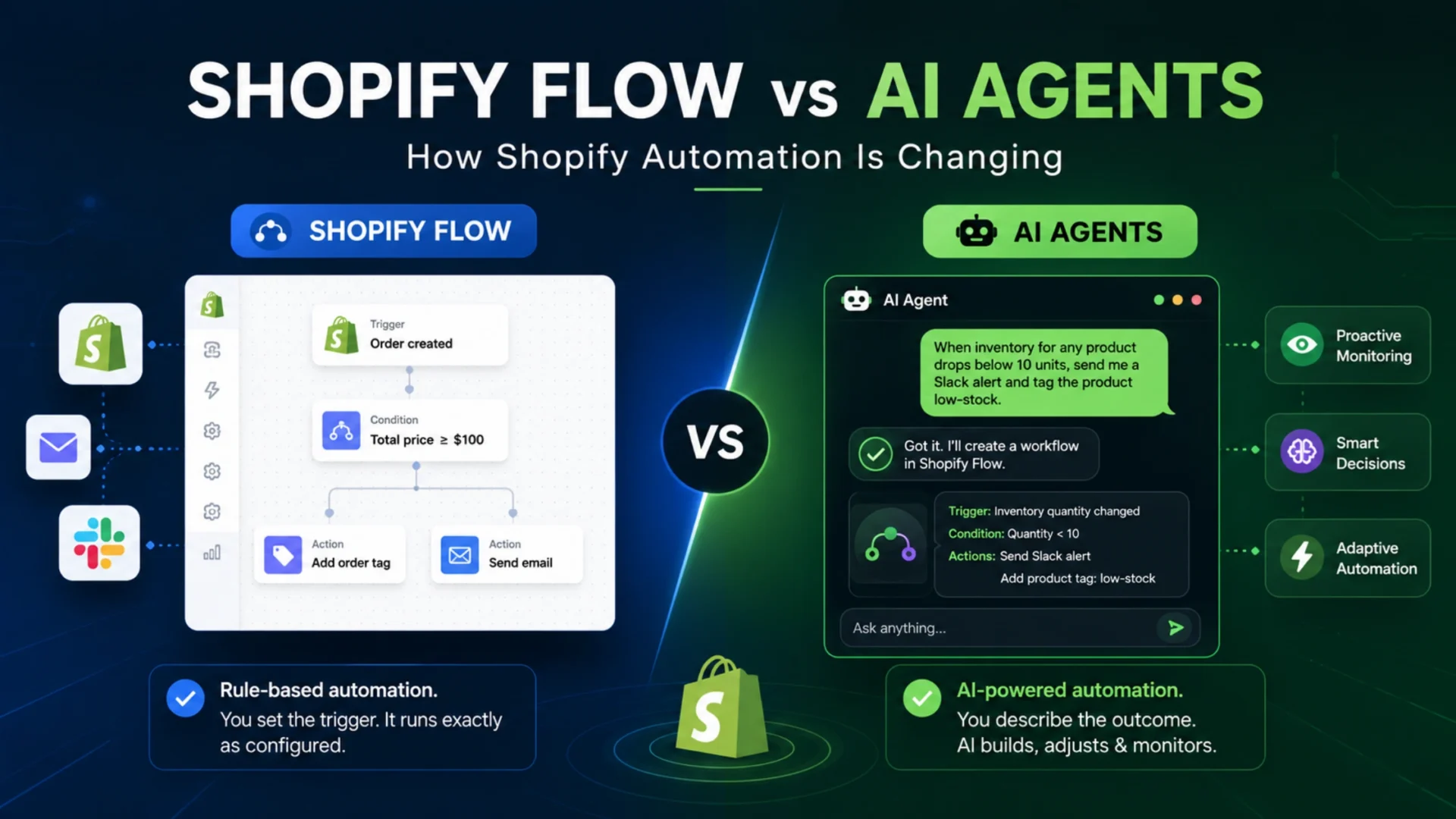
Shopify Flow is rule based automation: you set the trigger and the action, and it runs exactly as configured every time. Sidekick and other AI agents inside Shopify’s admin work differently. You describe what you want in plain language, and the AI builds, adjusts, and in some cases monitors the workflow on its own. In 2026 the two are increasingly paired, with Flow supplying the execution layer and Sidekick supplying the interface and judgment on top of it.
What Shopify Flow still does well
Flow has not gone anywhere, and it should not. It is Shopify’s native, no-code automation builder, and for a specific kind of task, it is still the right tool. Tag an order over a certain value. Send an internal alert when stock for a top SKU drops below a threshold. Trigger a recovery email when a checkout gets abandoned, no third-party app subscription required. These run natively, predictably, and without an AI making a judgment call in the middle of them.
The catch is that Flow needs you to already know exactly what condition and what action you want before you build anything. There is no room for ambiguity. If the workflow needs a bit of judgment, like deciding whether a refund request looks legitimate or figuring out which of three warehouses should ship an order based on shifting demand, Flow was never built to make that call. It waits for a rule you write. We have covered the operational side of setting these up, from Klaviyo pairings to inventory triggers, in our Shopify automation guide, which is worth a look if you have not touched Flow yet.
What actually changed: Sidekick’s move from assistant to operator
Sidekick started out as a chat assistant. Ask it a question about your store, get an answer, done. That is not what it is anymore. Shopify’s Winter ’26 update tied Flow directly into Sidekick, so a merchant can describe an automation in a sentence, something like “when inventory for any product drops below 10 units, send me a Slack alert and tag the product low-stock,” and Sidekick writes the workflow logic for review before anything goes live. You are not clicking through a builder for twenty minutes anymore. You are describing the outcome.
That shift shows up in the adoption numbers too. Close to half of all Flow automations created in the first quarter of 2026 were built through Sidekick’s natural language interface rather than the visual builder, according to Shopify’s own Q1 earnings figures. That is a meaningful swing away from manual configuration in under a year.
Sidekick also stopped waiting to be asked. Sidekick Pulse, the proactive layer Shopify shipped alongside this update, scans orders, traffic, and seasonality patterns on its own and surfaces recommendations before a merchant thinks to look. It is less “answer my question” and more “here is something you should probably know about.”
The numbers behind the shift
Honestly, most “AI is changing ecommerce” claims are vague on purpose. These are not. Here is what Shopify and independent trackers actually reported for the first part of 2026.
4x
Year over year growth in weekly active shops using Sidekick in Q1 2026, per Shopify’s own earnings call, reported by Marketing Brew.
~13x
Growth in AI-referred orders year over year, with AI-referred visitors converting close to 50 percent higher than organic search traffic, according to Shopify’s enterprise team.
18%
Of merchants use Sidekick weekly, even though 58 percent say they are aware it exists, per Shopify’s Q4 2025 merchant survey.
That last stat matters more than the big multipliers. Awareness is not adoption, and adoption is not habitual use. Worth remembering before anyone tells you every merchant on the platform has already rebuilt their operations around AI agents. Most have not, at least not yet.
One more thing worth flagging: independent tracking from fudge.ai’s ongoing analysis puts AI-attributed order growth at roughly 11 times over the past year, close to Shopify’s own reported figure but not identical. That gap is small, but it is a useful reminder to treat platform-reported growth numbers as directionally true rather than exact, since the underlying methodology is rarely published in full.
Where AI agents go further than Flow
Three things stand out once you get past the headline stats.
It lowers the barrier to build. A staff member who has never opened Flow’s builder can describe a workflow in a sentence and get a working draft. That matters for smaller teams without a dedicated ops person babysitting automations.
It reasons across signals, not just one trigger. Sidekick Pulse looks at orders, traffic, returns, and seasonality together, then surfaces a recommendation. Flow waits for one condition to be true. That difference is the whole point of pairing the two.
It acts inside the platform, not just around it. Because Sidekick is a function-calling agent over Shopify’s own APIs rather than a chatbot layered on top, it can query live order data, generate a discount code with specific rules, or draft a Flow workflow directly, all without leaving the admin.
Where it still falls short
This is the part most vendor blog posts skip. It matters more than the growth stats if you are actually deciding what to build.
Sidekick cannot see your third-party apps yet
Klaviyo flows, Gorgias tickets, a Google Sheet you use for supplier pricing: none of it is visible to Sidekick today. Its context stops at the admin’s edge. App Extensions, which would close this gap, are still in developer preview.
The governance layer is playing catch-up
Draft, preview, audit, rollback: the controls that make automation safe to run a business on shipped slower than the capability itself did in 2026. Sidekick will not publish changes without approval, which helps, but the broader trust tooling around agentic features is still maturing.
Custom app generation is plan-gated
As of April 2026, building custom apps through Sidekick requires Grow, Advanced, or Shopify Plus. Basic plan merchants had grace access until that cutoff. Worth checking before you plan a rollout around this feature specifically.
In-chat checkout is not settled
OpenAI quietly shut down Instant Checkout in March 2026, saying it did not offer the flexibility it wanted to provide. The Agentic Storefronts model that replaced it routes shoppers back to your own checkout instead. Discovery through AI is real and growing. Buying entirely inside a chat window, for now, is not.
Flow, Sidekick, or custom agent development: what fits where
All three of these can technically be called “Shopify automation.” What actually separates them is how far each one can reach, and what happens the moment your workflow needs to touch something outside Shopify’s own admin.
| Approach | What it is | Best for |
|---|---|---|
| Shopify Flow | Native, rule-based trigger and action builder | Predictable, single-condition workflows you can define in advance |
| Sidekick / native AI agent | Admin-scoped AI that drafts Flow logic, monitors data, surfaces alerts | Lowering the technical barrier for admin tasks and single-store operations |
| Custom AI agent / system integration | Purpose-built automation connecting Shopify to ERP, CRM, or warehouse systems | Cross-system automation and multi-brand or enterprise-scale operations |
A decision framework, not a feature checklist
1. Map what is already automated in Flow, and flag the ceiling. Look for the workflows that need a judgment call Flow cannot make, or that depend on data sitting in an app Sidekick cannot see yet.
2. Layer in Sidekick for what it is actually built for. Drafting Flow logic from plain language, generating reports, and surfacing proactive alerts are strong use cases today. Confirm your plan tier supports the features you want before you build a rollout around them.
3. Bring in custom agent development when automation needs to leave the Shopify admin. ERP data, CRM records, multi-warehouse inventory logic, or a supplier system nobody’s native tool touches: that is where a purpose-built integration earns its cost, and where native tools simply stop.
A practical migration framework: from Flow-only to AI-assisted operations
Merchants rarely move from pure Flow to AI-assisted automation in one step, and honestly, they should not. The stores that get this right tend to follow a similar sequence, whether they are running a single store or managing several brands under one account.
Start with an audit, not a wishlist. List every Flow automation currently running, what triggers it, and what it actually saves in hours or errors caught. Most merchants are surprised by how many workflows have been quietly running unchanged for a year or more.
From that audit, flag the workflows that hit a ceiling: anything where a human still steps in to make a judgment call, or where the automation depends on data Flow cannot see on its own. These are candidates for Sidekick, not everything on the list.
Pick one or two low-risk pilots first. A weekly inventory summary or a draft discount code generated from a plain language prompt is a reasonable place to start. Skip anything customer-facing or financially sensitive for the first round.
Test with a defined review window, typically two to four weeks, and keep a human checking every output before it goes live. Sidekick already requires approval before publishing changes, so use that built-in checkpoint rather than treating it as a formality.
Monitor results against the baseline from the audit: time saved, errors caught, anything that broke. Only after a pilot holds up consistently should it scale to more products, more stores, or more of the catalog. Rushing this step is the most common reason migrations stall or get walked back.
How different Shopify businesses are actually using this
Automation looks different depending on what a store sells and how it operates. The patterns below are illustrative examples of how Flow and Sidekick tend to get used across store types, not a fixed rulebook for every merchant.
Fashion and apparel
Flow handles size and color variant tagging, back-in-stock alerts, and seasonal collection scheduling well on its own. Sidekick tends to add more value drafting return-reason summaries or flagging unusual return spikes tied to a specific style, something a merchant would otherwise only notice weeks later in a spreadsheet.
Beauty and personal care
Expiry-linked reorder reminders and subscription renewal tagging fit Flow’s rule-based model cleanly. Where Sidekick tends to help is scanning ingredient-related support tickets for recurring complaints, something no single Flow trigger is built to catch.
Electronics
Flow covers warranty tagging and serial number logging without issue. Multi-warehouse routing based on real-time stock and shipping cost, though, needs judgment Flow was never designed to make. This is usually where a custom integration comes in rather than Sidekick alone.
B2B and wholesale
Tiered pricing rules and net-terms tagging run fine on Flow. Sidekick can draft a quick summary of which accounts are approaching their credit limit, but full ERP-linked credit checks fall outside what either native tool can see.
Subscription brands
Flow manages renewal reminders and failed-payment retries reliably. Sidekick’s value shows up in surfacing churn patterns across a cohort before a human would think to pull that report manually.
Large enterprise stores
At this scale, Flow and Sidekick both tend to hit their ceiling fast. Multi-brand catalogs, region-specific compliance rules, and ERP-synced inventory usually push enterprise merchants toward custom agent development well before native tools are exhausted.
Where AI Agent adoption goes wrong
Most automation problems we see are not technical. They come from how the rollout was managed.
Replacing everything at once is the most common one. A merchant sees Sidekick draft a workflow correctly a few times and starts handing it entire categories of decisions without a review step. Sidekick is designed to build and suggest, not to run unsupervised at scale, at least not yet.
Weak governance is close behind. If nobody owns approving what Sidekick drafts, changes either sit unreviewed for weeks or get rubber-stamped without a real check. Assign one person, not a rotating group, to own that approval queue.
Skipping monitoring after launch is another one. A workflow that looked right in testing can behave differently once real order volume hits it. Revisit pilot workflows on a set schedule, not just when something visibly breaks.
Prompt dependency is subtler. Teams that lean entirely on describing workflows in plain language sometimes lose the underlying logic of what is actually running. When something needs debugging, someone still has to understand the Flow steps underneath, not just the sentence that generated them.
Ignoring human review because “it is usually right” tends to cause the most damage. Sidekick requiring approval before publishing is a safeguard, not red tape. Treating that approval step as optional defeats the point of having it. None of this means AI agents are not worth adopting. It means the rollout needs the same discipline any operational change would.
Measuring whether the automation is actually working
Word-of-mouth impressions are not a KPI. A few measures worth tracking before calling a migration successful:
- Manual hours saved per week, compared against the baseline from the initial audit, not a guess.
- Error rate on the automated workflow versus its previous manual equivalent, especially for anything customer-facing like refunds or order tagging.
- Inventory accuracy, particularly for stores running multi-warehouse or multi-channel stock.
- Response time on anything customer-facing, since a delayed automated response is often worse than a slower human one.
- Reliability over a defined period, meaning how often the workflow needed a manual fix or override.
- Cost comparison between the native tooling, largely included in Shopify’s plan cost, and any custom integration work, weighed against the hours or errors it actually removes.
ROI for Flow-based automation is usually straightforward since it is included in existing plans. ROI for custom agent development takes longer to prove out and depends heavily on scale. It rarely makes sense for a single-store merchant handling a few hundred orders a month, and it becomes easier to justify once multiple systems, warehouses, or brands are involved. For most mid-size merchants, the investment case builds gradually rather than overnight, and it is worth revisiting the calculation every few months rather than deciding once and moving on.
Enterprise considerations most guides skip
None of this matters if a workflow saves time but creates a compliance problem. For enterprise merchants specifically, a few things deserve more attention than they usually get.
Audit trails matter more than most teams initially plan for. Every AI-drafted workflow change should leave a record of what was proposed, who approved it, and when it went live. Sidekick’s built-in approval step helps here, but it is worth confirming that record is actually retained and accessible, not just shown once and forgotten.
Permissions need to be scoped deliberately. Not every team member who can use Sidekick should be able to approve changes that touch pricing, discounts, or customer data. It is a basic access control question, but one that gets skipped often enough to be worth stating plainly.
Compliance and data handling deserve a direct conversation, particularly for merchants in regulated categories or operating across multiple regions with different data rules. AI agents that touch customer data need the same scrutiny any other system handling that data would get.
Human approval should stay mandatory for anything touching pricing, refunds, or customer communication, even once a workflow has run reliably for months. This is less about distrust of the tool and more about keeping accountability clear when something eventually does go wrong.
Change management is the piece enterprise teams underestimate most. Rolling out AI-assisted automation across multiple stores or brands works better as a staged process with a named owner, not a company-wide switch flipped on a single day.
Where Shopify automation is heading next
Based on what Shopify has already shipped and said publicly, a few directions look reasonably clear rather than speculative.
Agentic commerce is expanding, even if full in-chat checkout is not settled yet. Shopify’s Agentic Storefronts model and the broader push toward AI-assisted discovery suggest more traffic will arrive through AI assistants over time, even while the actual purchase still routes through a store’s own checkout for now.
Sidekick’s role is likely to keep growing rather than staying fixed at its current scope. The move from a chat assistant to something that drafts and monitors workflows happened inside about a year. App Extensions, still in developer preview, point toward Sidekick eventually gaining visibility into third-party apps, which would close one of its biggest current gaps.
Deeper integrations between native AI tools and the systems merchants already run, ERPs, CRMs, warehouse software, appear to be the direction Shopify is building toward, based on its own developer documentation and the pace of recent updates. That does not mean native tools will fully replace custom integration work. It means the boundary between the two will likely keep shifting.
Human-in-the-loop design seems to be a deliberate choice rather than a temporary limitation. Sidekick’s approval requirement before publishing changes suggests Shopify is building trust into the system gradually rather than racing toward full autonomy. That is a reasonable approach for something that touches live customer orders and revenue.
Where Elsner fits into this
Native tools handle a lot more than they used to, and that is a genuinely good thing for smaller stores. But growing and enterprise brands usually run into the same wall: the automation they need has to reach an ERP, a CRM, a multi-brand catalog, or a warehouse system that Sidekick was never built to touch. That gap is exactly where our AI agent development work sits, building the connective layer between Shopify and whatever system actually runs the rest of the business.
On the platform side itself, our Shopify development team handles the Flow logic, theme, and storefront work that needs a steady hand rather than a prompt. In practice, most of our clients end up somewhere between “native tools handle this fine” and “we need something custom,” and figuring out exactly where that line sits for a specific store is usually the first real conversation worth having.
The bottom line
Shopify Flow did not get worse. It got a smarter front door. Sidekick makes it easier to build and adjust the automations Flow already supported, and it is starting to catch things a human would have missed until the next reporting cycle. That is real progress, not hype dressed up as a feature launch.
It is not, however, a replacement for automation that needs to reach outside Shopify’s own admin. Knowing which side of that line your next automation project sits on is the actual decision, and it is worth getting right before you build anything.
Not sure which side of the line your store is on?
Elsner’s team builds both the Shopify Flow logic native tools support well and the custom AI agent and system integration work that starts where those tools stop. Let’s map out what your store actually needs before you build around a feature that will not reach far enough.
Frequently Asked Questions
What is the difference between Shopify Flow and Shopify Sidekick?
Shopify Flow is a rule-based automation builder where you manually set a trigger and an action. Sidekick is an AI agent inside the Shopify admin that can build, adjust, and monitor those same workflows from a plain language description, and can also surface proactive alerts without being asked.
Can Sidekick replace a Shopify Flow developer?
For straightforward, single-condition workflows, Sidekick can draft usable Flow logic on its own. It does not replace developer input for complex, multi-system automations, since its visibility stops at the Shopify admin and does not extend to most third-party apps or external systems.
Does Sidekick work with third-party apps like Klaviyo or Gorgias?
Not yet. Sidekick’s context is currently limited to the Shopify admin’s own data. Third-party app data, such as Klaviyo flows or Gorgias tickets, is not visible to it. Shopify’s App Extensions feature, still in developer preview, is intended to close this gap.
Is agentic checkout live on Shopify stores?
Discovery through AI assistants like ChatGPT, Copilot, and Gemini is live and growing. Full in-chat checkout is not settled: OpenAI scaled back its Instant Checkout feature in March 2026, and Shopify’s current Agentic Storefronts model routes buyers to a store’s own checkout instead of completing the purchase inside the chat.
Which Shopify plans include Sidekick’s automation features?
Sidekick itself is included free on every Shopify plan. Custom app generation through Sidekick, however, has been restricted to Grow, Advanced, and Shopify Plus plans since April 2026, after a grace period for Basic plan merchants ended.
When does a Shopify store need custom AI agent development instead of native tools?
Once an automation needs to reach outside the Shopify admin, into an ERP, a CRM, a multi-warehouse system, or a supplier platform, native tools like Flow and Sidekick stop being enough. That is the point where custom agent development or a system integration project typically becomes necessary.