- Why Shopify Stores Eventually Need a CRM
- What Shopify + Zoho CRM Integration Actually Solves
- Customer Visibility
- Marketing Automation
- Ecommerce Operations
- Reporting & Analytics
- Shopify + Zoho CRM Integration Methods
- Option 1: Native Shopify + Zoho Connector
- Option 2: Zoho Flow Automation
- Option 3: Custom API Integration
- Common Integration Challenges Businesses Face
- Duplicate Contacts
- Sync Delays
- Inventory Mismatches
- Reporting Inconsistencies
- Field Mapping Errors
- Internal Adoption Issues
- Real Shopify + Zoho CRM Use Cases
- D2C Ecommerce Brand
- Wholesale / B2B Ecommerce
- Multi-Store Ecommerce Brand
- Subscription Ecommerce
- Shopify + Zoho CRM vs Shopify + Klaviyo
- How Long Does Shopify + Zoho CRM Integration Take?
- Basic Integration
- Mid-Level Automation
- Enterprise Custom Integration
- Shopify + Zoho CRM Implementation Checklist
- Conclusion
- Ready to Build a Shopify + Zoho CRM Integration That Actually Works?
- Frequently Asked Questions
- Can Shopify integrate with Zoho CRM?
- What is the best way to integrate Shopify with Zoho CRM?
- Is Zoho CRM good for ecommerce businesses?
- How long does Shopify + Zoho CRM integration take?
- Can Zoho CRM replace Klaviyo?
- What should businesses prepare before integrating Shopify with Zoho CRM?
Shopify handles ecommerce operations extremely well in the early and mid stages. Orders flow smoothly, storefront performance stays strong, and with improvements in Core Web Vitals, site speed and stability are rarely the issue.
The real friction starts somewhere else.
As brands grow, customer data begins spreading across tools. Marketing lives in one platform, support tickets in another, and any kind of sales or wholesale tracking sits somewhere in between. Nothing is technically broken, but visibility starts thinning out.
You can still operate like this for a while. Most brands do. But retention gets harder to control. Reporting feels incomplete, and decisions rely more on assumptions than clarity.
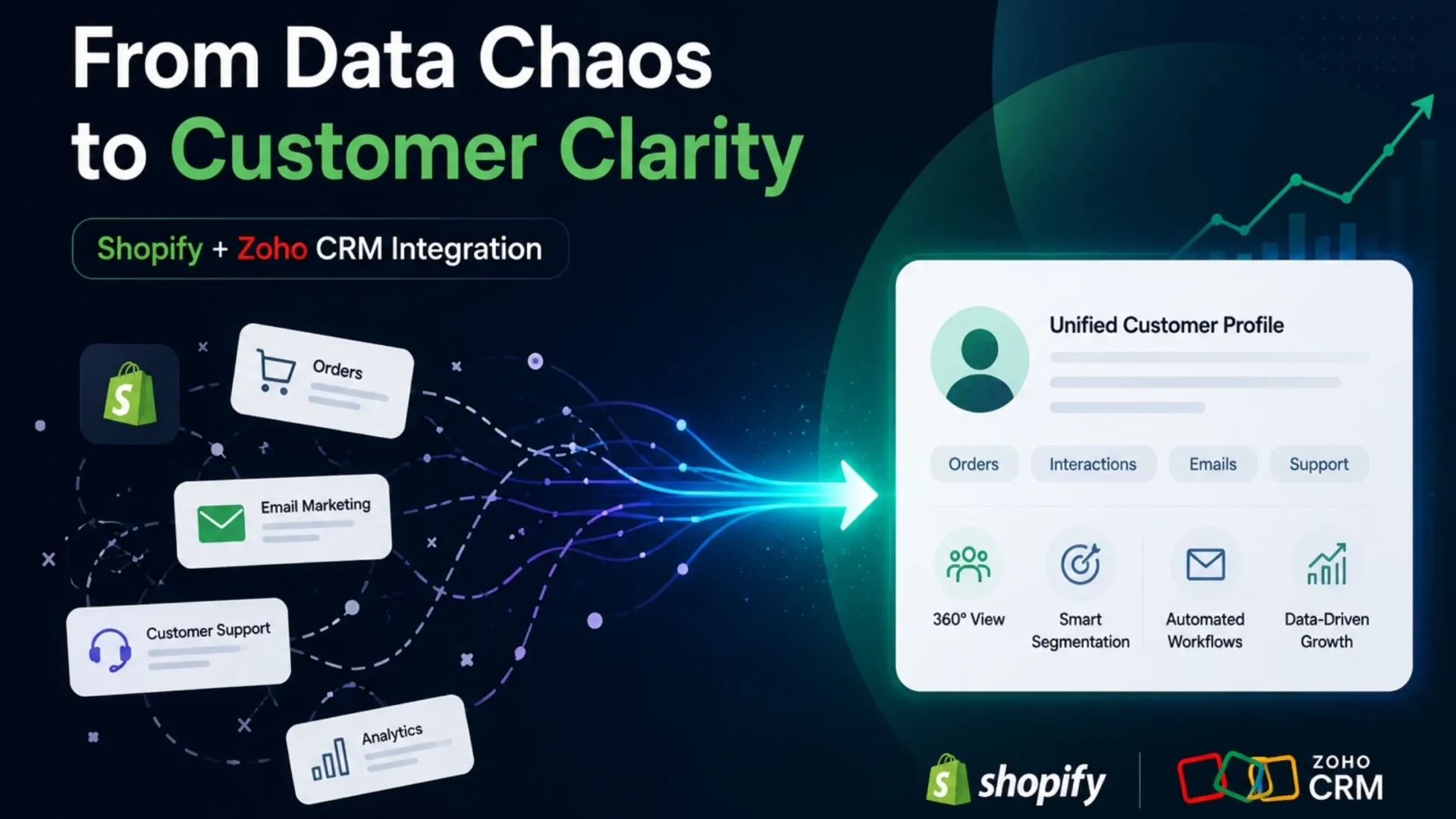
Integrating Shopify with Zoho CRM brings those moving parts into a more connected system. Customer interactions, orders, campaigns, and support data begin aligning in one place.
This guide breaks it all down. When you actually need this integration, what it solves operationally, how to set it up (the right way), and what to watch out for before you jump in.
Quick context: Shopify Zoho CRM integration isn’t just connecting two tools. It’s about creating a system where customer data, operations, and decision-making actually work together. This guide covers when you need it, what it solves, which integration method fits your stage, and how to implement it without costly mistakes.
Why Shopify Stores Eventually Need a CRM
At first, Shopify feels like enough. You’ve got customer profiles, order history, and basic segmentation. Once the volume grows, those profiles start feeling limited.
You try to understand customer lifetime value, but the data is incomplete. You run campaigns, but attribution feels fuzzy. You want to segment repeat buyers, but logic becomes messy.
And then there’s this bigger issue. Everything starts getting disconnected.
- Email marketing lives in one tool
- Customer support in another
- Wholesale inquiries in inboxes
- Ad performance somewhere else entirely
You’re technically “data-rich” but insight-poor. A few common pain points show up at this stage:
- You can’t clearly track LTV across channels
- Repeat purchase behavior is hard to analyze
- B2B or wholesale workflows feel hacked together
- Customer journeys are fragmented
- Reporting takes hours (and still feels incomplete)
- Teams operate in silos without realizing it
And honestly, this is where most growing brands slow down. Not because of traffic or products, but because operations can’t keep up.
A CRM like Zoho doesn’t just store customer data. It organizes your entire customer ecosystem.
What Shopify + Zoho CRM Integration Actually Solves
This is where things get interesting. Because the real value of Shopify Zoho CRM integration isn’t in “connecting tools”. It’s in what becomes possible after.
Customer Visibility
Instead of scattered profiles, you get unified customer records. Each customer isn’t just an order ID anymore. They’re a full story:
- Purchase history across time
- Support interactions
- Marketing engagement
- Tags, segments, lifecycle stages
You can see who your high-value customers actually are and not just guess. And yeah, this completely changes how you think about retention.
Marketing Automation
Once data is centralized, automation becomes meaningful. Not just “send email after purchase.”
But things like:
- Segmenting customers on the basis of buying patterns
- Triggering campaigns based on inactivity
- Running lifecycle flows (first purchase → repeat → VIP)
- Recovering abandoned carts with context
Instead of blasting campaigns, you start building journeys. Subtle difference, but a huge impact.
Ecommerce Operations
Operations is where integration quietly saves hours, sometimes days. With proper sync:
- Orders flow into CRM automatically
- Inventory visibility improves across systems
- Support teams access order + customer data instantly
- Wholesale workflows become structured
And suddenly, your team isn’t switching between five tabs just to answer one customer query.
Reporting & Analytics
This is where most brands feel the biggest shift. Instead of patchwork dashboards, you get:
- Customer lifetime value tracking
- Revenue attribution across channels
- Sales forecasting
- Segmentation insights
You stop asking “what’s happening?” and start asking “what should we do next?”
Understanding the broader Zoho integrations for ecommerce ecosystem helps you see how CRM fits into your complete operational picture — beyond just Shopify.
Shopify + Zoho CRM Integration Methods
This part matters more than most people think. Because not every integration approach fits every business. Let’s break them down.
Option 1: Native Shopify + Zoho Connector
This is the simplest route. You connect Shopify with Zoho using built-in connectors or marketplace apps.
When it makes sense:
- Early-stage or mid-size stores
- Limited automation needs
- Small teams
- Faster setup required
Advantages:
- Quick to implement
- Lower technical complexity
- Minimal upfront cost
Limitations:
- Limited customization
- Basic workflows only
- Can struggle with complex operations
Option 2: Zoho Flow Automation
Zoho Flow adds flexibility. It lets you build workflows between Shopify and Zoho CRM without heavy coding. It sits somewhere between basic connectors and full custom development.
When it makes sense:
- Growing ecommerce brands
- Need for workflow automation
- Multi-step customer journeys
- Mid-level operational complexity
Advantages:
- Custom workflows
- Better automation logic
- Scalable without full development
Limitations:
- Requires planning
- Can get complex quickly
- Dependency on flow reliability
This is often the sweet spot for scaling brands.
Option 3: Custom API Integration
Now we’re talking enterprise-level. Custom API integration connects Shopify and Zoho CRM exactly as per your business needs. No limitations, but also no shortcuts.
When it makes sense:
- High-revenue brands
- Complex operations
- Multiple systems (ERP, inventory, support)
- Advanced reporting needs
Advantages:
- Full control over data flow
- Custom business logic
- Deep integrations across systems
Limitations:
- Higher cost
- Longer implementation time
- Requires experienced developers
If you’re serious about scaling, this is where most brands eventually land. For enterprise-level implementations, Shopify Plus for enterprise ecommerce often becomes the underlying infrastructure that supports these custom integrations.
Common Integration Challenges Businesses Face
Let’s be honest. This part doesn’t get talked about enough. Integration isn’t always smooth. Here are real issues businesses run into:
Duplicate Contacts
Without proper rules, the same customer gets created multiple times. Different emails, slight variations. And suddenly, your CRM is messy.
Fix: Set up de-duplication logic early.
Sync Delays
Data doesn’t always sync instantly. There can be delays for orders, customer updates and inventory changes.
Fix: Define sync frequency based on business needs.
Inventory Mismatches
Especially when multiple systems are involved. Stock levels don’t align → overselling → unhappy customers.
Fix: Decide which system is the “source of truth.”
Reporting Inconsistencies
Attribution can break when data flows across tools. Numbers don’t match dashboards.
Fix: Align tracking logic before integration.
Field Mapping Errors
Wrong data is mapped in the wrong fields or is missing completely. This happens more than expected.
Fix: Audit mapping before going live.
Internal Adoption Issues
Sometimes the biggest problem is not tech, but it’s people. Teams resist new workflows.
Fix: Train teams properly. Don’t skip this.
Real Shopify + Zoho CRM Use Cases
Let’s make this practical with examples.
D2C Ecommerce Brand
A skincare brand scaling from $1M to $5M.
They needed:
- Better retention workflows
- Customer segmentation
- Lifecycle marketing
After integration:
- Repeat purchase rates improved
- Campaign targeting became sharper
- Customer insights drove product decisions
Wholesale / B2B Ecommerce
A brand handling both D2C and wholesale.
Challenges:
- Managing accounts
- Tracking leads
- Handling quotes
With Zoho CRM:
- Structured pipelines
- Account-level visibility
- Organized sales workflows
Multi-Store Ecommerce Brand
Multiple Shopify stores across regions.
Problems:
- Fragmented reporting
- Disconnected operations
After integration:
- Centralized dashboards
- Unified customer data
- Better decision-making
Subscription Ecommerce
Recurring revenue model.
Needs:
- Lifecycle tracking
- Churn reduction
- Engagement workflows
With integration:
- Automated lifecycle campaigns
- Improved retention
- Better subscription analytics
Shopify + Zoho CRM vs Shopify + Klaviyo
Let’s clear something up. This isn’t a “better vs worse” comparison. It’s about use cases.
Klaviyo is excellent for email marketing. No doubt. But as your business grows, customer management becomes more than campaigns.
That’s where Zoho CRM steps in. If you want to understand how similar platforms work with other ecommerce systems, exploring Zoho with WooCommerce integration can give you insights into CRM architecture across different platforms.
How Long Does Shopify + Zoho CRM Integration Take?
This depends on complexity. Not all setups are equal.
Basic Integration
- 2–5 days
- Simple sync setup
Mid-Level Automation
- 2–4 weeks
- Workflow automation + segmentation
Enterprise Custom Integration
- 1–3 months
- Full system architecture
Factors that affect timelines:
- Custom workflows
- Inventory systems
- Third-party apps
- ERP integrations
- Data migration
- Automation complexity
The more tailored your system is, the longer it takes. And that’s a good thing, honestly.
Shopify + Zoho CRM Implementation Checklist
Before you go live, pause. Check this thoroughly:
- Customer fields mapped correctly
- Duplicate prevention rules configured
- Order sync validated
- Inventory sync tested
- CRM permissions configured
- Marketing automations tested
- Historical data imported
- Reporting dashboards validated
- API limits reviewed
- Error logging enabled
Skipping this stage? And the integration failures begin.
Conclusion
Shopify is powerful. But it wasn’t built to handle everything. As ecommerce brands scale, complexity increases. Quietly at first, then all at once. That’s when Shopify Zoho CRM integration stops being optional and starts becoming necessary.
Because the real value isn’t just syncing data. It’s building a system where customer visibility, automation, reporting, and operations actually work together.
If your business is moving in that direction and you’re starting to feel those operational gaps, it might be time to rethink your setup.
And if you need help building a scalable integration architecture tailored to your workflows, exploring professional Zoho development services or Shopify development services can save you months of trial and error.
Ready to Build a Shopify + Zoho CRM Integration That Actually Works?
Get in touch. We work with ecommerce brands to build practical, structured integrations that solve real operational challenges.
Frequently Asked Questions
Can Shopify integrate with Zoho CRM?
Yes, Shopify can integrate with Zoho CRM using native connectors, Zoho Flow, or custom APIs. The choice depends on your business size and automation needs. Basic integrations are quick, while advanced setups allow deeper customization and operational control.
What is the best way to integrate Shopify with Zoho CRM?
The best method depends on your complexity. Small stores can use native connectors, growing brands benefit from Zoho Flow, and large businesses typically require custom API integrations for full flexibility and scalability. You can contact an e-commerce development company to help you with the complexities.
Is Zoho CRM good for ecommerce businesses?
Yes, Zoho CRM works well for ecommerce, especially for brands needing advanced customer tracking, automation, and reporting. It helps unify customer data, improve retention strategies, and manage both D2C and B2B workflows efficiently.
How long does Shopify + Zoho CRM integration take?
Basic integrations take a few days, while mid-level automation setups take a few weeks. Enterprise-level integrations with custom workflows, ERP systems, and data migration can take up to 1–3 months.
Can Zoho CRM replace Klaviyo?
Not exactly. Klaviyo specializes in email marketing, while Zoho CRM focuses on broader customer management, sales workflows, and operational automation. Many businesses use both, depending on their needs.
What should businesses prepare before integrating Shopify with Zoho CRM?
Businesses should define data structure, map customer fields, plan automation workflows, clean existing data, and decide integration methods. Proper planning prevents sync errors, duplication issues, and reporting inconsistencies later.