- What Is WordPress?
- Key characteristics:
- What Is Jamstack?
- Core components:
- Core Difference: WordPress vs Jamstack
- WordPress Flow
- Jamstack Flow
- 1. Performance & Speed Comparison
- 2. Handling Dynamic Content
- WordPress vs Jamstack: Feature Comparison
- 3. Security Perspective
- 4. Development & Maintenance Effort
- 5. Scalability & Future Readiness
- 6. Cost Considerations
- Initial Costs
- 7. Ongoing Costs
- When WordPress Makes More Sense
- Content volume is high:
- Non-technical team runs the site:
- Quick launch is critical:
- Budget is constrained initially:
- E-commerce is primary:
- When Jamstack Is the Better Choice?
- Performance is non-negotiable:
- Security concerns are paramount:
- Traffic is unpredictable:
- Developer team is available:
- Content updates are scheduled:
- Multi-channel distribution matters:
- Hybrid Approach: Best of Both Worlds
- How it works:
- Making Your Decision
- Team capabilities:
- Business requirements:
- Budget reality:
- Growth trajectory:
- Moving Forward
- Ready to Build Your Next Website?
- FAQs
- Can Jamstack handle real-time content updates?
- Is WordPress slower than Jamstack in all cases?
- Which architecture costs less in the long run?
- Can I migrate from WordPress to Jamstack later?
- Do I need a developer team for Jamstack?
- Which is better for SEO – WordPress or Jamstack?
- Can WordPress work as a headless CMS?
- What happens to my WordPress plugins if I switch to Jamstack?
Modern websites demand speed, flexibility, and reliability. Your content management system shapes how fast your pages load. It determines how well your site scales under traffic. The choice between WordPress and Jamstack affects your development costs, security posture, and long-term growth potential.
WordPress powers 43.5% of all websites globally. At the same time, Jamstack adoption has surged by over 50% annually, with more than 65% of developers actively using Jamstack technologies based on the 2024 State of Jamstack Report. This shift reflects a fundamental question businesses face – should you stick with traditional CMS architecture or move to a static-first approach?
This guide helps startups, enterprises, marketers, and CTOs make that decision. We will compare WordPress vs Jamstack across performance, security, scalability, and cost. You will learn when each architecture makes sense for your specific needs.
What Is WordPress?
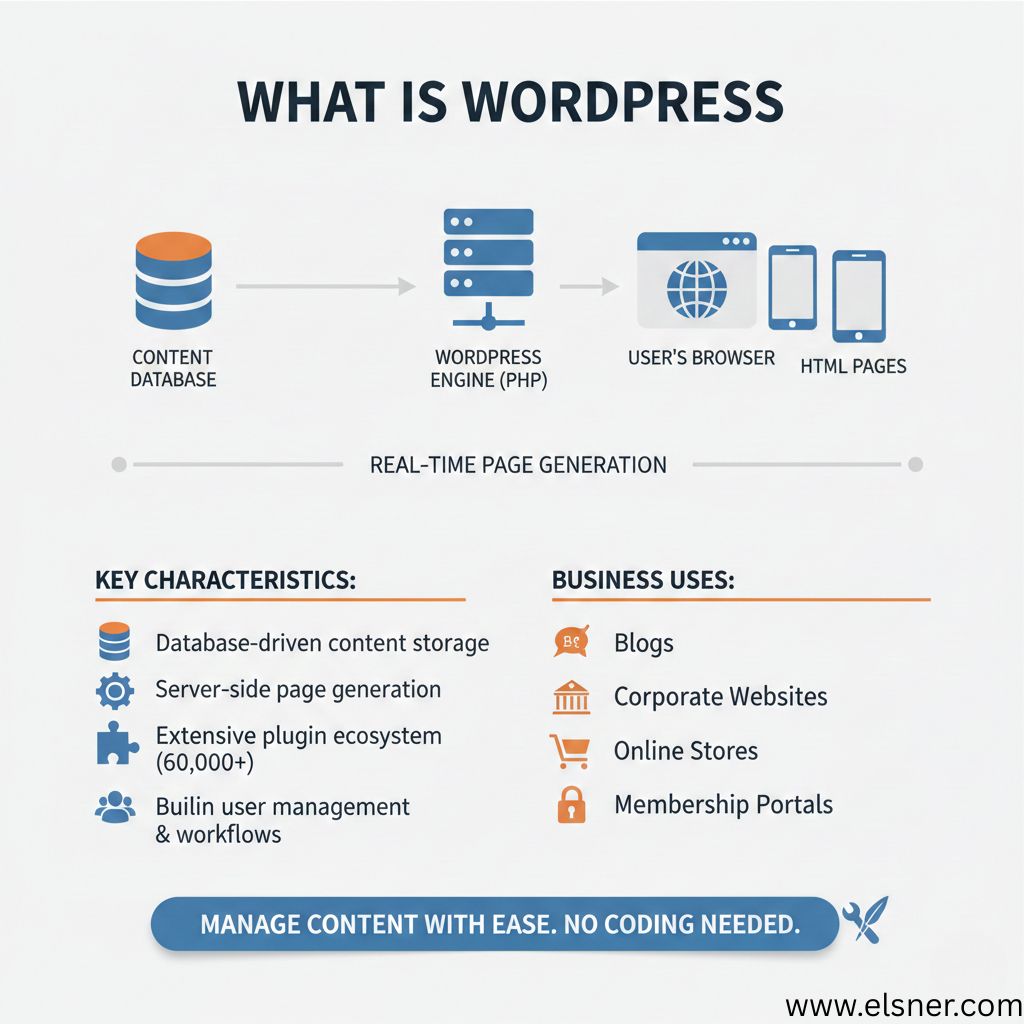
WordPress powers everything from personal blogs to enterprise websites. It is a traditional content management system that stores your content in a database. When someone visits your site, WordPress pulls data from the database and generates HTML pages in real-time.
The platform offers an intuitive admin dashboard where non-technical users can create and publish content with ease. You do not need coding skills to manage day-to-day operations, which is why content teams, small businesses, and enterprises working with a reliable WordPress development company continue to choose WordPress for scalable digital growth.
Key characteristics:
- Database-driven content storage
- Server-side page generation
- Extensive plugin ecosystem (over 60,000 plugins)
- Built-in user management and workflows
Businesses use WordPress for blogs, corporate websites, online stores, and membership portals. The platform handles dynamic content naturally through its PHP-based architecture.
What Is Jamstack?
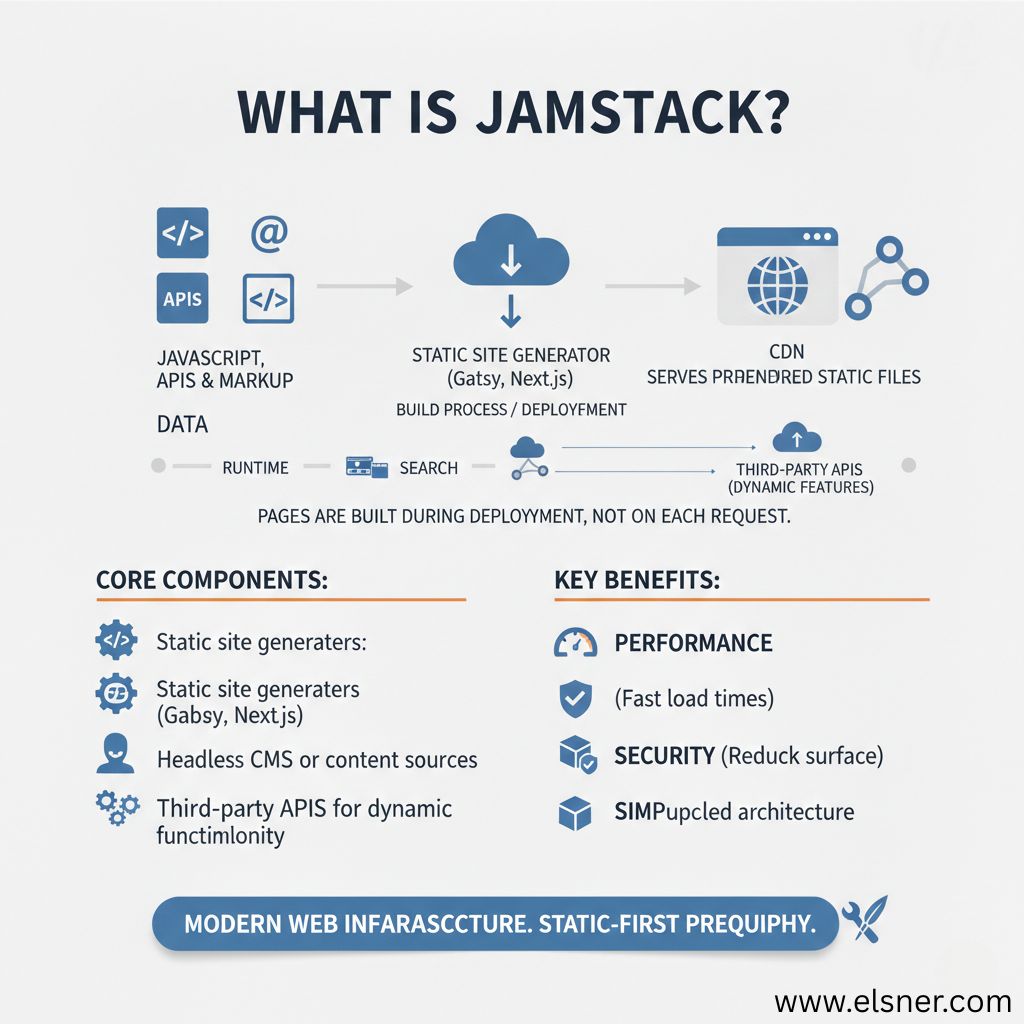
Jamstack represents an architectural approach rather than a specific tool. The name combines JavaScript, APIs, and Markup. Sites built this way serve pre-rendered static files from content delivery networks.
Instead of generating pages on each request, Jamstack builds all pages during deployment. When users need dynamic features like forms or search, the site calls external APIs. This separation of frontend and backend creates a different development model.
Core components:
- Static site generators (Gatsby, Next.js, Hugo)
- Headless CMS or content sources
- CDN for global distribution
- Third-party APIs for dynamic functionality
Jamstack is not a replacement for WordPress. It is an alternative way to structure your web infrastructure. The approach prioritizes performance and security through its static-first philosophy.
Core Difference: WordPress vs Jamstack
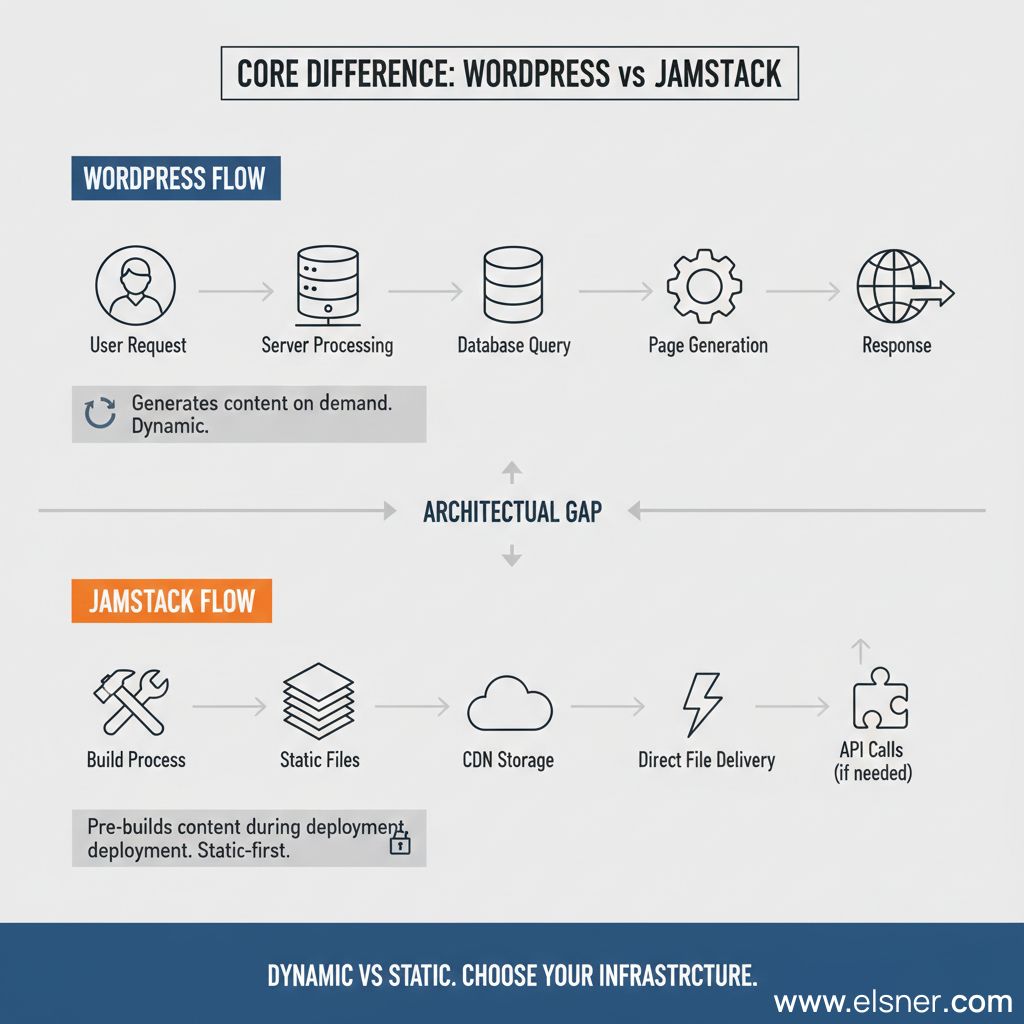
The architectural gap between these approaches defines how your website operates.
- WordPress generates content on demand. A visitor requests a page. The server queries the database, processes PHP templates, and assembles HTML. This happens for every page view. The process requires active server resources and database connections.
- Jamstack pre-builds content during deployment. Your site exists as static HTML files before anyone visits. When you publish new content, the build process regenerates affected pages. Users receive pre-made files from CDNs. APIs handle any real-time data needs.
This difference affects everything downstream – from hosting requirements to security vulnerabilities. Understanding it helps you evaluate the Jamstack vs WordPress debate beyond surface-level comparisons.
WordPress Flow
User Request → Server Processing → Database Query → Page Generation → Response
Jamstack Flow
Build Process → Static Files → CDN Storage → Direct File Delivery → API Calls (if needed)
1. Performance & Speed Comparison
Page speed directly impacts user experience and search rankings. Google research shows that 53% of mobile users abandon sites taking over three seconds to load.
WordPress
WordPress performance depends on multiple factors:
- Your hosting quality matters significantly
- Poorly coded plugins slow down page generation
- Database queries add latency
- Without caching, each page request triggers full processing
You can optimize WordPress sites to load quickly, but it requires ongoing effort and technical knowledge.
Jamstack
Jamstack sites load faster by design:
- Static files require minimal server processing
- CDNs deliver content from locations near your users
- There is no database bottleneck
- No plugin conflicts
- The browser receives HTML instantly
Speed factors:
WordPress:
- Hosting server capabilities
- Number and quality of plugins
- Database optimization
- Caching strategy implementation
Jamstack:
- Build optimization
- CDN distribution quality
- Asset optimization during build
- API response times for dynamic features
For content-heavy sites with frequent updates, WordPress can match Jamstack speeds with proper optimization. For sites prioritizing raw performance, Jamstack starts with an advantage.
2. Handling Dynamic Content
The term “dynamic content” means different things in each architecture.
WordPress
WordPress excels at real-time dynamic features:
- Comments appear immediately after posting
- User dashboards show live data
- Search results update instantly
- E-commerce inventory reflects current stock levels
- The database-driven model supports these interactions naturally
Jamstack
Jamstack achieves dynamic behavior through APIs:
- Forms submit to services like Netlify Forms or Formspree
- Authentication runs through Auth0 or Firebase
- Search functionality uses Algolia or Elasticsearch
- Comments load via Disqus or custom APIs
- Each dynamic feature requires integration planning
WordPress vs Jamstack: Feature Comparison
| Feature | WordPress | Jamstack |
| User Comments | Built-in commenting system | Handled via third-party APIs |
| Site Search | Native search or plugin-based | External search services required |
| User Authentication | Native WordPress user roles | Authentication service integration |
| Forms | Plugins like Contact Form 7 or Gravity Forms | Form handling via API endpoints |
| Real-time Updates | Content updates reflected immediately | Requires rebuild or dynamic API fetch |
Headless WordPress bridges these worlds. You keep WordPress as your content backend while serving a Jamstack frontend. This setup gives you WordPress’s content management comfort with Jamstack’s performance benefits.
The question is not whether Jamstack can handle dynamic content. It can. The question is whether your team wants to manage API integrations versus relying on plugin installations.
3. Security Perspective
Website security breaches cost businesses an average of $4.45 million, according to IBM’s 2023 report.
WordPress
WordPress sites face common security challenges:
- The platform’s popularity makes it a target
- Outdated plugins create vulnerabilities
- Weak admin passwords enable brute force attacks
- Database injections remain a risk
- PHP vulnerabilities affect unpatched installations
You can secure WordPress sites through:
- Regular core and plugin updates
- Strong authentication policies
- Security plugins like Wordfence
- Web application firewalls
- Regular backup protocols
Jamstack
Jamstack reduces attack surface area significantly:
- There is no database to inject
- No PHP to exploit
- No admin panel to breach
- Static files cannot execute malicious code
- API endpoints exist separately with their own security layers
This does not mean Jamstack is immune to security issues. API keys can leak. Third-party services can be compromised. Build processes need protection. The difference is that Jamstack eliminates entire categories of vulnerabilities present in server-side architectures.
At Elsner, we have seen both architectures deployed securely. The maintenance effort differs more than the security outcome when properly configured.
4. Development & Maintenance Effort
Your team’s technical capacity shapes which architecture works better.
WordPress
WordPress allows faster initial setup:
- Download the software, install a theme, add plugins, and publish content
- Non-developers can manage sites independently after initial configuration
- The learning curve is gentle
- Training new team members takes days, not weeks
Maintenance includes:
- Weekly plugin updates
- Monthly core updates
- Database optimization
- Backup verification
- Security monitoring
Jamstack
Jamstack requires stronger technical skills upfront:
- Developers configure build pipelines, integrate APIs, and set up deployment workflows
- Content teams need training on headless CMS interfaces
- The initial project takes longer to launch
Maintenance focuses on:
- Dependency updates in package managers
- API service monitoring
- Build pipeline optimization
- CDN configuration
- Content source management
WordPress maintenance is ongoing and operational. Jamstack maintenance is less frequent but more technical. Choose based on whether you have consistent developer availability or prefer an operations-focused approach.
5. Scalability & Future Readiness
Growth changes everything about your infrastructure needs.
WordPress
WordPress scalability requires planning:
- At low traffic, shared hosting works fine
- As visitors increase, you need better hosting
- High-traffic sites require load balancers, database replication, and caching layers
- Vertical scaling (bigger servers) has limits
- Horizontal scaling (multiple servers) adds complexity and cost
You will face these at scale:
- Database performance bottlenecks
- Server resource constraints
- Plugin compatibility under load
- Cache invalidation challenges
Jamstack
Jamstack scales differently:
- Static files handle traffic spikes easily
- CDNs distribute load automatically
- There is no database to overwhelm
- Adding servers means updating CDN distribution, not reconfiguring application servers
- You pay for bandwidth, not server processing power
A WordPress site might struggle at 10,000 simultaneous visitors. A Jamstack site handles that traffic as easily as 100 visitors. This difference matters for viral content, product launches, and global audiences.
The WordPress vs Jamstack question often becomes: “How much traffic do we expect, and how fast will we grow?”
6. Cost Considerations
Budget impact goes far beyond the monthly hosting bill. The real difference lies in how costs appear over time.
Initial Costs
WordPress
WordPress typically has a lower barrier to entry:
- Hosting options are widely available and easy to start with
- Ready-made themes reduce design effort
- Many essential plugins are free or low-cost
- Development expenses vary based on customization and integrations
This makes WordPress an accessible choice for businesses launching quickly or working with limited initial budgets.
Jamstack
Jamstack generally requires a higher upfront investment:
- Development demands specialized frontend and DevOps expertise
- Projects often require CI/CD pipeline configuration from the start
- Third-party services and APIs are part of the architecture early on
These factors increase initial planning and development effort compared to traditional CMS setups.
7. Ongoing Costs
WordPress
Costs tend to accumulate as the site grows:
- Hosting requirements increase with traffic and data volume
- Plugin licenses require renewals and ongoing management
- Security, updates, and performance optimization need regular attention
- Database maintenance becomes more complex over time
Operational overhead can increase steadily, especially for content-heavy or high-traffic websites.
Jamstack
Jamstack distributes ongoing costs differently:
- Content delivery via CDNs is highly efficient and scalable
- Ongoing reliance on API-based services replaces traditional server management
- Build and deployment platforms handle much of the infrastructure complexity
- Maintenance demands are generally lower due to reduced backend exposure
This model often results in more predictable long-term maintenance, particularly at scale.At Elsner, we guide clients with a simple principle:
WordPress offers a faster and more economical starting point, while Jamstack prioritizes long-term efficiency, performance, and scalability. The right choice depends on whether your priority is quick entry or sustained growth.
When WordPress Makes More Sense
Certain scenarios favor WordPress’s strengths.Your business benefits from WordPress when:
-
Content volume is high:
You publish 10-50 articles weekly. Multiple authors need access. Editorial workflows require approval chains. WordPress’s native content management handles this smoothly.
-
Non-technical team runs the site:
Marketing teams manage content without developer support. The visual editor feels familiar. Adding pages does not require code deployments.
-
Quick launch is critical:
You need a functional site in 2-4 weeks. WordPress delivers faster time-to-market with its ready-made ecosystem.
-
Budget is constrained initially:
Startup funds are limited. You want something working now and can optimize later.
-
E-commerce is primary:
WooCommerce integrates naturally with WordPress. The ecosystem supports complex product catalogs, inventory management, and payment processing without custom development.
// WordPress makes content management simple

$post = get_post(123);

echo $post->post_title;

update_post_meta($post->ID, 'custom_field', 'value');
These use cases align with WordPress’s architecture. Fighting against them to use Jamstack creates unnecessary complexity.
When Jamstack Is the Better Choice?
Other scenarios reveal Jamstack’s advantages. Consider Jamstack when:
-
Performance is non-negotiable:
Page speed affects conversion rates. Global audience needs consistent fast loading. Marketing budget depends on good Core Web Vitals scores.
-
Security concerns are paramount:
You operate in regulated industries. Data breaches carry severe consequences. Attack surface reduction is worth the investment.
-
Traffic is unpredictable:
Viral potential exists. Product launches drive traffic spikes. Black Friday sales multiply normal traffic by 10x.
-
Developer team is available:
In-house developers can build and maintain the infrastructure. Technical debt does not scare your team.
-
Content updates are scheduled:
You publish on predictable schedules. Real-time publishing is not required. Content goes through review processes before publication.
-
Multi-channel distribution matters:
The same content feeds your website, mobile app, and digital displays. A headless approach serves all channels from one source.
// Jamstack separates content from presentation

const posts = await fetch('https://api.example.com/posts');

const data = await posts.json();

data.forEach(post => renderPost(post));
Hybrid Approach: Best of Both Worlds
You do not have to choose exclusively.Headless WordPress combines both architectures. WordPress manages content through its familiar interface. A Jamstack frontend displays that content to users. APIs connect the two layers.
How it works:
- Editors use WordPress dashboard
- Content saves to WordPress database
- Build triggers on content updates
- Static site generator pulls WordPress data via REST or GraphQL API
- Jamstack frontend deploys to CDN
- Users see static site performance with WordPress content management
This setup suits organizations with:
- Non-technical content teams needing WordPress comfort
- Developer teams wanting modern frontend frameworks
- Performance requirements that WordPress alone cannot meet
- Existing WordPress content they want to preserve
Elsner implements headless WordPress for clients transitioning from traditional WordPress. It provides a migration path rather than a disruptive platform change.
The trade-off is complexity. You maintain two systems instead of one. DevOps requirements increase. Costs rise. Only pursue this when the benefits clearly outweigh the complexity.
Making Your Decision
No universal answer fits every business.Your choice depends on honest assessment of:
Team capabilities:
Can your team build and maintain Jamstack? Do you have developers on staff? Will content editors adapt to headless CMS interfaces?
Business requirements:
How often does content change? What traffic levels do you expect? How critical is performance to your business model?
Budget reality:
Can you invest more upfront for lower long-term costs? Or do you need the lowest possible entry cost?
Growth trajectory:
Where will your site be in three years? Will traffic double, 10x, or stay stable?
Both WordPress and Jamstack power successful businesses. The wrong choice is selecting based on trends rather than needs. The right choice aligns architecture with your business reality.
Consider starting with WordPress if speed-to-market matters most and you want a proven foundation that evolves with your team. For a deeper look at how the platform is advancing, explore WordPress Features 2025 for Faster Development to understand why WordPress continues to modernize without losing its core strengths.
Moving Forward
The WordPress vs Jamstack debate reflects larger shifts in web development. Traditional monolithic architectures are giving way to distributed, API-driven systems. Static-first approaches challenge decades of server-side rendering dominance.
Your website architecture should serve your business goals. It should empower your team. It should support your growth plans. The technical elegance of an approach matters less than whether it solves your actual problems.
We have built hundreds of sites on both architectures at Elsner. Some clients thrive with WordPress’s simplicity. Others need Jamstack’s performance characteristics. Many benefit from hybrid approaches that combine strengths from both worlds.
The choice is not permanent. Sites migrate between architectures as needs change. Starting with one approach does not lock you into it forever. What matters is making an informed choice today based on current needs and near-term growth.
Ready to Build Your Next Website?
Choosing between WordPress and Jamstack is just the first step. Implementation quality determines whether you capture the benefits of your chosen architecture.
At Elsner, we have delivered over 9,500 projects across 19 years. Our team of 250+ developers has built sites on both WordPress and Jamstack. We help businesses choose the right architecture, then build it correctly.
Whether you need a high-performance Jamstack site, a content-rich WordPress platform, or a hybrid solution, we can help. Our approach starts with understanding your business goals, not pushing a preferred technology.
Want to discuss which architecture fits your needs? If you’re looking to hire WordPress expert or explore modern Jamstack solutions, our team can review your requirements and provide honest, experience-backed recommendations. No pressure, just expertise gained from building websites across industries and at every scale.
Connect with Elsner to explore your options and build a website that supports your business growth.
FAQs
Can Jamstack handle real-time content updates?
Yes, but differently than WordPress. Jamstack uses APIs to fetch real-time data without rebuilding the entire site. For example, live chat, inventory updates, and user authentication work through API calls. For content changes that affect multiple pages, you trigger a rebuild. Modern build systems complete this in minutes.
Is WordPress slower than Jamstack in all cases?
Not necessarily. A well-optimized WordPress site with quality hosting and proper caching can load as fast as many Jamstack sites. The difference appears most clearly at scale – when traffic spikes or when you have hundreds of plugins. For small sites with light traffic, the speed difference may be negligible.
Which architecture costs less in the long run?
It depends on your scale. WordPress typically costs less initially but more as you grow due to hosting upgrades, plugin licenses, and maintenance. Jamstack costs more upfront but scales cheaper since CDN bandwidth is less expensive than server resources. Break-even usually happens around 50,000-100,000 monthly visitors.
Can I migrate from WordPress to Jamstack later?
Absolutely. Many businesses start with WordPress and migrate to Jamstack as they grow. You can export your content and rebuild the frontend. Alternatively, use headless WordPress as a transition strategy – keeping your WordPress backend while building a Jamstack frontend.
Do I need a developer team for Jamstack?
For initial setup and ongoing feature development, yes. Content editors can manage a Jamstack site once it is built, especially with user-friendly headless CMS options like Contentful or Sanity. The technical barrier is in building and configuring the system, not in daily content operations.
Which is better for SEO – WordPress or Jamstack?
Both can be excellent for SEO when properly configured. WordPress offers SEO plugins like Yoast that simplify optimization. Jamstack sites are naturally fast, which helps rankings, but require manual SEO configuration. The faster page speeds of Jamstack often give it a slight edge in Core Web Vitals metrics.
Can WordPress work as a headless CMS?
Yes. WordPress offers REST API and GraphQL support, making it viable as a headless CMS. You get familiar WordPress content management with the flexibility to use any frontend framework. This approach is popular for teams who want to keep their existing WordPress workflow while improving frontend performance.
What happens to my WordPress plugins if I switch to Jamstack?
You will need to replace most plugins with API services or custom code. Contact forms become API endpoints. SEO plugins become manual configurations. E-commerce plugins migrate to services like Shopify or custom solutions. This is one reason why WordPress to Jamstack migration requires developer involvement.