- Key Takeaways
- First, What Exactly is ERP?
- Where Does PIM Come in?
- The easiest way to understand this…
- PIM vs ERP: The Real Difference
- A practical scenario
- Can ERP Replace PIM?
- Do You Need PIM, ERP, or Both?
- You actually need PIM if:
- You need an ERP if:
- When ERP Alone Is Enough
- Why Pimcore is the Smartest PIM Choice When You Already Have an ERP
- PIM and ERP Integration: How It Actually Works
- Final Thoughts
- Not Sure Whether You Need PIM, ERP, or Both?
- Frequently Asked Questions
Key Takeaways
Different Jobs
ERP runs the business internally. PIM presents products externally to customers.
ERP’s Limit
ERP stores product data but can’t enrich, translate, or distribute it across channels.
When It’s Needed
Single-channel, small catalogues can survive on ERP alone. Scaling across channels makes PIM essential.
Not Competitors
ERP handles the backend; PIM handles the product experience. Most growing businesses need both.
At some point, almost every growing business runs into this problem, and it usually starts small.
A product title gets updated on the website, but not on Amazon. Someone replaces an image in one place, but the old one still shows up somewhere else. Someone from the sales team shares a PDF with outdated specs. No one notices at first. Then a customer points it out. Or worse, places an order based on the wrong information.
And then the internal confusion begins.
“Which version is correct?”
“Who updated this last?”
“Why is the pricing different here?”
The strange part is that most of this doesn’t happen because teams aren’t working hard enough. It happens because the data is scattered. One part of it lives in your ERP. Another sits in spreadsheets. Some of it is updated manually across platforms. And on top of all this, your ERP vendor says it can handle product data.
And somewhere along the way, things stop matching. This is usually the moment businesses start hearing or finally paying attention to two terms: PIM and ERP, with confusion on which one to implement.
This guide gives you a clear answer. What each system actually does, the difference between the two and how to decide what your business needs right now.
First, What Exactly is ERP?
Think of ERP as the system that runs your business internally.
Like, if your company was a body, ERP would be the nervous system. It connects everything. Finance, inventory, orders, procurement, HR and all the operational stuff that keeps things moving.
It handles transactional data like:
- How much stock do we have?
- What did we sell today?
- What’s the cost of this product?
- Have we shipped that order?
It’s very numbers-driven and very structured.
And honestly, it has to be. Because ERP systems deal with things where accuracy is non-negotiable, such as pricing, stock levels, and invoices. You can’t “approximate” those. Some examples are SAP, Oracle, Microsoft Dynamics, and NetSuite.
Manufacturing accounts for 47% of new ERP purchases, more than any other industry, since inventory, production, and supply chain coordination sit at the core of what ERP is built to manage. Source: NetSuite
Where Does PIM Come in?
Now imagine you’re selling products online. Not just listing them, but actually presenting them with descriptions, images, specifications, maybe even videos, and SEO content.
That’s where things get messy.
Because ERP doesn’t handle that well. It stores product data. But it’s not built to make that data look good or consistent across platforms.
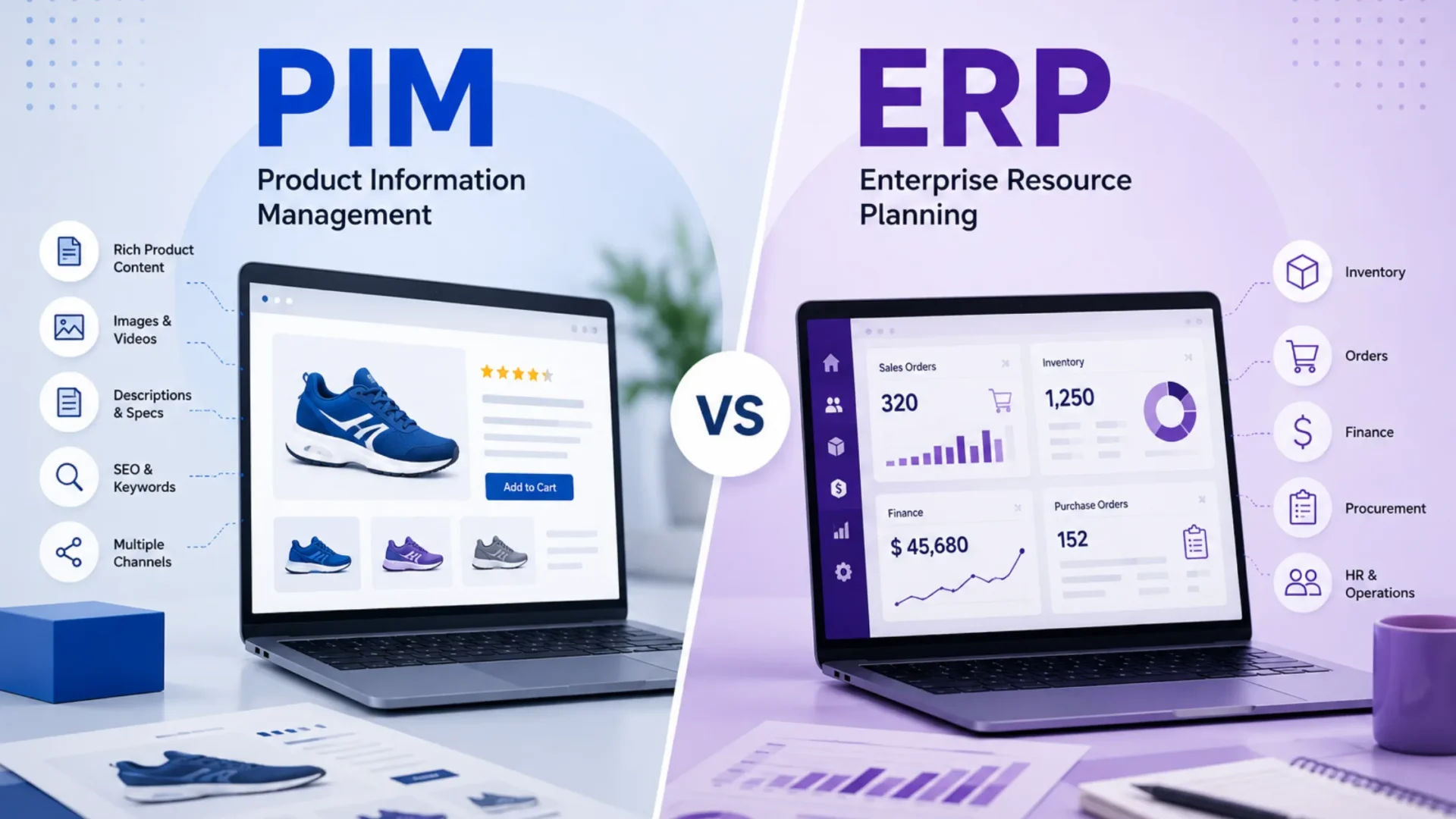
That’s where PIM steps in. PIM (Product Information Management) is where all your product content lives, gets cleaned up and enriched, and is then sent out to wherever it needs to go. Your website, marketplaces, apps, catalogues, etc.
If ERP is about “what the product is internally,” PIM is about “how the product is externally presented to the world.”
In a nutshell, PIM picks up exactly where ERP stops. ERP tells you you have 500 units of SKU-4821. PIM tells the customer what the product is, why they want it, and how to buy it.
The easiest way to understand this…
Let’s take an example where you’re selling a pair of shoes.
The difference? One is operational facts. The other is customer-facing storytelling. And you need both.
PIM vs ERP: The Real Difference
This is where a lot of businesses get stuck. In the early stages, they try to manage everything inside ERP. Maybe even Excel sheets on the side. It works for a while. But then things start breaking.
- Product data becomes inconsistent.
- Descriptions don’t match across platforms.
- Images go missing.
- Marketing teams start maintaining separate files.
And suddenly, instead of one solid piece of data, you have five slightly different versions of the same product.
Let’s understand the difference better.
A practical scenario
A US manufacturer is managing around 8,000 SKUs. They’re selling through their own website, Amazon, Walmart Marketplace, and about a dozen regional distributors. On paper, everything looks solid. Their ERP [SAP] is doing its job perfectly. Inventory is accurate, pricing is under control. No issues there.
But then something small changes. A product spec gets updated. And that’s where things start to feel messy.
Someone has to update the website manually.
Amazon listings? They’re still showing information from six months ago.
Distributor files are all over the place, different formats, different versions.
Meanwhile, three people on the team are spending nearly half their week just updating product data. Not improving it, not optimising it. Just updating it.
And that’s the frustrating part. Because this isn’t an ERP problem. SAP isn’t broken. It’s actually doing exactly what it was built to do.
The real gap is in how product information is handled once it leaves the ERP. That’s the part no one really owns. And that’s exactly where PIM fits in.
Can ERP Replace PIM?
The direct answer is no. While many businesses ask this question to avoid buying another system, an ERP cannot replace a PIM for any business that sells across multiple channels or manages hundreds of thousands of SKUs with rich content requirements.
Technically, an ERP can store product attributes, but it is not designed to enrich them, distribute them, or manage variations like colour and size for a digital shelf. Using an ERP as a PIM leads to manual exports, inconsistent data, and a complete lack of workflow for content approval or completeness scoring. This results in a slower time to market and lower product page quality, which directly hits your conversion rates.
40% of online shoppers have returned a purchase because of inaccurate or inconsistent product content, and 86% say they are unlikely to buy again from a retailer that gets it wrong. This is exactly the gap ERP was never built to close. Source: Retail Dive
Do You Need PIM, ERP, or Both?
Do I need a PIM if I have an ERP? Now this is where it gets interesting. Because PIM and ERP aren’t competing tools, they’re connected. Let’s say you update a product description.
That’s the difference between “managing data” and “actually controlling it.”
You actually need PIM if:
- You manage a large product catalogue
- You sell across multiple platforms
- Your product data keeps changing
- You have multiple teams working on product content
- You are launching in multiple markets with localised content
You need an ERP if:
- You don’t have centralised financial, inventory, and operations management
- You are managing procurement, HR, and supply chain manually
- Your business is scaling, and back-office processes are breaking down
Basically, if product information becomes hard to manage, that’s your signal. And it’s not PIM vs ERP in the sense of “choose one.” It’s more like ERP handles the backend, and PIM handles the frontend product experience.
When ERP Alone Is Enough
Here’s the honest part nobody likes to admit. A PIM isn’t the right investment for every business, at least not yet. If the content problem doesn’t really exist, adding another system just adds complexity for no real gain.
If your catalogue is small, say under a few hundred SKUs, and you’re selling through a single channel with fairly simple content needs, your ERP or even a well-organised spreadsheet can genuinely carry you through. The same goes for businesses that pass product content responsibility to someone else, like wholesalers who let retail partners handle the customer-facing listings.
A few situations where ERP alone usually holds up fine:
- You sell through one channel, and your product descriptions rarely change
- Your catalogue is small enough that one person can keep it accurate without a dedicated system
- You supply to a distributor or retailer who owns the customer-facing content, not you
- Your products are fairly generic with little differentiation to communicate, so there isn’t much content to manage in the first place
If none of that sounds like you, that’s usually the sign the content problem is already there, it’s just not being called by its name yet.
Why Pimcore is the Smartest PIM Choice When You Already Have an ERP
Once you already have an ERP in place, the question isn’t whether you need structure. You already do. The real question is how to extend that structure into product content without creating more chaos.
This is where Pimcore starts to make sense.
It’s open source and API-first, which means it connects smoothly with systems like SAP, Oracle, Dynamics, or NetSuite without forcing you into rigid workflows. You’re not bending your processes to fit the tool. It adapts to how your business already runs.
And unlike most SaaS PIM tools, there’s no lock-in. Your data stays yours. You can shape it, extend it, and evolve it without hitting platform limits six months down the line.
What also makes a difference is that Pimcore isn’t just PIM. It brings together PIM, MDM, DAM, and CMS in one place. So instead of stitching together multiple tools, you’re actually simplifying your stack.
The integration with the ERP turns out to be cleaner too, more maintainable, and easier to scale as things grow.
As a Pimcore development company working with US businesses since 2004, Elsner Technologies’ team handles the full integration, from ERP data mapping to Pimcore configuration and channel publishing setup. If you want to explore how this works in practice, you can take a closer look at their Pimcore development services.
PIM and ERP Integration: How It Actually Works
Here’s something people don’t talk about enough. Just having ERP and PIM doesn’t solve everything. If they’re not integrated properly, you still end up with data duplication, sync issues or manual fixes. And then teams start blaming the tools, when the real issue is how they’re connected. So yeah, implementation matters a lot.
Think of it like a flow. Your ERP sends core product data into PIM. PIM takes that data, enriches it, organises it, and then distributes it. So instead of editing product details in five different places, your team works in one system (PIM) that pushes updates everywhere.
When companies move from just ERP to ERP + PIM, something interesting happens.
The focus shifts. Earlier, product data was just data. Now it becomes an asset.
Something you can optimise. Improve. Test. Your product descriptions get better. Your listings become more consistent. Your time-to-market gets faster. And slowly, it starts impacting revenue.
Final Thoughts
If all of this feels a bit overwhelming, that’s okay. Because honestly, most businesses don’t fully understand this until they hit that breaking point where managing product data becomes too messy.
If you’re at that stage where ERP is doing its job, but product data still feels scattered, and you’re starting to look at Pimcore, or wondering how PIM development services would even fit into your current setup, it might help to talk it through with someone who’s done it before.
Elsner Technologies’ team has worked on 100+ Pimcore implementations for US businesses, so the conversation isn’t theoretical. It’s experienced in what actually works and what usually doesn’t.
You can get a free consultation, an audit of your current setup, and a clearer, more realistic sense of scope before making any decisions.
Not Sure Whether You Need PIM, ERP, or Both?
Get a free consultation and an audit of your current setup. Elsner Technologies’ team has completed 100+ Pimcore implementations for US businesses, the conversation is practical, not theoretical.
Frequently Asked Questions
What is the difference between PIM and ERP?
ERP is really about keeping the business running in the background. Inventory, pricing, orders, all the things that need to be precise and dependable. PIM, though, steps in where things become visible to customers. Handling product descriptions, images, attributes, and making sure everything looks consistent wherever it appears.
Can an ERP system replace a PIM?
No, not really. An ERP can store product data. But that’s about as far as it goes. It’s not built to shape that data, adapt it for different channels, or keep everything consistent. And this is when PIM comes into the picture.
Do I need both PIM and ERP?
For most growing businesses, it tends to work out that way. ERP keeps operations stable and accurate, while PIM makes sure product information actually makes sense to customers across platforms. One handles the inside of the business, the other shapes what customers see.
What is PIM vs ERP for ecommerce businesses?
In ecommerce, ERP sits behind the scenes, managing stock, orders, and pricing without much visibility. PIM is what customers indirectly experience. The product titles, images, details, and everything that helps them decide. Without PIM, things get scattered, and managing product data across channels starts feeling a bit chaotic.
How does Pimcore integrate with ERP systems like SAP or Oracle?
Pimcore usually connects to systems like SAP or Oracle through APIs, so data flows back and forth without too much friction. ERP sends the core information, SKUs, pricing, and inventory, and Pimcore builds on top of that, refining it and pushing it out to different channels in a more structured way.
What does a Pimcore development company actually do?
A Pimcore development company basically brings everything together. They set up the platform, connect it with your ERP and other systems, and make sure data flows properly. There’s some backend work, some configuration, and a lot of fine-tuning so the whole setup doesn’t just work, but keeps working as things grow.