- What Makes Magento 1 To Magento 2 Migration Complex?
- Why A Phased Magento 1 To Magento 2 Migration Checklist Matters?
- Pre-Migration Checklist: What to Do Before Migrating to Magento 2?
- During Migration: How to Migrate from Magento 1 to Magento 2 Successfully?
- After Migration: What to Check After Magento 2 Migration Is Completed?
- Avoid Migration Mistakes
- Common Magento 1 To Magento 2 Migration Pitfalls — And How To Dodge Them
- Do You Need An Expert Magento Migration Service?
- Wrapping Up: Your Path to a Smooth Magento 2 Launch
- Migrating from Magento to Another Platform
- Frequently Asked Questions
- How much time does a Magento migration typically take?
- Is data migration safe?
- Can I keep my old theme?
- Why hire a Magento 2 development company?
Quick Answer: How Does a Successful Magento Migration Work?
A successful Magento migration runs in three phases. Before: back up everything, audit your store, plan your data and redirects, and vet your extensions for compatibility. During: install and configure Magento 2, migrate settings, then data, then any deltas, and rebuild your theme and custom extensions. After: run full QA, fix redirects and analytics, and tune performance and security. The biggest risks to plan for are extension incompatibility, missed redirects, and underestimating the timeline.
Are you still running on the outdated Magento 1? Magento 1 reached end-of-life in 2020, and as a result, it no longer receives official security patches, performance updates, or technical support from the vendor, Adobe. In other words, Adobe no longer provides fixes or utility enhancements for Magento, nor can it assist with your product. The Magento 1 to Magento 2 migration is essential, as without it, your store is susceptible to malware and performance issues, risking not only your customer data but also your business’s reputation.
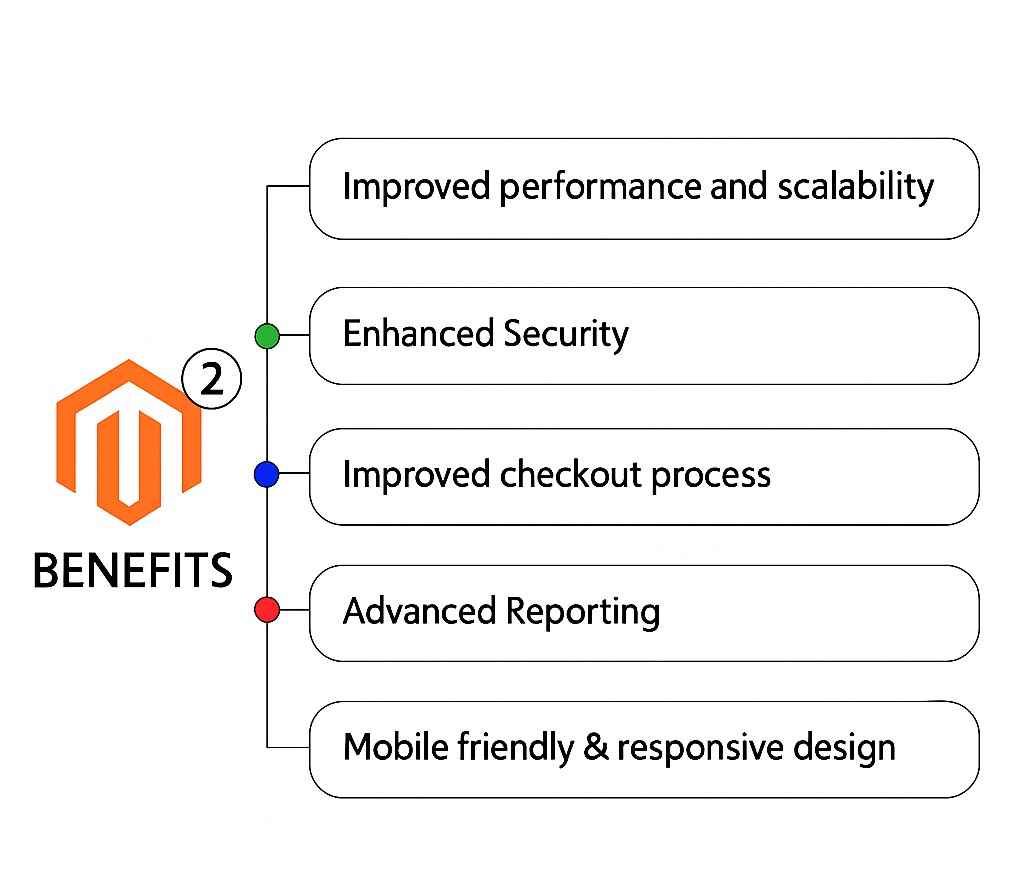
But here’s the good news: moving to Magento 2 is more about transformation than just survival. Consider 38% faster checkouts, 117% more orders processed, and 50% faster page load times. With a well-configured Magento, you can achieve these improvements in Easier Magento, which will help you provide a better shopping experience and drive higher conversions.
The challenge? Most companies migrate on a whim and underestimate complexity. And that is the worst thing you could do. To pull off a great migration, you’ve got to think, prioritize, and execute precisely, not getting everything done, but getting the most impact for the least disruption, best performance, and biggest results.
Keep reading to learn how to do this migration the right way. You can also hire Magento 2 developer support who will assist you throughout the process and make your Magento 2 upgrade as seamless as possible, without interrupting your day-to-day business operations.
What Makes Magento 1 To Magento 2 Migration Complex?
A migration from Magento 1 to Magento 2 is more complex than just a version upgrade. The two have many differences in architecture, database design, coding standards and underlying technologies.
The migration involves four critical components:
Major challenges include:
Entirely Different Architecture
Magento 2 has a more modular, service-oriented architecture with better dependency injection, so code cannot be ported directly.
Incompatible Extensions and Themes
The majority of Magento 1 extensions and custom themes are not compatible with Magento 2; they need to be rebuilt or replaced.
Variations in Database Schemas
Table structures, field names, and relationships are modified, increasing the risk of data loss or corruption.
Performance and Customization Conflicts
Customized Magento 1 stores are often extensively reworked to preserve business logic in the new system.
Security and Compliance Risk
Magento 1 stores are enduring vulnerabilities because they are unsupported; Magento 2 offers better built-in security but requires careful migration planning.
These hurdles frequently lead to extended time-to-market, cost overruns, and potential revenue losses unless managed by experienced Magento development services. In 2026, as cyber threats rise and PCI-DSS becomes stricter, delaying the migration might put the entire business at risk.
Unlike regular updates, Magento 2’s architecture is fundamentally different. Your existing themes? They won’t work. Those custom extensions? Most need replacements. Professional Magento Development Services become essential here.
Why A Phased Magento 1 To Magento 2 Migration Checklist Matters?
Phase Magento 1 to Magento 2 Migration lets the transition be controlled, measurable, and risk-free. By segmenting the process instead of rushing, companies can avoid costly mistakes. Without organization, too many migrations result in data loss, drops in SEO rankings, and performance issues after go-live.
Breaking the process into before, during, and after keeps you sorted at every turn. A properly defined checklist will prevent confusion and bottlenecks. Your migration will be completed quickly, and you can expect the least downtime and loss of business.
Key benefits of a phased approach:
- Enhanced risk management with verification in stages.
- Better data quality through staged migration testing.
- No disruption to your live services.
- Specific team and timeline responsibilities.
That is also true for this module-based development in modern Magento development: gradual implementation and introduction of modules ensures that your product remains stable and scalable.
When you hire a Magento migration service, this is how they break down your migration process:
Pre-Migration Checklist: What to Do Before Migrating to Magento 2?
- Review your existing Magento 1 store (extensions, themes, custom code).
- Purge stale, duplicate, or unused data.
- Make sure to back up all of your store’s data, including your database and media files.
- Identify your migration objectives (performance, UX, scalability).
- Preserve SEO (URL structure, redirects, metadata) planning.
And review which features are still relevant. Migration is ideal for stripping away unnecessary complexity and refining your store’s architecture.
|
1
|
Secure Your Existing AssetsStart by backing up your entire Magento 1 store, including files, database, media, and configurations. Store copies offsite and verify they restore cleanly. You need to secure everything before you start the data migration Magento 2 process. |
|
2
|
Audit EverythingWalk through your live store as if seeing it for the first time. Which custom modules continue to deliver value? What SEO rules need preserving? List out: products, customers, orders, and CMS pages to migrate, extensions and custom code to replace or rebuild, and URLs requiring 301 redirects to keep Google happy. |
|
3
|
Data Migration Magento 2 PlanningDetermine exactly what data requires migration. The Magento Data Migration Tool handles core data migration Magento 2 process, but custom entities may require special attention. Clean up unnecessary data beforehand to streamline the process and improve performance. |
|
4
|
Vet Third-Party ExtensionsLoved that old payment plugin? It probably won’t work on Magento 2. Research Magento 2-ready alternatives and note which functionalities you’ll need custom-built instead. Tip: Hire dedicated Magento developers for this phase. They can help you catch compatibility issues before they become costly and time-consuming problems. |
During Migration: How to Migrate from Magento 1 to Magento 2 Successfully?
The migration phase is where technical execution meets strategy. Every step must be carefully monitored to avoid disruptions.
- Install the Magento 2 environment and infrastructure.
- You can also copy core data automatically with tools or scripts.
- Rebuild or swap out incompatible add-ons.
- Create and install a new responsive theme. Conduct ongoing tests (functional and performance).
Modern Magento development services often leverage automated solutions alongside manual verification to ensure data accuracy and system stability.
|
1
|
Mirror Your Live EnvironmentSpin up a staging site that matches production exactly, same PHP version, same cache setup, same CDN rules. Here, mistakes are lessons, not disasters. |
|
2
|
Install and Configure Magento 2Begin with a fresh Magento 2 installation that meets all system requirements. Install the Magento Data Migration Tool. Magento Development Services help you configure basic store settings, payment gateways, and shipping methods according to your business requirements. |
|
3
|
Data Migration Magento 2 ExecutionExecute data migration in three phases using the official migration tool. Settings Migration: Pull over store config, websites, tax rules, and payment methods. Data Migration: Migrate catalogs, customers, orders, and watch for mismatched fields. Delta Migration: Sync any new changes made since the first two phases. |
|
4
|
Rebuild Theme and ExtensionsYour Magento 1 theme can’t be dropped in. Treat this as an opportunity: adopt a mobile-first, speed-optimized design. Reinstall only extensions vetted for Magento 2 and hire dedicated Magento developers to test each feature thoroughly. |
After Migration: What to Check After Magento 2 Migration Is Completed?
Post-migration optimisation is important because today’s Magento stores are particularly dependent on performance, personalisation, and the mobile experience when it comes to conversion.
|
1
|
Quality-Assurance MarathonPlay every role: customer, admin, and guest user. Does the checkout flow from the home page to order confirmation without a hitch? Are forms, search, and filters working as intended? Reputed Magento 2 Development Services catch problems at the stage rather than after going live. |
|
2
|
SEO and Analytics CheckupRedirect every changed URL. Update XML sitemaps. Reinstall analytics tags and test goal-tracking events, sales funnels, newsletter signups, abandoned carts. |
|
3
|
Performance Tuning and SecurityEnable full-page caching, Redis session storage, and a CDN. Turn on two-factor authentication for admin accounts. Magento 2 Development Services should scan for vulnerabilities and schedule regular updates. Monitor error logs daily until you’re confident everything hums smoothly. |
After migration, there’s more. Migration is not over after launch; it is when optimization begins.
- Perform end-to-end testing (site performance, checkout, integrations).
- Keep an eye on SEO rankings and fix indexing issues.
- Enhance speed with caching, CDN, and code optimization.
- Observe user trends and conversion rates.
- Grow with AI features and PWA improvements.
Avoid Migration Mistakes
Is your Magento migration causing stress? Download our comprehensive checklist to navigate every step, ensuring a seamless and error-free move.
Common Magento 1 To Magento 2 Migration Pitfalls — And How To Dodge Them
These are the mistakes that show up most often, and the ones that cost the most when they do.
Assuming Compatibility
Many businesses assume their favorite extensions will work perfectly in Magento 2. This mistake leads to project delays, budget overruns, and functionality gaps. Always verify extension compatibility before starting migration.
Underestimating Timeline and Complexity
Simple stores might migrate in 3-4 weeks, but complex operations can take months. In such cases, experience with Magento Enterprise implementations becomes essential to handle the challenges. Factors include number of products and customers, custom code complexity, third-party integrations, design complexity, and testing requirements. Plan for contingencies with the help of Magento Development Services.
Neglecting Redirects
Missing redirects result in broken links and lost traffic. Document all URL changes, implement comprehensive redirect rules, and test redirects thoroughly since automated tools can verify thousands of links quickly. A professional Magento migration service helps avoid these pitfalls through proven methodologies and extensive experience.
Do You Need An Expert Magento Migration Service?
When complexity spikes, high-volume orders, elaborate custom code, tight deadlines, a professional Magento 2 development company becomes your safety harness.
Professional Magento Migration Services reduce downtime, improve performance, and ensure long-term stability.
Wrapping Up: Your Path to a Smooth Magento 2 Launch
There’s no longer a choice for Magento 1 users not to move to Magento 2, it’s a strategic step to get their ecommerce in shape for the future.
With AI-powered personalization, headless merchant expertise, PWA performance, and more, Magento 2 lets companies craft speedy, intelligent, and compelling shopping experiences.
It all comes down to how well you plan and execute the migration if you want to be successful. A well-defined checklist, a phased approach, and ongoing optimization, these save the day and maximize ROI.
When executed well, migration does more than just update your store; it completely reshapes your digital commerce strategy.
Ready to make the migration? Connect with Elsner experts today!
Migrating from Magento to Another Platform
This checklist focuses on Magento 1 to Magento 2, but many businesses now weigh moving from Magento to another platform like Shopify entirely. The before, during, and after phases still apply: audit, back up, map redirects, migrate data, rebuild the front end, then run QA. The key extra step is a full URL redirect map from Magento to the new platform, so you keep your rankings.
Frequently Asked Questions
How much time does a Magento migration typically take?
Most stores migrate in 3–8 weeks. Simple setups lean closer to three weeks; complex operations can span 12–16 weeks.
Is data migration safe?
Yes, when using Magento’s official Data Migration Tool and professionals who verify backups and run delta syncs.
Can I keep my old theme?
No. Magento 2 requires fresh themes. However, modern rebuilds often outperform old designs in terms of speed and responsiveness.
Why hire a Magento 2 development company?
Expert teams cut migration timelines, reduce surprises, and ensure your store not only survives the transition but thrives afterward.