
- Who This GA4 Lead Generation Guide Is For
- How Can GA4 Be Used for Lead Generation?
- 1. Event Tracking
- 2. Put Out a Well-Thought Strategy
- Confused by GA4 Reports?
- What GA4 Lead Tracking Looks Like in 2026?
- How to Optimize the GA4 Tool for B2B User Acquisition?
- Use Lead Scoring Method:
- Funnel Analysis:
- CRM and Marketing Platform Integration:
- How to Track the Landing Page Conversions Using GA4?
- 1. Look for the Content that is Converting Better:
- 2. Determine if Visitors’ Expectations are Met:
- 3. Seek Optimization for the Low Converting Landing Pages:
- How to Track Website Traffic Sources Using GA4?
- Parting Words
- FAQs
Data quietly decides whether your marketing works or wastes budget. Every form fill, every click, every scroll tells a story. Most businesses collect that data. Very few know what to do with it.
That is where GA4 earns its place. Not as a reporting tool, but as a decision-making layer that shows you who is interested, who is hesitating, and who is ready to convert. When used right, GA4 does not just track visitors. It helps you spot real business leads hiding inside everyday user behavior.
Apart from assisting you with tracking customer behavior and the status of your online presence, GA4 can also help you with generating your business leads through thorough data collection and analysis. This way, you will be able to drive some noteworthy conversions.
Thus, your digital strategy will grow exceptionally! However, there are still some new business entrepreneurs unaware of how GA4 can help them analyze their business leads and whether or not this tool is relevant to them.
So, if you are one among them who wants to learn about the potential of GA4 with respect to lead analysis, this article will address that information on priority.
Who This GA4 Lead Generation Guide Is For
-
B2B marketers
-
Business owners
-
Performance marketers
-
Agencies
Many of these GA4 insights directly influence how Google evaluates content quality and rankings, which is explained in detail in our SEO ranking guide for 2026.
How Can GA4 Be Used for Lead Generation?
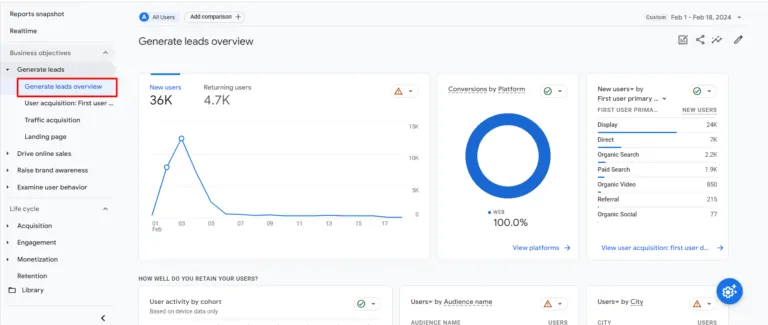
GA4 is undoubtedly the best tool for you to generate leads, as far as the digital age of 2024 is concerned. You get profound event tracking as well as a user-centric approach, which will empower your business to streamline your standard process of lead generation.
Upon adopting GA4, you will be able to shift your data analytics focus from tracking just the simple pageviews and emphasizing event tracking. This way, you will be able to monitor or measure all those specific actions that will indicate the interest or intent of the users to be your leads.
May it be about tracking the form submissions, site clicks or other such interactions on the site, GA4 will help you acquire your user behavior insights. Not just that, but GA4 also offers you predictive metrics, which will enable your business to list out the potential leads. This way, tailoring the marketing strategies will be easier for you.
When you are aware of how the users tend to interact with your brand content or offerings, you will be able to revamp your lead generation campaigns. Thus, you will eventually have more leads and conversions. For you to better understand the potential of this tool, here are some of the ways you can use the GA4 solution for generating business leads:
1. Event Tracking
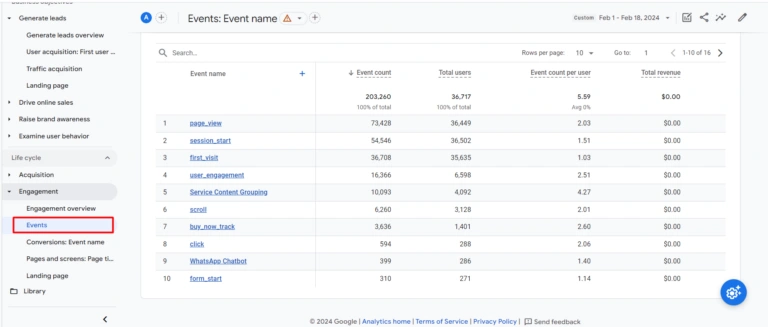
When you are using GA4 for your lead generation purposes, event tracking is the ultimate approach for you to count on. With this, you will be able to monitor or measure the dedicated user interactions and filter the ones with a better chance of being your leads.
For implementing GA4 for event tracking, you need to make sure all the configurations are done within the tool. You might have to add event tags with respect to specific site actions, such as product inquiries or contact form submissions.
You will be able to create your lead generation campaigns by not just keeping a tab on the pageviews but also on the specific actions that will contribute to overall lead acquisition.
For example, a user who views a pricing page, scrolls through testimonials, and clicks a demo button shows far stronger intent than someone who only visits a blog page once.
2. Put Out a Well-Thought Strategy
To ensure that GA4 works out well for your business lead generation, you must implement a proper strategy of execution. In the quest of making one, you must first identify the audience you are targeting and analyze their standard behavior over the internet.
When you spend enough time mapping out the journey of your users and the diverse touchpoints they come across, you will have a better chance to convert potential site visitors into leads.
The user-centric focus of the GA4 is practically unmatched! You will be able to analyze the lifecycle of users, starting from the time they came to know about your brand to the point of conversion. Based on such metrics, you will be able to adjust the overall lead generation efforts.
Using GA4, you will be able to determine the right moments when a specific user shows any kind of interest in your brand products. And then, you can personalize your marketing measures to ensure the conversion.
Not only that, but GA4 can also provide you with metrics that will streamline the remarketing efforts. With this, you will be able to re-engage the users who interacted with your offerings or stayed on a specific web page for longer. By sending out personalized messages, there’s a high chance you will bring in those users into the lead funnel.
|
GA4 Feature |
What It Tracks |
How It Helps Generate Leads |
|
Event tracking |
User actions like form submits and button clicks |
Identifies visitors showing buying intent |
|
User engagement |
Scroll depth and time spent | Highlights users genuinely interested in your offering |
|
Predictive metrics |
Likelihood of conversion or churn |
Helps prioritize high intent users |
|
Cross device tracking |
User activity across devices |
Provides a complete lead journey view |
|
Funnel exploration |
Drop offs at each stage |
Improves lead flow and conversion paths |
Confused by GA4 Reports?
Get clarity with expert setup and tracking support.
What GA4 Lead Tracking Looks Like in 2026?
In 2026, lead generation is less about volume and more about intent quality. GA4 now plays a critical role in separating casual visitors from decision-ready users.
With privacy-first tracking becoming the default, businesses rely more on event-based signals like scroll depth, repeated visits, engagement time, and interaction sequences instead of raw traffic numbers. GA4 helps connect these dots and highlight users who behave like buyers even before they submit a form.
This shift allows marketing teams to focus energy where it matters. Sales conversations start warmer. Campaigns get sharper. Guesswork slowly disappears.
How to Optimize the GA4 Tool for B2B User Acquisition?
If you are a new business owner, you would agree that generating B2B leads is a bit challenging and brings in a lot of opportunities as well. Therefore, using GA4 is the smartest move for you to optimise your B2B user acquisition strategy. Here are a few things you can do with GA4 to help you with the same: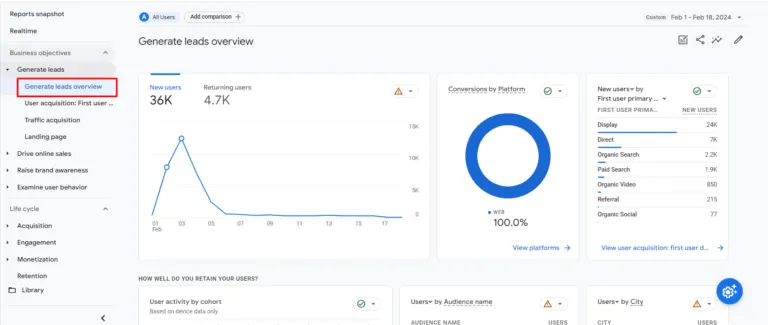
Use Lead Scoring Method:
GA4 allows you to initiate the lead scoring models for identifying all the high-potential leads based on specific user interactions. Your focus should always be to use your resources for nurturing or converting your leads in an effective manner. Lead scoring will help you measure your success in that quest.
Funnel Analysis:
By implementing the funnel analysis feature of GA4, you will be able to determine the drawback points within your lead generation campaigns. When you are aware of the flaws in your lead funnel, work or optimize the respective stages and improve the path of acquiring more conversions.
CRM and Marketing Platform Integration:
You can integrate GA4 with your marketing and CRM platform. By doing this, you will be able to capture all the crucial lead data and utilize them efficiently across diverse business operations.
GA4 is undoubtedly your biggest ally while you step out into the B2B world with a business model. Your traffic acquisition and user acquisition strategies will all be backed with valuable data, collected by GA4. You will end up generating very high-quality leads, and sales growth will be phenomenal.
Upon integrating GA4, you will get a lot of tools and reporting provisions that will make it easier for you to create a good customer base for kickstarting your business.
How to Track the Landing Page Conversions Using GA4?
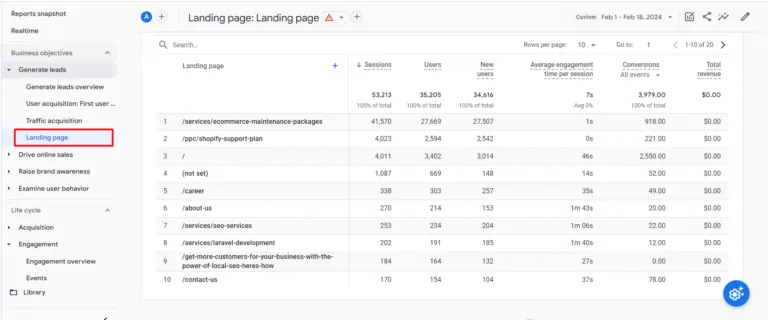
One of the ways you can measure the success of your business is by tracking the performance of your landing pages using GA4. This way, you will be able to specify which of the landing pages are enticing your target audience to make the purchases.
Based on the data you acquire, optimize SEO measures for the landing pages that are performing well. And for the pages that aren’t converting enough, make the necessary changes to fix the experience flaws.
To help you utilize the potential of GA4 to the maximum efficiency, here are a few ways you can adopt for tracking the landing page conversions with it:
1. Look for the Content that is Converting Better:
With the use of GA4, you will be able to specify the landing pages that are getting the maximum conversion. Upon availing of such data, you will then be aware of the type of content that brings in more sales and conversions for your business.
2. Determine if Visitors’ Expectations are Met:
You must look out for the average count of pages that were viewed in each session for specific landing pages. With this metric by GA4, you will gain an understanding of the specific type of content that convinces users to explore further information on your business site.
3. Seek Optimization for the Low Converting Landing Pages:
There might be some landing pages that might be witnessing heavy traffic, but low conversions. Use GA4 to filter such landing pages and find the loopholes or flaws in them. Once found, you can then work on fixing them!
How to Track Website Traffic Sources Using GA4?
As you are pursuing the quest of lead analysis, tracking the traffic acquisition rate and the diverse sources is an important consideration. And GA4 will help you attain the same at ease.
With the use of GA4, you will be able to create reports that will specify the sources of your web traffic. Not only that, but you will also get a detailed answer on how the users find or reach your brand site.
Not just that, but tracking traffic acquisition rate also highlights the performance of your marketing strategies and whether or not they are directing traffic to your site. Upon accessing or creating the ‘Acquisition’ reports on GA4, you will find information on both user and traffic acquisition rates.
The traffic acquisition report showcases the most recent medium or source that channeled visitors to your site. On the other hand, the user acquisition report specifies the different ways how your potential customers have found your website and have accessed it.
Parting Words
GA4 is undoubtedly one of the most noteworthy analytics tools, empowering businesses to run their operations based on data. With the right use of it, generating leads and conversions is easier. You have different ways to run a lead analysis to determine if a website visitor is interested in making the purchase or not.
Following that, you also have metrics to specify if the landing pages are bringing in enough leads and conversions or not. With such practical measures, tailoring your marketing strategies will be easier. This way, you will ultimately be able to win more clients or customers for the business.
FAQs
Is GA4 suitable for small businesses generating leads?
Yes. GA4 works well for small teams because it tracks intent signals without needing complex setups. Even basic event tracking can reveal which users are worth following up with.
Can GA4 replace CRM lead tracking?
No. GA4 complements CRM platforms. It shows behavior before conversion, while CRMs track interactions after a lead is captured.
How long does GA4 take to show useful lead insights?
Most businesses start seeing meaningful patterns within a few weeks, once enough user interaction data is collected.