- 67% Still Run Comp on Spreadsheets
- What Is Enterprise Compensation Management Software
- Beyond Basic Payroll Tools
- Who Actually Uses This Software
- Why Large Enterprises Cannot Rely on Generic Tools
- Why Enterprises Are Moving Toward Custom Compensation Management Software
- Rising Pay Transparency Regulations
- Global Workforce Complexity
- Integration Challenges with Existing HR Tech Stack
- Data Security and Compliance
- Essential Features to Include in Enterprise Compensation Management Software
- Centralized Compensation Dashboard
- Salary Planning and Budget Modeling
- Variable Pay and Bonus Management
- Equity and Long Term Incentive Tracking
- Pay Equity Analytics
- Multi Country Compliance Engine
- Manager Self Service Portal
- Approval Workflows and Audit Trails
- Integration APIs
- Reporting and Analytics
- AI Powered Recommendations
- Mobile Accessibility
- How Much Does It Cost to Build Enterprise Compensation Management Software
- Factors That Influence Development Cost
- Feature Complexity and Integration Scope
- Compliance Requirements
- AI and Machine Learning Capabilities
- User Scale and Performance Requirements
- Security and Certifications
- Design, Mobile, and Maintenance
- Build vs Buy: Quick Cost Comparison
- Want a Detailed Cost Estimate for Your Specific Requirements?
- Recommended Tech Stack for Building Enterprise Compensation Management Software
- Frontend Technologies
- Backend Technologies
- Database Solutions
- Cloud Infrastructure
- AI and Machine Learning Layer
- Security and Compliance Stack
- Integration Layer
- How to Build Enterprise Compensation Management Software Step by Step
- How to Automate Partner and Channel Compensation Management
- Why Partner Compensation Is Different
- Key Automation Capabilities to Build
- Integration with CRM and Sales Tools
- Common Challenges in Enterprise Compensation Management Software Development
- Data Migration from Legacy Systems
- Compliance Across Multiple Regions
- User Adoption Resistance
- Scalability Bottlenecks
- Security Concerns
- Custom Build vs Off the Shelf SaaS: Which Suits Your Enterprise
- What to Look For in an Enterprise Software Development Partner
- Domain Expertise in HR Tech and Finance Systems
- Proven Experience with Enterprise Grade Security
- Strong Integration Capabilities
- Compliance Knowledge
- Post Launch Support and Maintenance
- Transparent Pricing and Project Management
- Frequently Asked Questions
- Final Thoughts on Building Enterprise Compensation Management Software
- Treat Compensation as Core Infrastructure
Large enterprises don’t usually lose money on compensation because they’re underpaying or overpaying. They lose it in the cracks. A spreadsheet that didn’t sync with payroll. A merit increase approved twice. A bonus structure that worked for the US team but quietly violated pay transparency rules in California or Colorado. A senior engineer who left because her offer letter promised RSUs that nobody tracked properly.
Compensation is one of the largest line items on any enterprise P&L. Yet most companies still manage it through a stack of disconnected tools, Excel files emailed between HR and finance, and approval chains that exist mostly in someone’s inbox. The result is predictable. Errors, audit headaches, and compensation decisions that don’t actually reflect strategy.
67% Still Run Comp on Spreadsheets
According to Mercer’s 2024 study, two-thirds of large enterprises still rely on spreadsheets for compensation planning. Companies running dedicated software report 40 to 60 percent fewer payroll errors and cycle times shorter by half.
This guide walks through what enterprise compensation management software actually needs to do, how much it costs to build, the right tech stack, and the step by step process of moving from disconnected tools to a real platform. Whether you’re evaluating a custom build versus SaaS development options like Workday or SAP SuccessFactors, the framework here helps you decide what actually fits your organization.
What Is Enterprise Compensation Management Software
Enterprise compensation management software is the operational backbone behind how large organizations plan, calculate, approve, and distribute every form of employee pay. Base salary. Variable bonuses. Sales commissions. Equity grants. Long term incentive plans. Merit increases. All of it, governed by rules, budgets, and compliance requirements that vary by country, state, and sometimes by department.
Beyond Basic Payroll Tools
Payroll software pays people. Compensation management software decides how much they should be paid in the first place. That distinction matters. Payroll handles the transaction. Compensation handles the strategy, modeling, approvals, and analytics behind the transaction.
A proper enterprise platform manages base pay, variable pay, bonuses, equity, long term incentives, merit increases, and global compliance from one centralized system. Not three. Not seven. One.
Who Actually Uses This Software
HR leaders use it to run annual compensation cycles without drowning in version control hell. Compensation analysts use it for market benchmarking and pay equity audits. Finance teams use it to forecast labor costs and run budget scenarios. Business unit heads use it to propose increases within approved guardrails. Executives use it for board level reporting on workforce investment.
Each user group has different needs. The platform has to serve all of them without forcing anyone to learn a tool built for someone else.
Why Large Enterprises Cannot Rely on Generic Tools
Scale breaks generic tools quickly. A 200 person company can run merit cycles on a spreadsheet and survive. A 15,000 person company cannot. Multi country payroll laws, equity vesting schedules, complex bonus structures tied to performance metrics, and the audit trails regulators expect simply don’t fit inside Excel.
Generic HR tools usually handle the basics fine. They struggle the moment you add multi tier sales commissions, performance based equity vesting, or pay equity reporting across 40 countries. That’s when enterprise grade software earns its budget.
Why Enterprises Are Moving Toward Custom Compensation Management Software
Something shifted in the last 24 months. Compensation conversations that used to live inside HR are now boardroom topics. Pay transparency laws are forcing disclosure. Activist investors are scrutinizing executive comp. Skilled employees expect equity discussions to feel professional, not improvised. And the technology choices that worked five years ago feel cramped.
Rising Pay Transparency Regulations
California, Colorado, Washington, New York, and Illinois have all passed pay transparency laws within the last three years. The EU Pay Transparency Directive lands fully by mid 2026. Off the shelf software often supports a generic version of these requirements, but the moment your enterprise needs to report by job family, by department, or by promotion pathway, gaps appear fast.
Custom software lets compliance follow the business, not the other way around.
Global Workforce Complexity
An enterprise running operations across 12 countries faces 12 sets of tax rules, statutory benefits, mandatory bonuses, and labor regulations. Some countries require 13th month pay. Some restrict equity grants. Some demand specific reporting formats for regulators. Standard SaaS platforms usually handle the top 6 to 8 markets cleanly and then start showing seams.
Integration Challenges with Existing HR Tech Stack
Most large enterprises already run Workday or SAP SuccessFactors for HRIS, ADP or Ceridian for payroll, Salesforce for sales operations, and one of a dozen platforms for performance management. A new compensation system has to plug into all of that cleanly. Off the shelf tools offer integrations, but they’re often shallow. Custom platforms can sync at the depth your business actually needs.
Data Security and Compliance
Compensation data is among the most sensitive information any company holds. A breach exposes individual salaries, executive packages, and proprietary pay strategies. Generic SaaS providers offer reasonable security, but enterprises with strict internal data residency rules, sector specific compliance requirements, or zero trust architecture mandates often need control that only a custom build delivers.
The pattern we keep seeing with mid market and enterprise clients is consistent. They start with a SaaS platform, outgrow it within three to four years, and then face a choice between paying escalating per employee fees or building something they actually own. Both paths have merit. The decision usually comes down to scale, customization needs, and how much control matters.
Essential Features to Include in Enterprise Compensation Management Software

The feature list separates real platforms from glorified spreadsheets. Skip any of these and you’ll feel the gap inside six months.
Centralized Compensation Dashboard
One pane of glass showing total compensation across employees, departments, locations, and business units. Filters by tenure, role, geography, performance band, and equity status. HR leaders should be able to answer the question “what does our top 10 percent earn compared to market” in under 30 seconds. If the dashboard takes longer, it’s not a dashboard. It’s a report builder.
Salary Planning and Budget Modeling
The annual comp cycle is where most enterprises waste the most time. Strong software lets HR model multiple budget scenarios, distribute increases by performance bands, forecast total impact, and run “what if” simulations before a single approval is finalized. A 3 percent merit pool feels small until you model what it actually costs across 8,000 employees with varying performance ratings.
Variable Pay and Bonus Management
Sales commissions, performance bonuses, spot rewards, and incentive plans all live here. The complexity isn’t in calculating them. It’s in handling exceptions. A rep who closed deals across two territories. A bonus tied to a metric the finance team revised mid quarter. A spot award that needs manager approval but already got verbal sign off. Real software handles the edge cases, not just the happy path.
Equity and Long Term Incentive Tracking
Stock options, RSUs, performance shares, and vesting schedules require their own dedicated logic. Cliff vesting. Graded vesting. Acceleration on change of control. Tax treatment that varies by jurisdiction. Most generic tools handle equity at a surface level. Enterprise grade software treats it as a first class object.
Quick observation: Equity tracking is the single most common feature gap we see when auditing client compensation systems. Companies grant equity confidently but track it in spreadsheets that nobody updates. Two years later, nobody can answer how much equity is outstanding or who’s vesting when.
Pay Equity Analytics
Built in pay gap analysis by gender, race, role, tenure, and location. With pay transparency laws expanding rapidly across the US and Europe, this isn’t a nice to have anymore. Strong platforms run continuous pay equity audits, flag outliers automatically, and generate the reports regulators want without requiring HR to build them manually every quarter.
Multi Country Compliance Engine
A flexible rule engine that handles different tax treatments, statutory benefits, mandatory bonuses, and labor regulations across regions. The best implementations decouple compliance rules from core logic so updates happen without code changes. When a country updates its tax code, you change a configuration. You don’t rebuild a module.
Manager Self Service Portal
Managers should be able to propose increases, recommend bonuses, and review their team’s compensation within approved budgets and guidelines. Without managers in the loop, HR ends up being a bottleneck for every decision. Self service portals shift the work to where it belongs while keeping HR in oversight.
Approval Workflows and Audit Trails
Multi level approvals with full logging of who proposed what, who approved, who modified, and when. Audit trails are non negotiable for SOX compliance, internal audits, and regulatory inquiries. Every change should be traceable to a person, a timestamp, and a reason.
Integration APIs
Native connectors for major HRIS platforms (Workday, SAP SuccessFactors, BambooHR, ADP Workforce Now), payroll systems, ERP, and performance management tools. Honestly, this is where most builds underinvest. A platform that’s painful to integrate becomes a platform that’s painful to use.
Reporting and Analytics
Customizable reports, executive dashboards, predictive insights, and self serve analytics for HR and finance. Bonus points for natural language query capabilities so a finance lead can ask “what was total variable pay impact in Q3” without filing a report request.
AI Powered Recommendations
Smart suggestions for merit increases based on performance and market data. Retention risk scoring that flags employees with high flight risk. Market benchmarking that updates as new compensation data comes in. AI shouldn’t replace HR judgment. It should augment it. Our work in AI and machine learning development consistently shows that the most effective ML features in compensation tools are the ones that surface insights humans would miss, not the ones that try to automate decisions humans should make.
Mobile Accessibility
Managers approve increases from phones. Employees check equity vesting on the go. Mobile isn’t a secondary channel anymore. Build for mobile early or retrofit it expensively later.
How Much Does It Cost to Build Enterprise Compensation Management Software
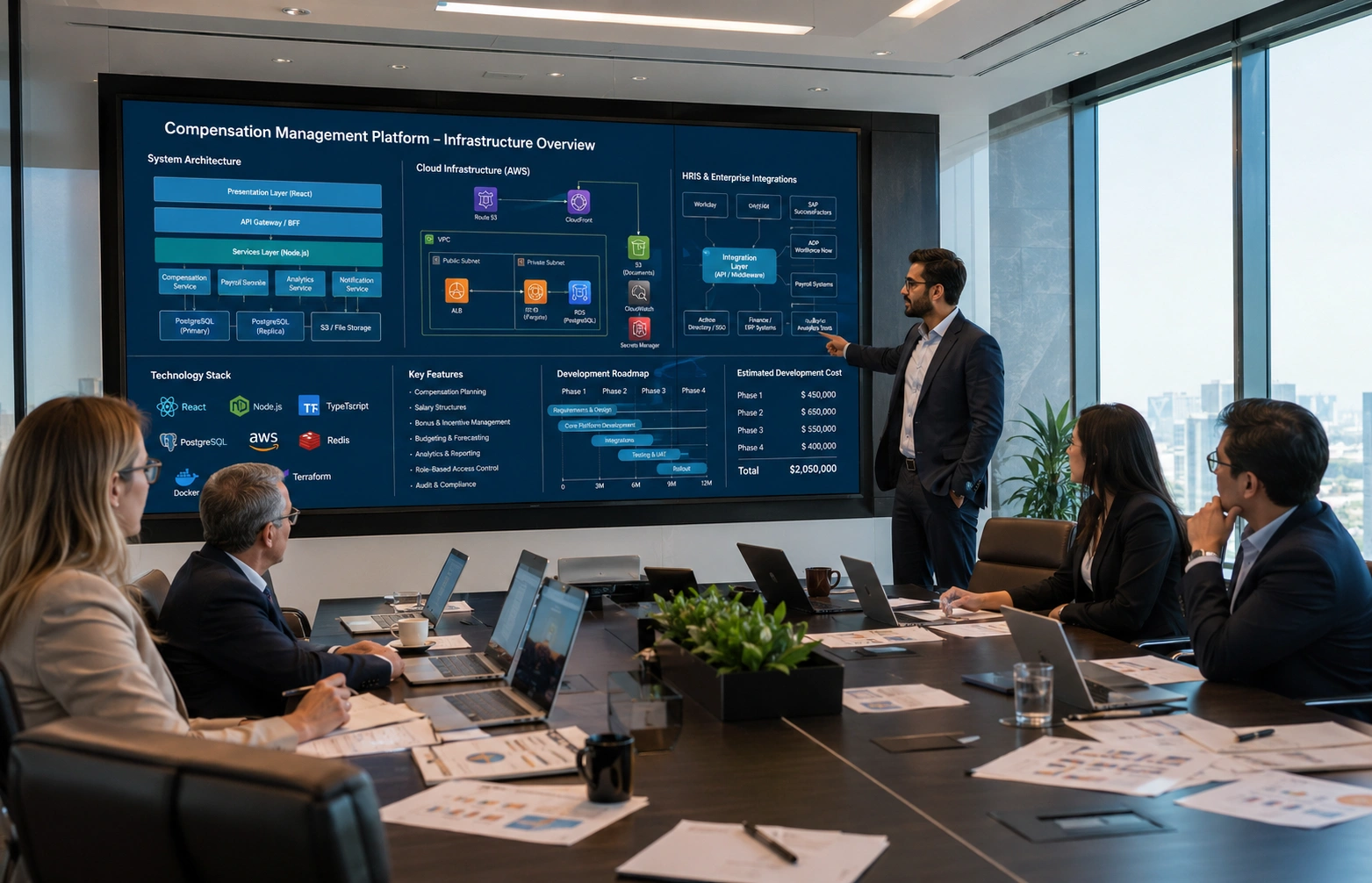
Cost ranges in custom enterprise software always come with caveats, but here’s what we see across actual builds in the US market over the past two years.
Factors That Influence Development Cost
Feature Complexity and Integration Scope
A platform with 8 core modules costs less than one with 18. Integration scope matters just as much. Connecting to Workday and ADP is straightforward. Connecting to 14 different country specific payroll providers, each with their own API quirks, is not. Both factors compound quickly when scope expands mid project.
Compliance Requirements
Single country compliance is manageable. Global multi region compliance, with the rule engine flexibility to adapt to new regulations, costs more upfront but saves enormously over time. Skipping flexibility here usually means rebuilding compliance modules within two years.
AI and Machine Learning Capabilities
AI and ML add 15 to 25 percent depending on depth. A simple recommendation engine costs less. Predictive retention modeling with custom training on your historical data costs more. Decide early what level of intelligence the platform actually needs.
User Scale and Performance Requirements
A platform built for 2,000 users runs differently from one built for 50,000. Database architecture, caching layers, async processing, and load distribution all shift with scale. Plan for projected growth at the architecture stage, not after launch.
Security and Certifications
SOC 2 Type II readiness, ISO 27001 compliance, GDPR alignment, and CCPA support all carry cost. Skip them at peril if your enterprise sells to regulated industries or holds sensitive global workforce data.
Design, Mobile, and Maintenance
Off the shelf component libraries cut costs. Bespoke design language adds 10 to 20 percent to the engineering budget. Native iOS and Android apps cost more than responsive web. And post launch maintenance typically runs 15 to 25 percent of build cost annually. Budget for all of it from day one.
Build vs Buy: Quick Cost Comparison
The math on build versus buy gets interesting at enterprise scale. SaaS platforms like SAP SuccessFactors, Workday Compensation, and HRSoft typically charge between $15 and $30 per employee per month for compensation modules. For a 5,000 employee enterprise, that’s $900,000 to $1.8 million per year. Over five years, you’re looking at $4.5 million to $9 million in licensing fees alone, plus implementation and ongoing customization costs.
A custom build at $300,000 to $400,000, with maintenance running $60,000 to $100,000 annually, totals roughly $600,000 to $900,000 over five years. The payback period is usually 18 to 30 months for enterprises above 3,000 employees.
That said, SaaS makes sense for smaller enterprises or organizations with limited internal tech capability. The economics flip somewhere around 2,500 to 4,000 employees, depending on customization needs.
Want a Detailed Cost Estimate for Your Specific Requirements?
Every enterprise has unique compensation complexity. Our team can map out features, tech stack, and a realistic budget tailored to your scale and compliance needs.
Recommended Tech Stack for Building Enterprise Compensation Management Software

Tech stack choices shape every later decision about scale, performance, and maintainability. The right stack for compensation software prioritizes reliability, security, and long term flexibility over trendy frameworks.
Frontend Technologies
React.js and Next.js dominate enterprise frontend work for good reason. Component reusability, strong ecosystem, and server side rendering for performance. Angular still has a place in large enterprises with existing Angular investment. For styling, Tailwind CSS keeps the UI fast and consistent, while Material UI or Ant Design provide enterprise grade component libraries when speed to market matters more than design uniqueness.
Backend Technologies
Node.js works well for API heavy platforms with real time requirements. Python with Django or FastAPI is excellent for compensation systems because the data processing and analytics workloads pair naturally with Python’s data ecosystem. Java with Spring Boot remains the conservative enterprise choice and integrates cleanly with existing Java estates. PHP Laravel is a viable option for cost effective builds that don’t require extreme scale.
Database Solutions
PostgreSQL is the workhorse. Structured compensation data with complex relationships, ACID compliance, and powerful querying capabilities make it ideal. MySQL works too and is often chosen for cost reasons. MongoDB has a place for flexible employee profile data, certifications, and history logs where schema flexibility matters. Redis handles caching of frequently accessed pay data and session management.
Cloud Infrastructure
AWS, Microsoft Azure, or Google Cloud Platform. The choice usually depends on existing enterprise commitments. All three offer the security certifications, regional availability, and compliance frameworks enterprise compensation systems require. Multi region deployment matters for global enterprises to meet data residency requirements.
AI and Machine Learning Layer
Python based ML frameworks lead here. TensorFlow and PyTorch for predictive analytics. Scikit learn for pay equity detection and outlier analysis. For natural language interactions, integration with foundation models from OpenAI, Anthropic, or open source alternatives like Llama can power smart search and recommendation features.
Security and Compliance Stack
OAuth 2.0 and SAML for single sign on integration with enterprise identity providers. End to end encryption with AES 256 at rest and TLS 1.3 in transit. Role based access control with granular permissions. SOC 2 compliance tooling. Audit logging integrated at the application layer. Penetration testing schedules baked into the SDLC.
Integration Layer
REST APIs as the standard, GraphQL where flexibility matters, and webhook architecture for event driven sync with HRIS, payroll, and ERP systems. iPaaS platforms like MuleSoft or Workato can serve as middleware where enterprise complexity demands centralized integration governance.
How to Build Enterprise Compensation Management Software Step by Step
The path from concept to production usually follows a predictable arc. Here’s how the phases break down in practice.
|
1
|
Discovery and Requirements AnalysisMap current pain points across HR, finance, and managers. Document existing tools, integration needs, compliance requirements, and edge cases. This phase usually takes 3 to 6 weeks and is where most projects either succeed or set themselves up to fail. |
|
2
|
UX and UI DesignWireframes, user flows, and prototype designs for the three core personas: HR planners, managers, and executives. Test prototypes with actual users before writing a single line of production code. Cheaper to redesign a Figma file than a deployed app. |
|
3
|
Architecture and Tech Stack FinalizationChoose scalable architecture based on projected user load, integration complexity, and compliance footprint. Document architectural decisions and the reasoning behind them. Future maintainers will thank you. |
|
4
|
MVP DevelopmentBuild core features first. Salary planning, basic approvals, fundamental reporting. Resist the urge to ship everything at once. An MVP that does five things excellently beats one that does fifteen things adequately. |
|
5
|
Integration DevelopmentConnect with existing HRIS, payroll, ERP, and performance management systems. This phase often takes longer than expected because every system has its quirks. Plan buffer time. |
|
6
|
Testing and QAFunctional testing, security testing, performance testing under load, and compliance audits. Compensation calculation errors compound quickly, so test coverage on calculation logic matters more than almost anywhere else. |
|
7
|
Deployment and TrainingPhased rollout starting with a pilot group. HR team training, manager onboarding, and clear documentation. A great platform that nobody knows how to use isn’t great. It’s expensive. |
|
8
|
Maintenance and Continuous ImprovementRegular updates for new compliance requirements, feature additions based on user feedback, and AI model refinements as more data flows through the system. Treat the platform as a living product, not a one time delivery. |
Total timeline for a full enterprise grade build typically runs 7 to 12 months. Faster is possible with smaller scope. Longer happens when integration complexity or compliance scope expand mid project.
How to Automate Partner and Channel Compensation Management
Partner compensation is its own animal. Most enterprise compensation conversations focus on employees, but channel partners, resellers, and affiliates often represent significant portions of revenue and need their own compensation infrastructure.
Why Partner Compensation Is Different
Employees get paid for showing up and performing roles. Partners get paid for outcomes. Deal registrations. Closed sales. Customer retention metrics. The relationships are contractual, not employment based, which changes everything about tax treatment, payment timing, and dispute resolution.
Partner programs often layer multiple compensation types. A base rebate. A tiered volume incentive. A new product bonus. A marketing development fund credit. Each one has rules, eligibility windows, and approval requirements. Manual calculation of partner compensation is where most enterprises bleed money quietly through errors and delayed payments.
Key Automation Capabilities to Build
- Automated commission calculation engines that handle multi tier payouts, retroactive adjustments, and split deals across partners
- Tiered payout rules with automatic progression based on quarterly or annual performance thresholds
- Real time partner dashboards so partners see earnings, pending payouts, and performance metrics without filing requests
- Dispute resolution workflows with audit trails and clear escalation paths
- Tax compliance for partner payouts across regions, including 1099 reporting in the US and equivalent forms internationally
Integration with CRM and Sales Tools
Partner compensation lives or dies on accurate deal attribution. That means deep integration with Salesforce, HubSpot, or whatever CRM the sales operation runs on. Without clean deal data flowing into the compensation engine, calculation errors are guaranteed. Strong implementations use bi directional sync so attribution changes in CRM update partner earnings automatically. Our experience building custom software solutions for B2B platforms has shown this integration layer to be the highest leverage piece of any partner compensation rollout.
Common Challenges in Enterprise Compensation Management Software Development
Every enterprise build runs into similar friction points. Knowing them upfront saves months of pain.
Data Migration from Legacy Systems
Years of compensation history scattered across spreadsheets, legacy HRIS exports, and individual manager records. Clean migration requires data validation, deduplication, and reconciliation against payroll records. Plan for this to take longer than initial estimates suggest. Most teams underbudget migration by 30 to 50 percent.
Compliance Across Multiple Regions
Pay transparency laws, statutory benefits, and tax treatment differ by jurisdiction and change frequently. Building rigid compliance logic locks you in. Building flexible rule engines that adapt as regulations evolve is harder upfront but pays off within the first major regulatory change cycle.
User Adoption Resistance
HR teams who lived in spreadsheets for a decade don’t always welcome new platforms. Managers who relied on email approvals push back on structured workflows. Intuitive UX matters here, but so does proper change management. Build training, run pilot groups, gather feedback, iterate. Adoption is a process, not an event.
Scalability Bottlenecks
A platform that handles 2,000 employees gracefully can crumble at 20,000 if the architecture wasn’t built for it. Design for future scale from day one. Database indexing, caching strategies, async processing for heavy operations, and horizontal scalability all matter.
Security Concerns
Compensation data is among the most sensitive an enterprise holds. Zero trust architecture from the start. Encryption at rest and in transit. Role based access with audit trails. Regular penetration testing. Security isn’t a feature you add later. It’s a design philosophy you embed early.
Custom Build vs Off the Shelf SaaS: Which Suits Your Enterprise
The custom versus SaaS debate doesn’t have one right answer. It depends on scale, complexity, and strategic priorities. Both paths are valid for the right organization.
SaaS platforms like SAP SuccessFactors, Workday Compensation, and HRSoft handle standardized compensation needs well. They come with built in compliance updates, established integrations with common HR tools, and don’t require internal engineering investment. For enterprises with relatively standard compensation structures and limited customization needs, they’re often the faster path.
Custom built software shines when standard platforms start to feel like constraints. Enterprises with unique compensation structures, complex global compliance requirements, deep existing HR tech investments that need tight integration, or strategic reasons to own their compensation IP often outgrow SaaS within three to four years.
Custom builds typically make sense when you have 5,000 or more employees, complex global compliance needs, unique compensation structures that don’t fit standard SaaS models, an existing custom HR tech stack that benefits from deep integration, or a long term cost optimization goal that justifies the upfront investment.
What to Look For in an Enterprise Software Development Partner
Choosing the wrong development partner costs more than budget. It costs time, organizational trust, and sometimes the project itself. Here’s what actually matters during evaluation.
Domain Expertise in HR Tech and Finance Systems
Compensation software sits at the intersection of HR, finance, and compliance. A partner who has only built consumer apps will struggle with the regulatory and calculation complexity. Ask for specific examples of HR tech, fintech, or compliance heavy enterprise builds. Generic enterprise experience isn’t enough.
Proven Experience with Enterprise Grade Security
Look for partners who can articulate their security practices clearly. SOC 2 audit experience, secure SDLC processes, penetration testing routines, and a clear security incident response capability. Vague answers here are red flags.
Strong Integration Capabilities
The partner should be fluent with major HRIS, payroll, and ERP systems. Workday, SAP SuccessFactors, ADP, Ceridian, Oracle HCM. Ask for examples of complex integration projects they’ve delivered.
Compliance Knowledge
SOC 2, GDPR, CCPA, and where applicable HIPAA awareness. The partner doesn’t need to be a law firm, but they should understand what compliance frameworks mean for architecture and feature design.
Post Launch Support and Maintenance
A platform delivered without ongoing support becomes brittle quickly. Look for partners offering structured maintenance programs, SLA backed support, and continuous improvement frameworks.
Transparent Pricing and Project Management
Fixed bid versus time and materials. Sprint cadence. Reporting frequency. Escalation paths. Get the project management approach in writing before the contract is signed.
A development partner like Elsner brings the combination of enterprise software experience, secure integration capabilities, and proven track record across multiple complex domains that makes compensation platform builds smoother. Worth talking to before finalizing direction.
Frequently Asked Questions
What is enterprise compensation management software?
Enterprise compensation management software is a centralized platform that handles base pay, variable bonuses, sales commissions, equity grants, long term incentives, merit increases, and global compliance for large organizations. It replaces disconnected spreadsheets and point tools with one system that manages planning, calculation, approvals, and reporting across the entire workforce.
How long does it take to build custom compensation management software?
Timeline ranges from 3 to 5 months for a basic MVP, 5 to 7 months for a mid level platform with integrations and analytics, and 7 to 12 months for a full enterprise grade solution with global compliance, AI capabilities, and deep integrations. Discovery, integration complexity, and compliance scope drive most of the variance.
What is the difference between SAP enterprise compensation management and custom built solutions?
SAP enterprise compensation management is part of the SAP SuccessFactors suite and offers standardized compensation features with strong integration into the broader SAP ecosystem. Custom built solutions offer unlimited customization, deeper integration with non SAP systems, lower long term costs at scale, and full ownership of the platform. SAP suits standardized needs. Custom suits unique or complex requirements.
Which is the most recommended compensation management software for large enterprises?
Recommendations depend on the specific enterprise context. Workday Compensation and SAP SuccessFactors lead among SaaS options for organizations already invested in those ecosystems. HRSoft and Decusoft serve enterprises looking for compensation specialist tools. Custom built solutions are increasingly recommended for enterprises above 5,000 employees with complex compliance or integration needs.
Can compensation management software integrate with existing payroll systems?
Yes, and integration is essential for the platform to deliver value. Modern compensation software connects with major payroll systems like ADP, Ceridian, Paychex, and others through REST APIs, native connectors, or middleware platforms. The integration depth varies by software, but bi directional sync of approved compensation changes is a baseline requirement.
How does AI improve enterprise compensation management?
AI improves compensation management through predictive retention risk scoring, smart merit increase recommendations based on performance and market data, automated pay equity outlier detection, market benchmarking updates, and natural language search across compensation data. The goal is augmenting HR judgment, not replacing it. AI surfaces insights humans would miss while leaving final decisions to people.
Is custom compensation management software worth the investment for mid size enterprises?
For mid size enterprises between 1,000 and 2,500 employees, SaaS platforms usually offer better economics. The build versus buy math typically tips toward custom at around 3,000 to 5,000 employees or when compensation complexity, compliance scope, or integration depth makes SaaS feel limiting. A focused cost analysis based on five year projections gives the clearest answer.
What security certifications should enterprise compensation software have?
At minimum, SOC 2 Type II compliance for operational security, ISO 27001 for information security management, and GDPR alignment for data privacy. Enterprises in regulated industries may also require HIPAA compliance for healthcare data, PCI DSS if payment information flows through the platform, and country specific certifications for global operations.
Final Thoughts on Building Enterprise Compensation Management Software
Compensation has quietly become one of the most strategic functions inside large enterprises. It’s not just an HR cost center anymore. It’s a competitive lever for talent retention, a compliance frontier with rising regulatory stakes, and a data goldmine that informs decisions far beyond pay itself.
Treat Compensation as Core Infrastructure
The right software, built with the right features, tech stack, and partner, can transform how an organization manages one of its largest expense categories. The enterprises pulling ahead are the ones treating compensation as infrastructure deserving real investment, not as a side project.
Whether you build custom or stay on SaaS depends on your scale, complexity, and strategic priorities. Both paths can work. The decision matters less than committing fully to whichever direction fits your organization and executing it well.
If you’re evaluating whether to build a custom enterprise compensation management solution, our team can help map out the right features, tech stack, and roadmap for your specific scale and compliance needs. Get in touch for a consultation and we’ll walk through what a tailored build would look like for your organization.