 Zoho
Solutions
 Ecommerce
Development
 Web
Development
 AI
Solutions




- What should Zoho CRM and NetSuite share?
- Choose an integration method you can test
- What Oracle’s API changes mean for a 2027 plan
- Set up and test one order workflow
- Step 1. Agree when an order is ready
- Step 2. Map the business rules and record IDs
- Step 3. Test access in the intended environment
- Step 4. Trace a partial shipment back to CRM
- Step 5. Prove recovery before enabling more orders
- What should pass before launch?
- Troubleshoot failed or delayed records
- Missing or rejected orders
- Changes are delayed during a busy period
- Scope the cost and handover
- Plan your Zoho CRM and NetSuite integration
- Frequently asked questions
- Can Zoho CRM integrate with NetSuite?
- What data can Zoho CRM and NetSuite share?
- Can Zoho CRM show NetSuite orders and invoices?
- Does Zoho NetSuite integration update in real time?
- What should I check if my NetSuite connector uses SOAP or TBA?
- How much does a Zoho NetSuite integration cost and how long does it take?
A Zoho CRM and NetSuite integration can send approved sales orders from CRM to NetSuite and return selected inventory, fulfillment and billing information. Compare Zoho Flow, a third-party connector and a custom API connection based on the records and actions you need.
When a warehouse ships part of an order in NetSuite, sales needs to know what is still open and when CRM last received an update. Start by defining what each team needs to see or change, then test those operations with the account, permissions and connector you intend to use.
What should Zoho CRM and NetSuite share?
Zoho CRM can own the customer relationship and the sales decision. NetSuite can own the accepted order, inventory, fulfillment and accounting records. Agree who maintains customer identity, billing details and delivery addresses, since ownership may differ by field. The following mapping is one starting point for a distributor.
| Business information | Suggested direction and ownership |
|---|---|
| Customer references | Match a CRM account and its related contacts to the correct NetSuite customer. Assign an owner for new or ambiguous customers. |
| Sales order request | Send approved order details and line items from Zoho CRM to NetSuite when the required checks pass. |
| Product and stock information | Return selected item data and warehouse availability from NetSuite with a last-updated time. |
| Order and fulfillment status | Return the order reference and agreed shipped, open and closed line information from NetSuite. |
| Invoice and payment status | Return finance-approved references, balances or statuses from NetSuite to the CRM users who need them. |
Send only the fields that support the workflow. An outstanding balance may be enough for sales. Give detailed payment and accounting records their own access rules. Broader connections may need a separate integration plan. Explore Zoho ERP integrations.
Choose an integration method you can test
| Approach | What to verify |
|---|---|
| Zoho Flow | Record types, fields, line items, sync timing and failed-run visibility. |
| Marketplace extension or integration platform | A demonstration with your transaction types, data direction, update rules and supported NetSuite authentication. |
| Custom integration | API coverage, recovery and validation rules, hosting, monitoring and maintenance. |
Zoho Flow lists a NetSuite trigger for record creation or updates and actions to create, update and fetch records. It also documents a separate Zoho CRM connection. Test the exact operation in both applications before committing to an order, invoice or inventory flow. NetSuite actions in Zoho Flow and Zoho CRM connection guide.
Ask any connector vendor to identify which NetSuite API and authentication method the offered version uses. Consider a custom connection if the required operation or validation exceeds the supported options.
What Oracle’s API changes mean for a 2027 plan
Oracle recommends SuiteTalk REST web services with OAuth 2.0 for new integrations. Its published 2027.1 plan stops creation of new integrations using the older Token-Based Authentication feature, including SOAP integrations that depend on it. Existing SOAP integrations follow a separate retirement schedule, with full SOAP removal planned for 2028.2. Oracle also gives a tentative 2028.2 target for ending TBA support for existing affected integrations, with a SuiteAnalytics Connect exception. Check the live schedule and confirm your connector’s migration path. Oracle SOAP removal FAQ and Oracle TBA end-of-support guidance.
Inventory any existing SOAP or TBA connections and list the operations they perform. Check each required record and field against REST coverage. Oracle identifies SuiteScript RESTlets as an option for specific gaps. Oracle REST upgrade guide and supported REST records.
Set up and test one order workflow
Step 1. Agree when an order is ready
Choose the event that can send a request to NetSuite. For example, a CRM deal may need an approved quote, delivery address, validated customer reference and complete item lines. Define what happens when a sales rep changes quantities after the ERP accepts the order. Your process can require an amendment reviewed by operations once fulfillment starts.
Step 2. Map the business rules and record IDs
Match customer and item identifiers using an agreed cross-reference. Document the subsidiary where applicable, currency, exchange-rate handling, location, item unit, price, discount and tax treatment. Decide how inactive items, missing customer matches and unsupported currency combinations reach a reviewer. Have finance validate how NetSuite should calculate or receive tax. Oracle’s sales-order REST documentation excludes legacy tax features and specifies SuiteTax for working with taxation through REST. NetSuite sales-order record guidance.
Step 3. Test access in the intended environment
Use a dedicated integration role with the required permissions. Confirm which subsidiaries and locations it can access. In NetSuite OneWorld, role restrictions can affect access to customer and transaction records. Prepare OAuth connections in the appropriate test and production accounts and assign responsibility for credentials and renewal. The Zoho CRM API integration guide covers CRM-side access. Oracle REST authentication and OneWorld subsidiary restrictions.
Step 4. Trace a partial shipment back to CRM
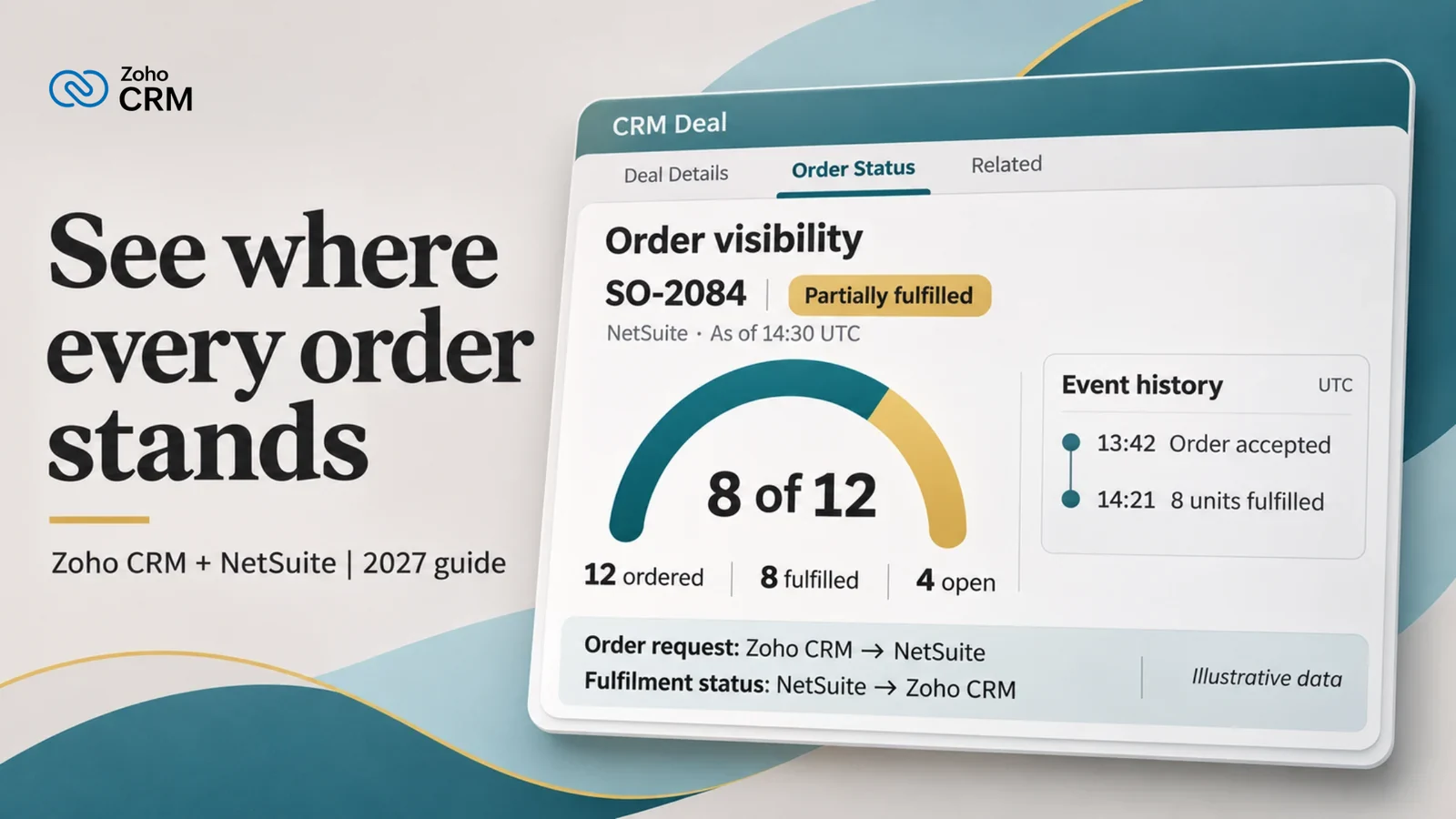
In an illustrative pilot, CRM deal D-2084 sends an approved request for 12 units of one item. CRM stores the linked NetSuite order reference SO-2084. At the 14:30 UTC sync, CRM shows eight fulfilled and four open for that line and records the update time separately from the shipment event. If the customer cancels the remaining units, finance bills the fulfilled portion before operations closes the line. After the closure is synchronized, CRM shows eight fulfilled, zero open and four closed against the original 12. Oracle fulfillment guidance and closed sales-order lines.
Step 5. Prove recovery before enabling more orders
Assign a stable reference to each order request and retain the resulting NetSuite ID. If a request times out, check whether NetSuite created the order before sending it again. NetSuite REST supports upsert using an external ID on supported operations. The business workflow still needs rules for repeated events, concurrent edits and amendments. Filter write-back updates so an order-status change does not trigger another order request. Oracle REST upsert guidance.
If you need to import open NetSuite orders into Zoho CRM, test a small batch in a sandbox and match each order using its NetSuite record ID. Pause the CRM workflow that creates new NetSuite orders during the initial load. Check that CRM caught changes made while the import ran before enabling live updates.
What should pass before launch?
- Send the same request twice and verify that operators can trace one accepted order.
- Simulate a lost response after NetSuite creates the order and verify that recovery finds it before another create attempt.
- Introduce an item, subsidiary, currency or tax conflict and verify that a reviewer gets a specific reason.
- Partially ship a line and close the remainder. Check the CRM quantities and confirm the status update does not trigger another order.
- Delay a stock update and check that sales can see the warehouse, update time and where to verify availability.
NetSuite distinguishes stock on hand, available and committed. Use the measure sales can interpret and show the warehouse and time of the last update. Make the decision to promise stock in the system that owns availability. Oracle stock level definitions.
Have sales and operations compare a sample of linked orders line by line, using quantities in the same item unit. Ask finance to check any billing references or balances shown in CRM. Track unresolved discrepancies and assign an owner before expanding the rollout to new subsidiaries or warehouses.
Troubleshoot failed or delayed records
Missing or rejected orders
Start with the recorded source reference, ERP response and integration role. Check required fields, item eligibility and subsidiary access. Resolve validation problems before retrying and record who approved the correction.
Changes are delayed during a busy period
Compare queued work, last successful updates and both platforms’ limits. NetSuite REST web services consume account capacity shared with other web services and RESTlets. Size the job alongside existing integrations. Use controlled retries for transient errors and reconcile outstanding records once the connection recovers. NetSuite concurrency guidance and Zoho CRM API limits.
Scope the cost and handover
Confirm the number of entities, locations, transaction types and rules before estimating timing. Initial history, custom fields, line-level mapping, upgrades to older connections and support coverage can change the workload. Ask for connector or hosting fees separately from implementation. Agree who checks discrepancies, handles rejected orders and verifies the first live batch. Elsner’s Zoho development services.
Plan your Zoho CRM and NetSuite integration
Share one order you want to automate, your NetSuite subsidiary and warehouse structure, the CRM fields involved, and how quickly sales needs updates. Elsner can help scope the connection, test the order lifecycle and plan recovery for failed transactions. Zoho CRM integration services.
Frequently asked questions
Can Zoho CRM integrate with NetSuite?
Yes. Evaluate Zoho Flow, a documented third-party connector or a custom API integration. Test the chosen method with your fields, roles and NetSuite account features before enabling production writes.
What data can Zoho CRM and NetSuite share?
A scoped integration can share selected customer, item, order, fulfillment and billing information. Confirm transaction types, line fields and permitted updates for the chosen method. Agree which application owns each field.
Can Zoho CRM show NetSuite orders and invoices?
Yes, if the connector or API setup supports the required operations. Sales may only need references, status and remaining balances. Keep reconciliation and accounting approval with finance.
Does Zoho NetSuite integration update in real time?
Update timing depends on triggers, scheduling, queue activity and the connector. Set an acceptable delay for each data type and show when the last update succeeded. Verify inventory freshness before promising delivery.
What should I check if my NetSuite connector uses SOAP or TBA?
Identify the connector version, protocol and authentication method. Ask the vendor for its REST and OAuth 2.0 upgrade path and check Oracle’s release schedules. Test your operations before switching the live connection.
How much does a Zoho NetSuite integration cost and how long does it take?
The estimate depends on transaction coverage, subsidiaries, line mapping, history, security and recovery requirements. Ask for platform fees, implementation, pilot testing and ongoing support to be specified separately.
Product documentation reviewed on 16 November 2026. Confirm current connector capability and Oracle release plans before implementation.