
- What is Metafield?
- What are Shopify Metaobjects?
- Let’s see Add to display parameters on product detail pages using meta fields.
- 1. How can we add a metafield to our store?
- 2. How to set Meta fields for products?
- 3. How to Metafields displayed on product detail pages
- Let’s see, Add to display dynamic data on product or collection pages using metaobjects.
- Metafields vs. Metaobjects: Which One Should You Use?
- Where to Find Them in Shopify Admin?
- 1. How to add Metaobjects?
- 2. How to add Metaobjects entry?
- 3. How to Prepare Product Metafield?
- 4. How to Add metaobject to products
- 5. How to display metaobjects on the product page
- Struggling to Organize Your Shopify Store?
- Conclusion
- FAQs
- Do I need to know how to code?
- What’s the difference between a definition and an entry?
- Do they work with third-party apps?
- How many fields can a definition have?
- Do changes go live everywhere at once?
- Will they help with SEO?
- Can I build landing pages with them?
- Is there an entry limit?
Shopify is supreme as the top-tier choice for flagship tools and features in Ecommerce websites in that it has many functionalities, features, and tools for all business sections in its stock. “Meta Objects” is one of the most important features.
Shopify Metaobjects are custom, reusable data structures that let you store and display information beyond Shopify’s default fields. Each metaobject is built from fields you define. Once set up, you can reuse that structure across your entire store without rebuilding it each time.
Metaobjects are mostly used to add custom data to different Shopify objects, like as
- Products Data
- Collections Data
- Orders Data
- Customers Data
Metaobjects tool is used for adding custom fields and information to our Shopify store that may not be available out of the box.
Before starting the Meta object we need to understand the Meta field.
What is Metafield?
- Metafields are incredibly versatile and can be used to add extra details, attributes, or functionality to your store. For example, you might use metafields to store additional product information like material, size, or special instructions. You can also utilize metafields to create custom sorting options, add labels or tags, or even integrate with third-party apps to enhance your store’s functionality.
- Metafields stores simple parts of information like text, color, product, page, etc., which you can assign to any product, collection, page, blog post, etc., on your store.
- The main disadvantage is that you need to enter the value for each separately. Also if you want to edit it, you must edit each one by one.
- Furthermore, the extensibility of Metafields extends beyond the confines of the Shopify development services. By seamlessly integrating with third-party apps and extensions, merchants can leverage Metafields to orchestrate complex workflows, synchronize data across multiple systems, and unlock advanced functionalities that elevate their online presence and drive business growth.
What are Shopify Metaobjects?
A few terms worth knowing:
|
Term |
What It Means |
Example |
|
Metaobject Definition |
The template — describes what fields the object holds |
“Photographer Profile” with name, bio, and photo fields |
|
Metaobject Entry |
The actual record created from that template |
“Jane Smith” — one photographer’s data |
|
Metafield |
A single extra data point on a product, page, etc. |
A colour swatch value on a product |
|
Storefront Access |
Makes the metaobject visible in your theme |
Showing a profile on product pages |
- The Metaobject is a group or collection of fields that encompass the full object.
- For example, your photo gallery store may feature profiles of each Photographer. The “Photographer profile” would be the metaobject and the individual fields (i.e. name, biodata, pictures, etc.) are the definition of that metaobject. You can then reuse the Photographer profile object on every product page. All the changes we make are at the same time reflected on the assigned pages.
- Meta objects help to organize and structure custom data for your Shopify entities.
- Overall, Metaobjects in Shopify provide a powerful mechanism for extending and customizing the platform to meet the specific needs of merchants and shopify developers. By leveraging metadata, store owners can tailor their online stores to offer unique experiences, streamline operations, and better engage with customers.
Let’s see Add to display parameters on product detail pages using meta fields.
- For example, we sell Purses and each purse’s product has different parameters (not variants) so purses have different 1. Stuff 2. fancy and which elements that you want to display on the product detail page.
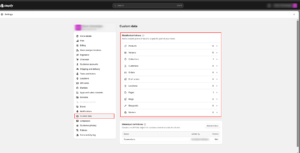
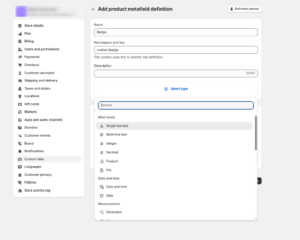
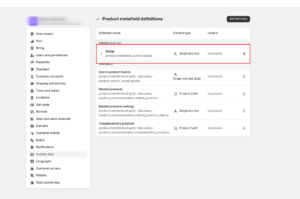
1. How can we add a metafield to our store?
- Go to your store’s Admin > Settings > Custom data
- Select any products and click on add definition in the metafields section.
- Select any meta field name (i.e. Stuff) and select any type like single-line text.
2. How to set Meta fields for products?
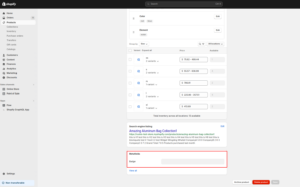
- We have defined Metafields, so let’s add them to your products
- Go to our store’s Admin > Products > Select a product for where we want to define those meta fields that we have created.
- On the product page > find meta fields options.
- Please enter the relevant data for this particular product and click on the “Save” button.
3. How to Metafields displayed on product detail pages
- We will display the metafield information on the Product details page now.
- Go to our store’s Admin > Online Store > Themes > Customize
- Then Top-middle template menu > Products > Default product
- Add a new block to the Product page, ex. Text
- Add metafields content by clicking on the database icon.

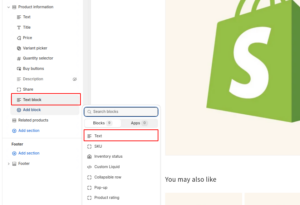
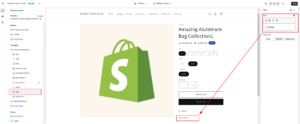
Now our Metafields is created for Metaobject we can follow the below steps.
Let’s see, Add to display dynamic data on product or collection pages using metaobjects.
- A metaobject is a very complex one that adds dynamic data to your store that you can edit or update at the same time.
Metafields vs. Metaobjects: Which One Should You Use?
They solve different problems. Here’s a quick side-by-side:
| Metafields |
Metaobjects |
|
|
What it stores |
One extra data point (text, number, colour, URL) |
A bundle of related fields in a single reusable object |
|
Reusability |
One value per resource |
Build once, attach to as many pages or products as you want |
|
Best for |
Simple, one-off data |
Structured content you repeat across the store |
|
Typical uses |
Dimensions, materials, delivery windows, care instructions |
Designer profiles, size guides, brand stories, team bios |
|
Updating |
Change each resource individually |
Edit the entry once — every page using it updates automatically |
|
Coding needed? |
No |
No (requires a 2.0 theme) |
|
API access |
Liquid, Storefront API, REST API |
Liquid, Storefront API, Metaobject API |
|
Added to Shopify |
Early 2022 |
February 2023 |
Where to Find Them in Shopify Admin?
- Definitions: Settings > Custom Data > Metaobjects
- Entries: Content > Metaobjects
- Connecting to themes: Online Store > Themes > Customize
1. How to add Metaobjects?
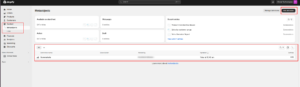
- Go to your store’s Admin store > Settings > Custom data
- Click on add definition under metaobjects
- Enter the metaobject name (i.e. Screenshots) and add metafields.
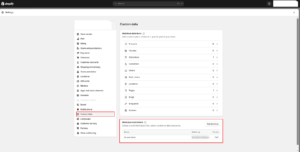
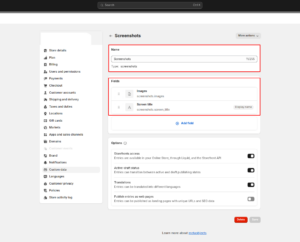
2. How to add Metaobjects entry?
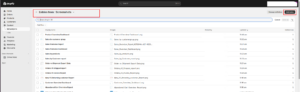
- Go to your store’s Content > Metaobject.
- Please select the existing metaobject in the meta objects sections
- Add a new entry by clicking More Actions in the top-right corner.
- Save and continue with another new entry.
- Complete all required inputs and save, then continue with another entry.
3. How to Prepare Product Metafield?
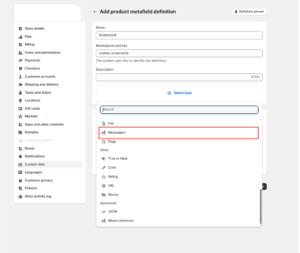
- Go to your store’s Admin store > Settings > Custom data.
- Metafields sections > select product > add your definition
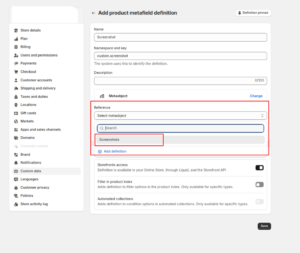
- Metafield name (i.e. Screenshots), select type (i.e. Meta Objects), reference, which should be an existing metaobject, and save.
4. How to Add metaobject to products
- Go to your store’s Admin store > Settings > Custom data > Product metafield > Create new > Select type as a metaobject. > Select existing metaobject as reference.
- In your admin, scroll down to see available metafields on the collection page.
- Click on the blank input next to your metafield, select one of the existing entries, and click on the Save button
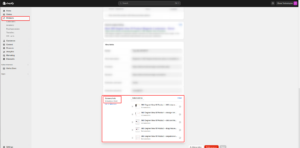
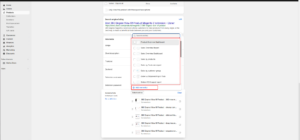
5. How to display metaobjects on the product page
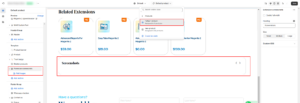
- Go to your store’s Admin > Online Store > Themes >Customize
- Go to Top-middle template menu > product > Default Product
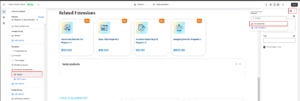
- Connect the new sections to the metaobject by clicking the database (“burger”) icon.
- Match relevant items in the section/block with the appropriate entries in your meta object you can see.
Struggling to Organize Your Shopify Store?
Discover how Shopify Metaobjects can streamline your store structure, improve content management, and enhance user experience. Our Shopify experts can help you implement it the right way for better scalability and performance.
Conclusion
Metaobjects and Metafields are powerful tools that enable you to extend the capabilities of your Shopify store and create a more personalized and engaging shopping experience for your customers. By understanding how these features work and exploring creative ways to leverage them, you can unlock the full potential of your Ecommerce business and stand out in a competitive market.
Whether you’re a small boutique or a large-scale retailer, incorporating metaobjects and meta fields into your Shopify store can help you differentiate your brand, streamline your operations, and drive more sales. So why wait? Start exploring the possibilities today and take your Shopify store to new heights.
Metaobjects serve as the building blocks of customization, offering you the ability to extend and enrich your store’s functionalities beyond its inherent features. Whether you seek to add new attributes to your products, introduce innovative categorization systems, or implement dynamic pricing strategies, metaobjects provide the framework for endless possibilities.
Complementing Shopify metaobjects are the versatile fields that hold the key to storing additional information about your products, collections, and more. From descriptive details to intricate specifications, metaobjects Shopify empowers you to infuse every store element with rich, contextual data, enabling deeper personalization and enhanced user engagement.
As you delve deeper into the realm of Metaobjects and Metafields, you’ll discover that their impact extends far beyond the confines of your storefront. From streamlining operations to driving sales, these tools become the linchpin of your Ecommerce strategy, guiding you toward sustained growth and prosperity. Whether you’re seeking to differentiate your brand, streamline your operations, or drive more sales, adopting Metaobjects and Metafields represents a pivotal step toward realizing your business objectives.
FAQs
Do I need to know how to code?
No. You can build and manage metaobjects entirely inside Shopify Admin — no code required. Two things to keep in mind though:
- You’ll need a Shopify Online Store 2.0 theme to connect metaobjects to your storefront
- Placing them in a custom spot using Liquid requires some basic code
For most stores, the Theme Editor handles it fine.
What’s the difference between a definition and an entry?
Think of it like a form and a filled-in form.
- Definition = the template (field names, types, rules)
- Entry = the actual data you fill in
Example: “Photographer Profile” is the definition. Jane Smith’s name, bio, and photo is the entry.
Do they work with third-party apps?
Yes. Metaobjects connect through:
- The Storefront API
- The Metaobject API
So linking them to marketing tools, analytics platforms, or a headless storefront is doable without any workarounds.
How many fields can a definition have?
Shopify hasn’t set a public cap. Supported field types include:
- Text (single-line, multi-line, rich)
- Numbers, dates, booleans
- Colours, URLs, JSON
- Files and images
- References to products, collections, pages, or other metaobjects
That said — keep each definition focused. One definition trying to do everything becomes hard to manage quickly.
Do changes go live everywhere at once?
Yes. That’s the whole point. Edit one entry and every page using it updates immediately. No tracking down individual pages.
Will they help with SEO?
Not directly. But they help indirectly:
- Richer content (specs, FAQs, brand context) makes pages more useful — which tends to perform better in search
- Turning on “Publish entries as web pages” gives each entry its own URL, adding more indexable pages to your site
Can I build landing pages with them?
Yes. Go to Custom Data settings and enable “Publish entries as web pages.” Each entry becomes its own page with a unique URL. Good for:
- Campaign or product launch pages
- Influencer or brand partner profiles
- Any content that doesn’t fit your existing templates
Is there an entry limit?
Shopify hasn’t published one. For most stores, this won’t matter. But if you’re thinking of thousands of entries, ask yourself: is a metaobject really the right tool here, or would a dedicated app handle it better?