- Odoo vs. Zoho: The Tale of Two Platforms
- Odoo Overview: The Developer’s Wild Playground
- Zoho Overview: The Cloud-Based Smooth Talker
- Still on the Fence? Here is a Side-by-Side Smackdown
- Fun Stat Break
- Why Do Businesses Migrate from Odoo to Zoho?
- 1. Lower Total Cost of Ownership
- 2. Say Goodbye to Code Dependency
- 3. One System to Rule Them All
- 4. Tailor-Made for Small Businesses
- 5. Always Cloud. Always Mobile.
- Bonus Wins When You Migrate From Odoo To Zoho
- Odoo vs Zoho: The Main Differences
- Benefits of Transitioning from Odoo ERP to Zoho
- Pre-Migration Checklist
- Odoo to Zoho Migration Step by Step
- Issues in Odoo to Zoho Migration
- Products & Services for Migrating Odoo to Zoho Data
- Odoo to Zoho Migration Process
- Tools, Services, and Panic Buttons
- DIY? Brave.
- Use Third-Party Tools
- Professional Services
- Pitfalls to Avoid
- When Should You Call the Pros?
- Advantages of Switching to Zoho
- Operational cost saving:
- Cloud-enabled accessibility:
- Simpler integration:
- Automation Features:
- Seamless Business Model:
- Typical Issues Faced During Migration
- Data mapping errors:
- Integration failures:
- Workflow differences:
- Incomplete data transfer:
- Looking For Help In Migrating from Odoo to Zoho?
- Why Elsner is Your Zoho Migration BFF?
- Final Thoughts: Make the Leap
- FAQs
- How long does the Odoo to Zoho migration process take?
- What can all be migrated from Odoo to Zoho?
- Is Zoho or Odoo better for small businesses?
- What is the price for Odoo to Zoho migration?
- Do I need a Zoho implementation partner?
- Can custom Odoo modules be replicated in Zoho?
- What are the most challenging aspects of relocation?
- Is the data secure during migration?
There is growing pressure on businesses to simplify their processes, cut expenses, and foster better teamwork. Many are opting for an Odoo-to-Zoho migration as a tactical solution to mitigate Odoo’s maintenance issues and adopt Zoho’s cohesive, easy-to-use platform. From dealing with complex, bespoke Odoo modules to seeking better cloud capabilities and automation, the benefits of shifting from Odoo to Zoho can be considerable.
Data inconsistencies, workflow interruptions, and heavy ongoing reliance on developers are common ERP migration challenges, often pushing companies toward alternatives like Zoho Development Services. Zoho’s integrated suite covers CRM, ERP, inventory management, and marketing in one platform, enabling lower costs and easier scalability.
This definitive Odoo-to-Zoho migration guide will cover: major differences, advantages, a step-by-step, detailed process, pitfalls to watch out for, and professional suggestions. You will learn how to perform an Odoo-to-Zoho migration easily, with minimal downtime and an optimal return on investment.
Quick Answer
Businesses migrate from Odoo to Zoho to cut developer dependency and lower total cost of ownership. Zoho’s cloud-based suite unifies CRM, Books, Inventory, and Projects in one system, so day-to-day changes happen with clicks instead of code.
|
Signs it’s time to migrate
|
Call in migration experts if
|
Short version: Odoo gives power but demands developers. Zoho gives you a cloud-first, all-in-one suite built for business users, not cyborgs fluent in Python.
Odoo vs. Zoho: The Tale of Two Platforms
Welcome to the ERP showdown. In the red corner, we have Odoo, the DIY champion with a tool for everything. In the blue corner, it is Zoho, the elegant all-rounder that behaves. Let us unpack both. Slowly. Like your last Monday morning.
Odoo Overview: The Developer’s Wild Playground
Odoo is open-source. That is the tech-code for “Good luck, you are on your own.” It is like buying IKEA furniture without the manual. You can build a palace. Or a pile of parts.
- It is modular, but high-maintenance.
- It is flexible, but only if your developers stretch like yoga instructors.
- It is powerful, but temperamental like your printer on a deadline.
To make Odoo work, you need experts in Odoo. No, not just any expert. You will want to hire Odoo developers, possibly a small army. You will also need Odoo development services. Unless, of course, your marketing manager is also a part-time coder. (Spoiler: they are not.)
Many businesses also lean on an Odoo website development company just to make their storefront look… clickable.
Add custom modules. Insert integrations. Stir in some bugs. Voila, you now have spaghetti workflows that would confuse even the developer on demand Odoo team.
Zoho Overview: The Cloud-Based Smooth Talker
Now let us talk about Zoho. It is the charming cousin who shows up on time, wears clean clothes, and reads the user manual. Imagine a platform where you do not need five coffee-fueled developers to update your CRM layout.
- Zoho is cloud-first. You do not need to install, update, or babysit it.
- It is mobile-friendly because your team is not chained to their desks.
- It is built for humans. Not cyborgs fluent in Python.
Zoho development services bring you pre-built apps that just work. No tantrums. No weird bugs after a Tuesday update.
When you switch from Odoo to Zoho, your team breathes easier. No more praying over deployments. With Zoho migration services, everything from customer data to leads can be moved safely and sensibly.
Want workflows? Get Zoho CRM migration. Need departments synced? Try Zoho integration services. Want it all? Call Elsner, yes, Elsner Zoho migration services have got your back. We do not just migrate. We help you evolve.
Still on the Fence? Here is a Side-by-Side Smackdown
| Feature | Odoo | Zoho |
|---|---|---|
| Type | Open-source platform | Cloud-based SaaS suite |
| Customization | High (but code-heavy) | High (but user-friendly) |
| Ease of Use | Developer-dependent | Business-user friendly |
| Cost of Ownership | High (due to dev costs) | Lower (subscription-based, no extra devs) |
| Support Ecosystem | Community and paid devs | Official support + Zoho community |
| Best For | Large enterprises with IT teams | SMBs, startups, and scaling businesses |
| Migration Simplicity | Complex and technical | Easy with Zoho migration support |
Fun Stat Break
Did You Know? Zoho handles over 75 million users worldwide. Meanwhile, Odoo boasts high customizability but requires up to 35% more internal tech resources for regular maintenance.
So, if your internal motto is “Let us work smarter, not harder,” it might be time to migrate from Odoo to Zoho. Not just for sanity. But for survival.
And if you are unsure where to start? Elsner Technologies is the migration Sherpa you never knew you needed. Whether you’re weighing Zoho vs Odoo or are already set on switching, our Zoho consulting services make the Odoo to Zoho data transfer feel less like surgery and more like a spa day. You can also hire Zoho developers through us. Smart ones. Ones who speak fluent API and sarcasm.
Bonus: Odoo to Zoho Migration Decision Flowchart
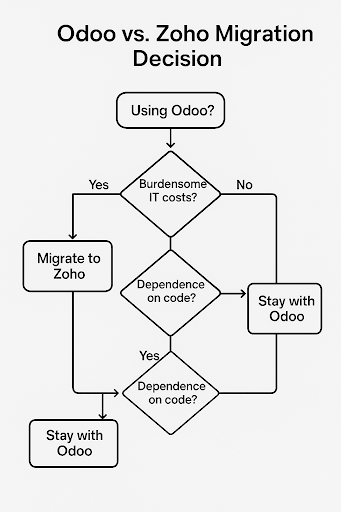
This is not just a comparison. It is your business at a crossroads. You can either keep feeding the hungry tech monster. Or you can hop on the Zoho train with Elsner Technologies, where everything just works, thanks to expert Zoho development services that streamline your operations and remove the chaos.
Now that you know the characters in this story, ready to flip the page? In this guide, we will also learn how you prepare before you switch from Odoo to Zoho.
Why Do Businesses Migrate from Odoo to Zoho?
Does your business really need to move from Odoo to Zoho? Tens of thousands of companies can’t be wrong; Odoo to Zoho migration is a big favorite for usability and scalability. Odoo is great, but you have to know a bit about technology to run it. The Zoho interface is much simpler, but they do offer plenty of automation options.
Key Reasons Are:
1. Lower Total Cost of Ownership
Odoo is open source, and while that sounds great on paper, it can mean juggling more than just technical knowledge.
Want to generate a simple Sales Order or update Required Fields in your Odoo account? Better call a dev.
Want to sleep at night? Better hope your Odoo Implementation partner knows the difference between a source file and a prayer.
Now enter Zoho, a sleek, CRM system that feels like hiring a brainy sidekick who manages your business operations without asking for lunch breaks.
When you migrate from Odoo to Zoho, your cloud cost management suddenly makes sense. No more patching together tools like a 90s mixtape, just setup Zoho CRM and go.
And yes, Elsner Technologies brings years of experience to ensure a smooth transition, not just in theory but in every custom field, data transfer, and nerve-saving Free Consultation.
2. Say Goodbye to Code Dependency
Odoo gives you power. But also homework.
Want to rename a field? Update a CRM module? Add a Purchase Order tag?
That’s not drag-and-drop. That is “open GitHub, send emails, and chant to the code gods.”
Zoho? Different vibe. You tweak. You click. You smile.
Thanks to Zoho’s user-friendly interface, you get to make updates without opening a ticket or sacrificing your weekend.
Whether it is setting up Zoho CRM data workflows or adjusting mandatory fields, you no longer feel trapped in the matrix.
And with ongoing support from Elsner’s Zoho experts, you are not just switching tools, you are upgrading your whole Customer Relationship Management experience.
3. One System to Rule Them All
There are many Odoo Apps. Too many. Like a legacy system with commitment issues.
They often bicker. One does not talk to the other. Your data ends up like roommates sharing a fridge, isolated and passive-aggressive.
Zoho? It is an integrated empire. Everything, from Inventory Management to email campaigns, Human Resources to project management, syncs beautifully.
Need Office 365 Integration? Done. Want to track leads from an email address to a phone number? Easy.
Even Zoho Books speaks fluent QuickBooks and knows when you last exported data from your old system.
With Elsner’s expert Zoho integration services, you avoid friction and build a future-proof setup.
4. Tailor-Made for Small Businesses
Let us face it. Odoo can feel like lifting a barbell with your pinky toe.
For small businesses just wanting a solid CRM platform with actual results and no 900-page guides, Zoho is your friend.
It adapts to your specific business needs, handles data entry without drama, and has a Knowledge Base that does not double as bedtime reading.
You get essential tools, like email marketing, Zoho Creator for automation, and yes, Zoho Analytics for those boardroom charts, without needing a PhD in ERP.
Elsner’s Zoho experts understand specific needs, not just buzzwords. That means less time decoding tech, more time growing your online business.
5. Always Cloud. Always Mobile.
Odoo Online might work… sometimes. Sometimes not. Sometimes it just hides in your server room, eating cookies.
Zoho? It runs on the cloud like it was born there.
On your Mobile Device, on your desktop, in your car (okay, maybe not your car). But you get the point.
Whether you’re in the United States, the United Kingdom, or sipping kopi in Bahasa Indonesia, your Zoho Corporation data is always accessible.
And because it is a SaaS management platform, updates, upgrades, and data security come standard.
No more calling your Odoo website development company after hours. No more begging your Service Provider to fix the POS.
Yes, even POS Restaurant setups get the upgrade with Zoho.
Bonus Wins When You Migrate From Odoo To Zoho
- No more praying to the Odoo Integration fairy just to Import Customers
- Zoho’s design = fewer signs during import file trainings
- Onboarding is so quick, you might cry happy tears
- Want more? Zoho works with Microsoft Office, Zoho Projects, and even scrum teams
And if you want to take your customer-facing teams to the next level, check out tools like Office Integrator, Digital Risk Analyzer, or even the All-in-one digital risk assessment tool Zoho just launched.
Because the future is data-driven work, not duct tape and debugging.
Odoo vs Zoho: The Main Differences
Understanding the Odoo vs Zoho comparison is essential before migration.
| Feature | Odoo | Zoho |
|---|---|---|
| Customization | High but complex | Moderate but easier |
| Cost | Can increase with modules | More predictable pricing |
| Usability | Technical learning curve | User-friendly |
| Deployment | Self-hosted/cloud | Fully cloud-based |
| Integrations | Requires setup | Built-in ecosystem |
Benefits of Transitioning from Odoo ERP to Zoho
The advantages of a switch from Odoo to Zoho aren’t just about cost savings. Businesses can run more efficiently and improve their workflows.
Benefits of Zoho Books compared to Odoo:
- Reduced cost of operation
- Access from the cloud anytime, anywhere
- Built-in automation
- Single ecosystem (CRM, Books, Projects, etc.)
- Quick Implementation with Zoho Development Services
Pre-Migration Checklist
It is not just about data. Here is the step-by-step process to follow.
Odoo to Zoho Migration Step by Step
|
1
|
Backup Your Odoo Data. Begin your data migration from Odoo to Zoho by taking a full backup of your Odoo system. That includes your customer data, invoices, stock, and workflows. A backup ensures that no important information is lost during migration and provides rollback options if RM needs to undo the migration. |
|
2
|
Audit Odoo Modules and Workflows. Evaluate all active modules and workflows. You may not need every Odoo feature in Zoho. This process allows you to organize your system and remove unneeded data transfer to make the Odoo ERP migration guide more streamlined. |
|
3
|
Map Odoo Fields to Zoho Modules. Mapping Fields is important for the Odoo-to-Zoho CRM migration. You have to match Odoo fields to the relevant Zoho module, such as CRM, Books, or Inventory. Wrong mapping can lead to data inconsistencies and errors in reporting. |
|
4
|
Import Data into Zoho. After completing mapping, import the data into Zoho using tools or APIs. Some organizations use a Zoho data migration service provider to transfer large files faster and more securely, with no risk. |
|
5
|
Test Workflows and Integrations. Once the data is imported, check the workflows, automated rules, and integrations. This not only ensures that your business processes run smoothly in Zoho but also prevents any interference after migration. |
|
6
|
Train Teams and Prepare for Go-Live. Training your staff is essential when you migrate from Odoo to Zoho. Make sure your teams are comfortable with the new interface, workflows, and automated tools to maximize productivity. |
|
7
|
Go Live with Zoho System. Now you have seen the step-by-step process to implement the Zoho system. In the end, go live with your Zoho system and keep an eye on performance, quickly fixing any issues. Seamless latching ensures business continuity and a successful ERP system migration. |
Issues in Odoo to Zoho Migration
Planning a business is hard, and such is the case when migrating from Odoo to Zoho:
- Reduction in data mapping errors.
- System breakdowns.
- Differences in workflows.
- Partial data transfer.
ERP migrations often fail due to poor planning and incorrect data mapping. That’s why having a clear ERP migration strategy is essential.
Products & Services for Migrating Odoo to Zoho Data
Make the most of tools for a hassle-free migration.
Among the options are:
- Zoho imports native tools.
- Third-party migration tools.
- Custom APIs.
- Professional services for Zoho migration.
Working with experts ensures a secure and efficient Odoo-to-Zoho data migration.
Ready to Switch to Zoho?
Our Zoho migration service ensures a smooth, secure, and accurate transition tailored to your business needs.
Odoo to Zoho Migration Process
Migrating? Sounds painful. But we promise, it is not dental surgery. When done right, an Odoo to Zoho migration feels more like a makeover. A fancy one.
Let us walk you through each step. You will laugh, you will cry (from relief), and you will switch from Odoo to Zoho like a pro.
|
1
|
Backup Like a Maniac. Trust issues are healthy here. Do not just assume your data is safe in the cloud. It is not a magic vault. Think of it more like a moody teenager, it behaves until it does not. Back up every bit of your Odoo setup. Twice. Then once again for peace of mind. At Elsner Technologies, our team follows a 3x backup policy. Because when you migrate from Odoo to Zoho, missing data is a crime. Our Odoo development services even offer backup automation. So you do not break a sweat, or your server. |
|
2
|
Map It Out. This part? Pure logic. But with a sprinkle of chaos. You have fields in Odoo. Zoho has its own structure. Your job? Match them like a dating app for data. No awkward blind dates allowed.
For example:
Get the drift? If this sounds like a crossword puzzle, do not panic. Just hire Zoho developer talent. They live for this stuff. Our Zoho consulting services also include pre-migration mapping for your Project Management System. And yes, Elsner Zoho migration services nail this stage every single time. |
|
3
|
Import with Confidence. You have mapped. You have prepped. Now, breathe. Use Zoho’s built-in import tools. They are surprisingly kind, like a Labrador. Not perfect, but eager to please. Import your CRM records. Your leads. Your invoices. Your tasks. If something refuses to fit, do not force it. This is when Zoho migration support comes into play. Or go the pro route, let Elsner handle the entire Odoo to Zoho data transfer from start to finish. Need something extra snazzy? Call on our Zoho development services to customize the process. Oh, and if you have weird workflows in Odoo? Our developer on demand Odoo experts can untangle them first. |
|
4
|
Test It Like You Mean It. Now, do not just sit back. This is not over. Push every button. Open every record. Try to break things. This is your testing sandbox. This is your last chance to catch errors before the whole team dives in. The last thing you want post-launch? Angry emails with “URGENT” in the subject. If something feels off, fix it. Or bring in Zoho CRM migration experts. Or better, let Elsner Zoho migration services run full QA. We love finding bugs before they haunt you. |
|
5
|
Go Live. The moment has arrived. This is not just a button click. It is a full-blown business shift. Announce the migration. Celebrate the upgrade. Throw in cupcakes if you must. Make sure your team knows the ropes. Keep Zoho migration support on call for the first few days. Want everything to run without hiccups? Use Zoho integration services to plug your CRM into other apps you rely on. And if you are dreaming of a smoother setup from day one, Elsner Technologies can handle both the launch and long-term optimization. |
The best part? You do not have to do it alone. Whether you want to migrate from Odoo to Zoho, streamline CRM, enhance your existing Odoo modules, or even build new modules, Elsner is here.
We provide everything from Zoho migration services to Odoo website development company support. Yes, even backup strategy. Even training.
Want to go full custom? Hire Odoo developer support. Or tap into experts Odoo for a clean exit. Either way, you are in safe hands.
Tools, Services, and Panic Buttons
DIY? Brave.
If you have 100 records, maybe. More than that? Not worth the gray hairs.
Use Third-Party Tools
Odoo to Zoho data transfer tools exist. Some work well. Others break your data like a pinata.
Professional Services
This is where Elsner Technologies shows off. Our Zoho migration services include everything. Planning. Testing. Crying (optional). Recovery.
Pitfalls to Avoid
- Skipping backup? Rookie mistake.
- Not testing workflows? Classic fail.
- Training your team post-launch? Bold. But unwise.
Thinking you can “just try it.” Spoiler: You cannot.
When Should You Call the Pros?
You need help if:
- You use more than 5 Odoo modules
- You run E-commerce with custom workflows
- You want zero downtime
- You forgot your last backup password
In that case, call Elsner. Seriously.
Advantages of Switching to Zoho
Organizations that complete the Odoo-to-Zoho migration tend to enjoy immediate business benefits such as improved efficiency, cost savings, and scalability. Zoho’s cloud-based systems streamline operations and lay the foundation for long-term growth.
Here are the key advantages:
Operational cost saving:
Zoho has a clear pricing model, and maintenance costs are much lower than Odoo’s. After the switch, companies can slash their infrastructure and IT-related expenses.
Cloud-enabled accessibility:
Being fully cloud-based, Zoho allows teams to work on business data anytime, anywhere. It enhances collaboration, especially among remote and distributed teams.
Simpler integration:
Zoho is compatible with other applications, such as Microsoft products and third-party tools, so you can connect the dots. It’s easier to integrate CRM with finance, marketing, and support, for example, without extensive customization.
Automation Features:
With automation features in place, Zoho enables users to automate recurring activities, such as lead management, invoicing, and reporting. Enhancing efficiency and reducing human error.
Seamless Business Model:
Zoho houses almost everything you need to run your business under one roof, like CRM, Books, Inventory, Projects, and more. With this, you’ll be able to create a unified workspace where departments can collaborate seamlessly.
Typical Issues Faced During Migration
Although the Odoo-to-Zoho data migration has several advantages, organizations need to be prepared for a few challenges that might hinder its success.
These are some of the prevalent challenges to have in mind:
Data mapping errors:
If Odoo fields are incorrectly mapped to Zoho modules, critical data may be missed or inaccurate, which in turn affects operations and reporting.
Integration failures:
So existing Odoo integrations may not translate directly to Zoho, may require reconfiguration or the development of new integrations, and this can be time-consuming.
Workflow differences:
The workflows between Odoo and Zoho are different, and it mayifyex need to be rethought to adapt to Zoho’s ecosystem.
Incomplete data transfer:
If the transition is not conducted properly, it could result in the loss of some records or historical data along the way.
A common reason for these failures is poor planning and inaccurate data mapping during ERP migrations. This talks about having a clear ERP migration plan and, if required, using professional Zoho migration services to ensure a hassle-free, safe migration process.
Looking For Help In Migrating from Odoo to Zoho?
The Odoo-to-Zoho migration process isn’t easy, especially when large volumes of data, integrations, custom workflows, etc., are involved. Data protection, downtime risks, and technological complexities all make it necessary to migrate cautiously.
Partnering with experts offering Zoho migration services ensures a seamless transition with minimal disruption. Planning, data mapping, execution, and testing experts can assist you in avoiding costly blunders and in strengthening your move, and provide support across all aspects of the process.
Planning to switch over from Odoo to Zoho? We recommend teaming up with veteran consultants who can guide you through every step of the journey as you migrate from Odoo to Zoho.
Why Elsner is Your Zoho Migration BFF?
Elsner Technologies is not just another tech firm. We live and breathe migrations.
We offer:
- Elsner Zoho migration services with precision
- Zoho CRM migration with sanity
- Post-migration hugs. Metaphorical ones.
Whether you need to hire an Odoo developer, switch to Zoho, or get help fast, we are here.
Final Thoughts: Make the Leap
A successful Odoo to Zoho migration can transform your business processes, driving greater efficiency, cost effectiveness, and scalability. By following the right approach, get in touch for Zoho Consulting, addressing migration challenges, and using expert Zoho Development Services, companies can achieve a smooth transition.
FAQs
How long does the Odoo to Zoho migration process take?
The time frame for this activity depends on the volume of data. Migration can take from a few days for a simple migration to a few weeks (even months) for a complex ERP migration.
What can all be migrated from Odoo to Zoho?
You may bring over everything from customer data to sales history and invoices, as well as inventory, workflows, and reports, from Odoo to Zoho Data Migration.
Is Zoho or Odoo better for small businesses?
Zoho is more popular for its simplicity & lower price, and cloud-delivery model, which makes it a better choice for small and mid-sized companies.
What is the price for Odoo to Zoho migration?
The expenses depend on the amount of data, the extent of customizations, and whether you opt for Zoho consulting services or execute the migration yourself.
Do I need a Zoho implementation partner?
Not necessary, but a Zoho implementation partner will ensure a precise data transfer and minimize the risks of migration.
Can custom Odoo modules be replicated in Zoho?
Yes, with the help of Zoho development services, you can customize or develop new functionalities to suit your business needs that integrate seamlessly with Zoho.
What are the most challenging aspects of relocation?
Common challenges include incorrect data mapping, continuous workflow interruptions, and plug-in failures during ERP system migration.
Is the data secure during migration?
Yes, if proper tools and professional Zoho data migration services are used, data security can be maintained throughout the process.