- The Evolution of Frontend Architecture and Where Tailwind Fits
- From Monolithic CSS to Component-Driven UI
- The Rise of Utility-First and Atomic CSS
- Tailwind as an Engineering Strategy, Not Just a Framework
- What Advanced Tailwind CSS Development Really Involves?
- Custom Design System Configuration
- Component Abstraction and Reusability
- Performance Optimization
- Accessibility and Semantic Integrity
- Why Hiring Specialized Tailwind Developers Delivers Strategic Advantage?
- Accelerated Time-to-Market Without Sacrificing Quality
- Scalable Design Systems for Growing Products
- Reduced CSS Technical Debt Over Product Lifecycle
- Performance-First Frontend Engineering
- Seamless Integration with Modern Tech Stack
- Clean Codebase and Maintainability at Scale
- Security and Stability Benefits
- ROI Analysis – The Business Case for Hiring Tailwind Experts
- Cost Efficiency Over Time
- Faster Iteration Cycles
- Improved Team Productivity Metrics
- Competitive Differentiation
- Tailwind CSS Specialists vs. General Frontend Developers
- When You Absolutely Need a Tailwind CSS Specialist?
- Risks of Hiring Inexperienced Tailwind Developers
- Evaluation Framework – How to Assess Tailwind CSS Developer Expertise
- Technical Evaluation Criteria
- Code Review Checklist
- Architectural Thinking
- The Future of Utility-First CSS and Why Early Adoption Matters
- Advanced FAQ – For Decision-Makers
- Is hiring Tailwind CSS developers better than traditional frontend developers?
- Does Tailwind CSS scale for enterprise-grade applications?
- How does Tailwind reduce frontend technical debt?
- Is Tailwind suitable for long-term product development?
- Can Tailwind CSS improve Core Web Vitals?
- What skills should a professional Tailwind developer have?
- How long does it take to see ROI from hiring Tailwind CSS specialists?
- Can Tailwind work alongside an existing CSS codebase?
- What is the difference between Tailwind CSS and CSS-in-JS solutions like Styled Components?
- How does Tailwind CSS handle responsive design?
- Strategic Conclusion – Why Tailwind Expertise Is a Business Decision?
- About Elsner
Frontend development has changed – fast. A lot of developers who tried Tailwind CSS continued using it in production. That number says a lot. Hire Tailwind CSS developers means you are not just picking a styling preference. You are making a deliberate call on how your product will be built, scaled, and maintained.
Modern frontend complexity is not slowing down. Businesses today expect faster launches, tighter design consistency, and cleaner performance across every device. These are engineering problems – not just design ones. Solving them requires a team that understands the tools at a level that goes well beyond applying classes.
Performance-first web standards are now table stakes, and modern CSS approaches like Tailwind are playing a key role in achieving this. That means your CSS strategy is also your SEO strategy. Tailwind CSS performance optimization – done right – strips away unused styles and keeps your stylesheet lean. Done poorly, it adds bloat that quietly drags down your scores.
Design system-driven development is the new standard for any product that needs to grow. Tailwind makes it structurally possible to build a real system – but only when the developer knows how to configure and maintain it with discipline.
Skilled Tailwind CSS experts create competitive advantage by moving faster without sacrificing quality. They reduce back-and-forth between designers and developers. They help teams ship consistent UIs across multiple products. And they keep the codebase clean enough that onboarding a new developer does not feel like starting from scratch.
The result – ROI, scalability, speed, and maintainability all improve when the right people are running the Tailwind setup. This blog breaks down exactly why that is worth investing in. So, let’s get started:
The Evolution of Frontend Architecture and Where Tailwind Fits
From Monolithic CSS to Component-Driven UI
Traditional CSS scaled terribly. Early projects were built with giant stylesheets that started clean and gradually turned into a maintenance burden. Naming conflicts crept in. Overrides piled on top of overrides. Global styles caused unintended side effects that took hours to track down.
Methodologies like BEM, SMACSS, and Sass-based architecture tried to fix this. They brought structure – and they helped. But they also introduced their own overhead. Naming conventions had to be enforced manually. Sass partials required strict organization. And as codebases grew, so did CSS technical debt. Large teams spent real engineering time managing the styling layer alone.
Component-driven UI changed the conversation. React, Vue, and similar frameworks made it natural to think in isolated building blocks. Styling needed to follow the same logic – scoped, predictable, and reusable. That shift created the right conditions for Tailwind to thrive.
The Rise of Utility-First and Atomic CSS
Atomic CSS – the idea of writing small, single-purpose utility classes – has been around longer than Tailwind. Tailwind is the framework that made it practical at scale. The core principle is simple: instead of writing .button-primary with custom rules, you apply individual utilities directly in your HTML. Color, spacing, typography, layout – all co-located with the component.
This approach cuts cascade complexity significantly. There is no need to trace a style back through three layers of inheritance to understand why a button looks a certain way. You read the component and see every styling decision right there.
Atomic design principles align naturally here too. When your UI is made of small, composable pieces – and your styles are made of small, composable utilities – the mental model stays consistent from design to code.
Tailwind as an Engineering Strategy, Not Just a Framework
This is where many teams miss the point. Tailwind is not just a CSS shortcut. At its core, it is a config-driven design token system. The tailwind.config.js file is where you define your colors, spacing scale, typography scale, and breakpoints. Your design language lives in one place – not scattered across dozens of files.
Systemized spacing and typography become default behavior. Every margin, padding, and font size is pulled from a defined scale. That alone eliminates an entire category of design inconsistencies.
The architecture is predictable by nature. Any developer who knows Tailwind can open your codebase and understand the styling decisions immediately. That said – expertise matters. Improper Tailwind usage creates utility class chaos, configuration drift, and performance issues just as bad as the problems it was meant to solve.
What Advanced Tailwind CSS Development Really Involves?
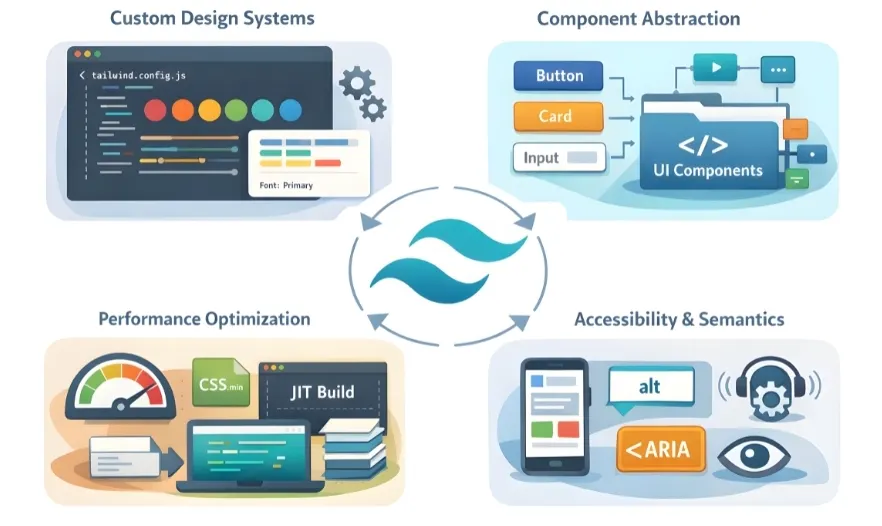
There is a real difference between a developer who has used Tailwind and one who has built production systems with it. This section shows where that difference shows up.
Custom Design System Configuration
Extending tailwind.config.js is where professional Tailwind CSS design system development begins. A beginner treats the default config as the final setup. An expert treats it as the starting point. Custom color palettes, extended spacing scales, brand-specific font stacks, and semantic token layers – all of these map directly to your product’s visual language.
Scalable token systems mean every design decision traces back to a defined variable. This way, when your brand updates its primary color, you change one line in the config – not fifty component files.
Theme layering – supporting both light and dark modes, or multiple brand themes in a white-label product – requires deliberate configuration thinking. This is not something you pick up from a quick tutorial. It takes real experience with how Tailwind’s cascading configuration works at depth.
Component Abstraction and Reusability
Tailwind’s utility classes are powerful, but raw HTML with 25 classes per element is not maintainable at scale. Experienced developers know when to extract reusable UI primitives into components that encapsulate the styling logic. Buttons, cards, form fields, badges – these should not be rebuilt from scratch every time.
Using @apply strategically is part of this. It is not a replacement for utility classes, but it is the right tool when you are building an internal UI library and need clean, named components that other developers can use without touching raw utilities. That way, your team builds on top of a consistent layer rather than reinventing button styles in every new screen.
Performance Optimization
Tailwind’s content configuration tells the framework which files to scan for class names. Get this wrong and you end up shipping unused CSS to production. Tailwind CSS performance optimization at a professional level means configuring content paths correctly, understanding JIT (Just-in-Time) compilation, and aligning your build pipeline with code-splitting logic.
JIT compilation generates only the styles your project actually uses – at build time. The result is a stylesheet that is often just a few kilobytes in production. That directly impacts page load speed and, by extension, Core Web Vitals scores.
Accessibility and Semantic Integrity
Utility-first CSS can tempt developers into using non-semantic HTML elements because styling is so easy to apply anywhere. A professional knows this is a trap. Semantic HTML – using the right element for the right job – matters for accessibility, SEO, and screen reader compatibility.
ARIA attributes need to work alongside the styling layer, not against it. Responsive-first architecture means mobile styles are the baseline, not an afterthought. These are habits that experienced Tailwind developers bring to every project by default.
Why Hiring Specialized Tailwind Developers Delivers Strategic Advantage?
Accelerated Time-to-Market Without Sacrificing Quality
One of the strongest reasons to hire Tailwind CSS developers is raw speed. Utility-first workflows allow developers to build and adjust UI without switching between component files and stylesheets. A button variant, a new layout, a responsive adjustment – each takes seconds rather than minutes.
This enables parallel designer-developer workflows. Designers working in tools like Figma can define spacing and color values that map directly to Tailwind tokens. Developers implement them without translation loss. The gap between mockup and production shrinks noticeably.
For teams building an MVP, this matters enormously. Faster UI iteration means faster feedback cycles and reduced opportunity cost. Every week saved in the frontend build is a week of market learning gained.
Scalable Design Systems for Growing Products
As products grow, visual inconsistency becomes a real problem. Buttons look slightly different on the dashboard than on the settings page. Spacing feels off between modules built by different developers. Tailwind CSS scalable architecture prevents this by centralizing all design decisions in the configuration layer.
Centralized design tokens mean every developer on the team pulls from the same source of truth. There is no guessing whether a color is brand-primary or close-enough-to-brand-primary.
For enterprises running multiple products or sub-brands, this becomes critical. A single well-maintained Tailwind configuration can scale across teams, repositories, and product lines. Cross-team consistency becomes the default – not something you have to enforce manually.
Reduced CSS Technical Debt Over Product Lifecycle
Traditional CSS codebases accumulate debt in a specific way: override on top of override, until nobody knows what is safe to change. Global styles have side effects. Removing a class breaks something three pages away.
Tailwind eliminates cascade conflicts by design. Every utility class is scoped to the element it sits on. There are no global overrides. There is no inheritance chain to untangle. Tailwind CSS development services built around utility-first principles carry significantly less long-term maintenance cost than traditional stylesheet approaches.
Easier onboarding is a direct result. A new developer joining the team does not need to learn the project’s custom CSS conventions. They read the component, see the utilities, and understand the styling immediately. Ramp-up time drops. The cost of team growth comes down.
Performance-First Frontend Engineering
Minimal CSS footprint is one of Tailwind’s most valuable production-level benefits. When Tailwind CSS performance optimization is handled correctly, your final stylesheet can be under 10KB – even for complex applications. That is significantly smaller than a traditional CSS codebase of similar scope.
Core Web Vitals – Largest Contentful Paint, First Input Delay, and Cumulative Layout Shift – are directly tied to CSS load behavior. A leaner stylesheet contributes to faster LCP scores and more stable rendering. Google notices. Users notice.
The SEO performance benefits compound over time. Better Core Web Vitals scores mean better organic search positions. Better page speeds mean lower bounce rates. Lower bounce rates correlate with higher conversion rates. The frontend engineering decision you make today has a direct line to business outcomes months from now.
Seamless Integration with Modern Tech Stack
Professional Tailwind CSS experts for enterprise projects understand that Tailwind does not exist in isolation. It needs to work cleanly with the rest of your stack. Here is where that plays out in practice:
- React / Next.js: Tailwind integrates cleanly with SSR. JIT compilation works well with Next.js build pipelines. Purge configuration aligns with dynamic route structures.
- Vue / Nuxt: Scoped component styling pairs naturally with Tailwind’s utility system. Nuxt’s build layer supports Tailwind’s PostCSS setup without friction.
- Headless CMS: Dynamic content structures benefit from Tailwind’s ability to apply styling conditionally based on content type.
- Micro-frontend architecture: Tailwind’s config-driven setup makes it possible to share a consistent design system across independent frontend modules without tight CSS coupling.
Clean Codebase and Maintainability at Scale
Co-located styles – utility classes that live right inside the component – reduce fragmentation. There is no separate CSS file to hunt down. There is no mismatch between what the stylesheet says and what the component renders.
Predictable utility patterns mean code reviews become faster and more focused. Reviewers can immediately see whether spacing, color, and layout decisions follow established conventions. Debugging layout issues is quicker because the styling source is always right there in the markup.
At scale, this cleanliness compounds. Large codebases with hundreds of components stay navigable. Teams stay productive. New features do not require archaeology through historical CSS files.
Security and Stability Benefits
This angle is often overlooked. Tailwind CSS has fewer external dependencies than many CSS-in-JS libraries or heavy UI frameworks. A leaner dependency tree means fewer potential vulnerability vectors and a more stable upgrade path.
Controlled configuration means every style decision is intentional and traceable. There are no mystery overrides from third-party plugins fighting with your base styles. Reduced override vulnerabilities – the kind that come from cascading global styles – lower the risk of visual regressions after updates.
Want to build faster and scale without frontend chaos?
Our Tailwind experts help you create clean, scalable, and high-performance UI systems.
ROI Analysis – The Business Case for Hiring Tailwind Experts
Cost Efficiency Over Time
The upfront cost of hiring experienced Tailwind developers is offset quickly by what you do not spend later. Traditional stylesheets often need a full overhaul every 18 to 24 months as debt accumulates. Tailwind-based codebases tend to age far better. Lower refactor frequency means fewer engineering cycles wasted on CSS rewrites – and more time on features that actually move the product forward.
Faster Iteration Cycles
A/B testing requires UI variants to be built quickly and cleanly. Tailwind makes that genuinely fast. Changing a layout, adjusting color logic, or trying a new component variant is a matter of updating a handful of utility classes. That way, your marketing and product teams can run experiments without creating engineering backlogs.
Improved Team Productivity Metrics
Reduced styling decision fatigue is real. When every developer pulls from the same token system, there are fewer debates about whether to use 16px or 18px for body text. The system has already made that decision. Streamlined code reviews follow naturally – reviewers spend less time on CSS consistency questions and more time on logic and architecture.
Competitive Differentiation
Products built with proper Tailwind CSS development services look and perform at a standard that users notice – even if they cannot articulate why. Consistent spacing, smooth responsive behavior, fast load times – these things add up to a perception of quality. Better user engagement follows. Lower bounce rates, higher session durations, and more completed conversion flows are all downstream outcomes of a well-built frontend.
Tailwind CSS Specialists vs. General Frontend Developers
|
Factor |
General Frontend Developer |
Tailwind CSS Specialist |
|
Design System Setup |
Manual, ad-hoc configuration |
Structured token-based configuration |
|
CSS Technical Debt |
Accumulates over time |
Minimized by design |
|
Performance Output |
Variable, depends on habits |
Lean CSS, optimized purge setup |
|
Time-to-Market |
Slower iteration cycles |
Rapid UI build and adjustment |
|
Onboarding New Devs |
Requires learning project CSS |
Utilities are self-documenting |
|
Scalability |
Degrades in large codebases |
Predictable at any scale |
|
Dark Mode / Theming |
Custom, fragile overrides |
Config-driven, stable |
|
Core Web Vitals Impact |
Inconsistent |
Directly optimized |
When You Absolutely Need a Tailwind CSS Specialist?
Not every project demands a specialist. But some do – and getting this wrong has real consequences. These are the situations where the need is clear:
- Enterprise dashboards with complex state-based UI, dense data tables, and multi-role interfaces. Managing utility class logic at this scale requires architectural discipline that only comes with experience.
- Multi-tenant SaaS platforms that need per-tenant theming, consistent UI across different user contexts, and performance that does not degrade as the product grows. Tailwind CSS for SaaS platforms done properly supports all of this – but the configuration work is non-trivial.
- White-label product systems that require deep but controlled brand customization. Tailwind’s config-driven approach makes this possible – only if the developer knows how to structure theme layers correctly.
- High-performance ecommerce platforms where page speed is a direct conversion rate factor. Tailwind CSS performance optimization is not optional in this environment – it is a business requirement.
- Projects requiring strict design governance – where visual consistency across teams is a business requirement, not a preference. A properly configured Tailwind design system makes this the default, not a manual enforcement task.
Not sure if your project needs a Tailwind specialist?
If you’re building complex dashboards, SaaS platforms, or scalable frontend systems, getting the architecture right from the start is critical.
Risks of Hiring Inexperienced Tailwind Developers
The risks are specific and worth naming directly. Here is what goes wrong when Tailwind is in the wrong hands:
- Utility class overload without structure. HTML files bloated with 40-class strings that no one can parse at a glance. The readability advantage of Tailwind disappears entirely.
- Poor configuration management. Inconsistent tokens, hardcoded values that bypass the design system, and a tailwind.config.js that no longer reflects the actual product design.
- Performance misconfiguration. Incorrect content path setup means unused CSS makes it to production. The CSS footprint grows. Core Web Vitals scores drop.
- Inconsistent abstraction. Some components are extracted cleanly while others are raw utility strings. The codebase loses predictability. Code reviews become harder.
- Bloated HTML without architectural discipline. This defeats the purpose of the whole approach. Enterprise Tailwind CSS development requires developers who treat component extraction as an engineering discipline, not an optional cleanup task.
Expertise is not optional when you are building something that needs to last. At Elsner, this is precisely why our Tailwind CSS team follows strict architectural standards on every project.
Also Read
Tailwind CSS vs Bootstrap: A detailed comparison of performance, flexibility, and scalability
Evaluation Framework – How to Assess Tailwind CSS Developer Expertise
Technical Evaluation Criteria
Ask candidates to walk you through their tailwind.config.js setup on a past project. Deep config customization knowledge separates practitioners from beginners. Key questions to ask:
- Can they explain why they extended certain spacing or color scales?
- How did they handle light and dark mode theming at the config level?
- Have they built and maintained an internal component library?
- How did they translate design tokens from Figma into Tailwind configuration?
- How do they handle breakpoint logic in complex responsive layouts?
Code Review Checklist
|
Review Area |
What to Look For |
|
Utility grouping discipline |
Are classes grouped by concern – layout, spacing, color, typography? |
|
Logical class ordering |
Consistent ordering reduces cognitive load and speeds up reviews |
|
Performance consideration |
Is the content config set up correctly? Are custom values minimized? |
|
Abstraction decisions |
Are reusable components extracted appropriately or is HTML overloaded? |
|
Semantic HTML |
Are the right elements used – or is everything a div with classes? |
Architectural Thinking
Reusable component extraction – knowing when to abstract and when to leave utilities inline – is an architectural judgment call. It takes experience to get right.
State-based styling – handling hover, focus, active, disabled, and conditional states cleanly – requires understanding of Tailwind’s variant system beyond the basics.
Theme scalability means the configuration can support new brand themes or product lines without a full rewrite. Ask candidates how they would approach adding a second brand theme to an existing Tailwind setup.
The Future of Utility-First CSS and Why Early Adoption Matters
The direction of frontend CSS is clear. Atomic CSS principles are no longer experimental – they are mainstream. Tailwind’s adoption curve among professional teams has been steep and consistent. Several shifts are reinforcing this trajectory:
- AI-driven UI generation is accelerating the shift. Tools that generate UI from prompts tend to output utility-class-based code. Tailwind is the natural language of these systems. Teams with Tailwind expertise will integrate AI-generated components more smoothly than teams relying on custom CSS conventions.
- Component library dominance – whether Shadcn/UI, Headless UI, or other Tailwind-compatible libraries – means the ecosystem is deepening. More third-party components are built assuming Tailwind as the styling layer.
- Performance-first web pressures are only increasing. Core Web Vitals scoring, INP (Interaction to Next Paint) as a newer metric, and edge-rendering architectures all push toward leaner, more controlled CSS output.
- Design-to-code tooling is increasingly Tailwind-aware. Figma plugins, design token exporters, and component generators now output Tailwind-compatible code by default.
Investing in Tailwind CSS expertise today means your team is positioned for these shifts – not scrambling to catch up when they become industry defaults.
Ready to build a faster, scalable frontend with Tailwind?
From design systems to performance optimization, our Tailwind CSS experts help you build clean, scalable, and high-performance frontend systems that grow with your business.
Advanced FAQ – For Decision-Makers
Is hiring Tailwind CSS developers better than traditional frontend developers?
For projects that need scale, consistency, and long-term maintainability – yes. Traditional CSS skills are valuable, but Tailwind CSS scalable architecture delivers structural benefits that are difficult to replicate with conventional stylesheet approaches. The config-driven design system, predictable utility patterns, and minimal CSS output all require a specialist mindset to set up and maintain correctly.
Does Tailwind CSS scale for enterprise-grade applications?
Enterprise Tailwind CSS development is well-established. Large SaaS products, multi-tenant platforms, and cross-team design systems all scale well with a properly configured Tailwind setup. The key is having developers who understand how to structure configuration, manage tokens, and enforce abstraction discipline as the product grows.
How does Tailwind reduce frontend technical debt?
By eliminating cascade conflicts and centralizing design decisions in configuration. Every utility class is scoped to the element it is applied to. There are no global overrides to manage. There is no inheritance chain to untangle. Tailwind CSS development services built this way carry significantly less maintenance cost than traditional stylesheets – and the codebase stays clean over time rather than degrading.
Is Tailwind suitable for long-term product development?
Absolutely. Its config-driven nature means design changes propagate predictably. The codebase stays readable as it grows. Developer onboarding stays fast because utilities are self-documenting. These are characteristics that make Tailwind a strong long-term investment for any product roadmap.
Can Tailwind CSS improve Core Web Vitals?
Directly, yes. Correct Tailwind CSS performance optimization produces minimal CSS output – often under 10KB in production. That reduces render-blocking resources and improves Largest Contentful Paint (LCP) and Cumulative Layout Shift (CLS) scores. Better Core Web Vitals feed directly into search rankings and user experience metrics.
What skills should a professional Tailwind developer have?
A professional Tailwind developer brings more than familiarity with utility classes. Look for:
- Deep tailwind.config.js knowledge – custom tokens, theme extension, content configuration
- Experience building and maintaining design systems across teams
- Understanding of JIT compilation and its impact on production build size
- Clean component abstraction habits – knowing when to use @apply and when not to
- Semantic HTML discipline – not everything belongs in a div
- Hands-on experience integrating Tailwind with React, Next.js, or Vue in production environments
How long does it take to see ROI from hiring Tailwind CSS specialists?
Most teams see measurable gains within the first development sprint. Faster UI iteration, fewer styling debates, and cleaner code reviews all show up immediately. The longer-term ROI – reduced refactor cycles, better Core Web Vitals, and lower onboarding costs – compounds over the first 6 to 12 months of the product lifecycle.
Can Tailwind work alongside an existing CSS codebase?
Yes – Tailwind can be introduced incrementally. Many teams adopt it component by component, running it alongside existing SCSS or CSS Modules during a gradual migration. The key is having a developer who knows how to manage the transition without creating conflicts between the two systems.
What is the difference between Tailwind CSS and CSS-in-JS solutions like Styled Components?
CSS-in-JS solutions like Styled Components generate styles at runtime or build time using JavaScript. Tailwind generates a static utility stylesheet that is purged at build time. Tailwind CSS performance optimization through static generation typically results in smaller CSS payloads and better runtime performance, especially in SSR environments like Next.js.
How does Tailwind CSS handle responsive design?
Tailwind uses a mobile-first breakpoint system. You apply base styles without a prefix and add responsive variants using prefixes like md: and lg:. This keeps responsive logic co-located with the component. Experienced Tailwind CSS experts use this system to build layouts that work correctly across all screen sizes without maintaining separate responsive stylesheet files.
Strategic Conclusion – Why Tailwind Expertise Is a Business Decision?
Tailwind CSS is not just a styling tool. It is a frontend engineering strategy – one that shapes how your product scales, how your team works, and how your codebase holds up over time. The decision to hire Tailwind CSS developers who specialize in it is a decision to invest in speed, consistency, and long-term ROI.
Experts ensure that the configuration is built correctly from day one. They prevent the utility class chaos that plagues teams who adopt Tailwind without architectural discipline. They build design systems that scale across teams, products, and time.
At Elsner, we bring over 19 years of software development experience and 250+ developers dedicated to delivering exactly this kind of outcome. Our Tailwind CSS development services are built around engineering discipline, design system thinking, and long-term product quality. We have served 6,200+ global clients across industries – from ecommerce and SaaS to healthcare and real estate.
Ready to hire Tailwind CSS developers who treat your project as a real engineering investment? Let’s talk. Reach out to the Elsner team for a consultation, and we will walk you through how our enterprise Tailwind CSS development approach can deliver measurable impact for your next project.
About Elsner
Elsner is a full-service IT company with a focused track record in web development. Founded on honesty, integrity, and quality deliverables, Elsner has grown into a team of 250+ developers serving clients across the globe for 19+ years.
Our mission is to take ownership of technology-driven projects and deliver cost-effective solutions through technical excellence. We have delivered 650+ Magento websites, 9,500+ projects overall, and built lasting relationships with clients across tiles, furniture, fashion, healthcare, education, real estate, and many other sectors.
Founder and CEO Harshal Shah brings visionary leadership and deep IT expertise to every client engagement.
“The Only Vital Task of a Great Leader is to Show Path to Team Members”
This philosophy reflects how Elsner operates with clarity, accountability, and a genuine commitment to client success.
We work hard to earn trust – and we build software that earns yours.