- What Is PIM (Product Information Management) in eCommerce?
- What a PIM system manages:
- Who uses it:
- Real-world use cases:
- What Is a DAM System (Digital Asset Management)?
- What a DAM system manages:
- Who uses it:
- Real-world use cases:
- What Is a CMS (Content Management System)?
- What a CMS manages:
- Who uses it:
- Real-world use cases:
- PIM vs DAM vs CMS: Key Differences and Comparison
- Difference Between PIM, DAM, and CMS Explained
- Data type handled
- Business use
- Integration role
- Target users
- When to Use PIM vs DAM vs CMS?
- When to use PIM
- When to use DAM
- When to use CMS
- Can You Use PIM, DAM, and CMS Together?
- Simple Workflow of PIM, DAM, and CMS Integration
- Benefits of Using PIM for Businesses
- Centralized product data
- Faster time to market
- Improved content consistency
- Better eCommerce performance
- Easier multi-channel selling
- How to Settle on the Right System?
- FAQs
- Do you need a DAM system for eCommerce?
- Can a PIM system replace a CMS?
- Which system is best for managing product data?
- Do you need PIM, DAM, and CMS together?
- What is the best system for multi-channel product selling?
- What is the difference between PIM and CMS?
- Can PIM replace a DAM system?
- Final Thoughts
- About Elsner
Most businesses don’t lose sales because their website looks bad. They lose it because their product data, images, and content are all over the place.
A missing product detail, the wrong image, or outdated information is often enough for someone to leave without buying. And in most cases, the issue isn’t marketing, it’s how the content is being managed behind the scenes.
This is where things start to get complicated. The conversation around PIM vs DAM vs CMS is common, but these systems are often treated as interchangeable, even though they solve very different problems.
For growing eCommerce businesses, this confusion often leads to inefficiencies, especially when there’s no clear strategy or expert support like PIM Development Services to structure and manage product data effectively.
If you pick the wrong system, your team ends up doing extra work, and your customers get a fragmented experience.
In this guide, we’ll break down what each system actually does, how they’re different, and when you really need them.
What Is PIM (Product Information Management) in eCommerce?
A PIM system is purpose-built to store, manage, and distribute product data across every channel your business uses.
Think of it as the single source of truth for everything related to your products. You create a product once, fill in every detail, and push it out to your website, Amazon, Google Shopping, and other channels without retyping a single word. This way, your team saves hours every single week.
If you’re wondering what is PIM in ecommerce, it’s the system that helps you manage and distribute product data across all your sales channels.
What a PIM system manages:
- Product names, descriptions, and specifications
- SKUs, barcodes, and category hierarchies
- Pricing, dimensions, and technical attributes
- Multi-language and multi-region product content
- Channel-specific content variations
Who uses it:
eCommerce managers, product teams, merchandising teams, and catalog managers.
Real-world use cases:
- A fashion brand managing thousands of SKUs across its website and retail marketplaces
- A B2B manufacturer syncing product specs to distributors and resellers
- An electronics retailer maintaining multilingual product pages for different markets
If you are selling products online across more than two channels, a PIM system is not optional. It is essential.
What Is a DAM System (Digital Asset Management)?
A DAM system is where you store, organize and share your files. It is a place where images, videos, brand logos and marketing materials all live together. Without a DAM, teams waste time searching through shared drives, folders and emails to find the logo. This is a productivity killer. It also causes brand inconsistency that’s hard to fix once it spreads across channels. A DAM helps to prevent this by keeping all assets in one place.
Simply put, if you’re asking what is a DAM system, it’s a centralized place to manage all your brand assets like images, videos, and design files.
Teams can easily use the right assets. This helps to keep the brand consistent. It also helps teams to work efficiently.
What a DAM system manages:
- Product images and lifestyle photography
- Videos and motion content
- Brand guidelines and templates
- Marketing creatives and campaign assets
- Audio files, PDFs, and design source files
Who uses it:
Marketing teams, creative directors, brand managers, and content production teams.
Real-world use cases:
- A retail brand managing thousands of product photos for seasonal campaigns
- An agency distributing approved brand assets to partners and vendors
- A media company archiving video content for reuse across platforms
A DAM does not replace your file storage. It brings order to it. If your team is already struggling with scattered files across drives, managing and centralizing digital asset data through a proper DAM setup is the logical first step. That difference matters more than most teams expect.
What Is a CMS (Content Management System)?
A Content Management System is what runs your website. It helps you create, update and publish web pages without having to write code every time.
WordPress, Shopify and Drupal are all examples of Content Management Systems. They help non-technical teams manage online content daily. This means your marketing team can update a landing page on a Monday morning without needing a developer.
What a CMS manages:
- Website pages and landing pages
- Blog posts and editorial content
- Navigation menus and site structure
- SEO metadata and URL slugs
- User-generated content and forms
Who uses it:
Content writers, marketers, web editors, and website administrators.
Real-world use cases:
- A company blog updated weekly by an in-house content team
- A service page with custom landing pages for paid ad campaigns
- An informational website with an FAQ section and resource library
A CMS is the front-end layer of your content strategy. It is how the world sees your brand online. That said, it was never designed to manage deep product data or thousands of marketing assets.
PIM vs DAM vs CMS: Key Differences and Comparison
This is where most guides lose the thread. The three systems overlap just enough to confuse people, but each one serves a completely distinct purpose. Here is how they compare side by side:
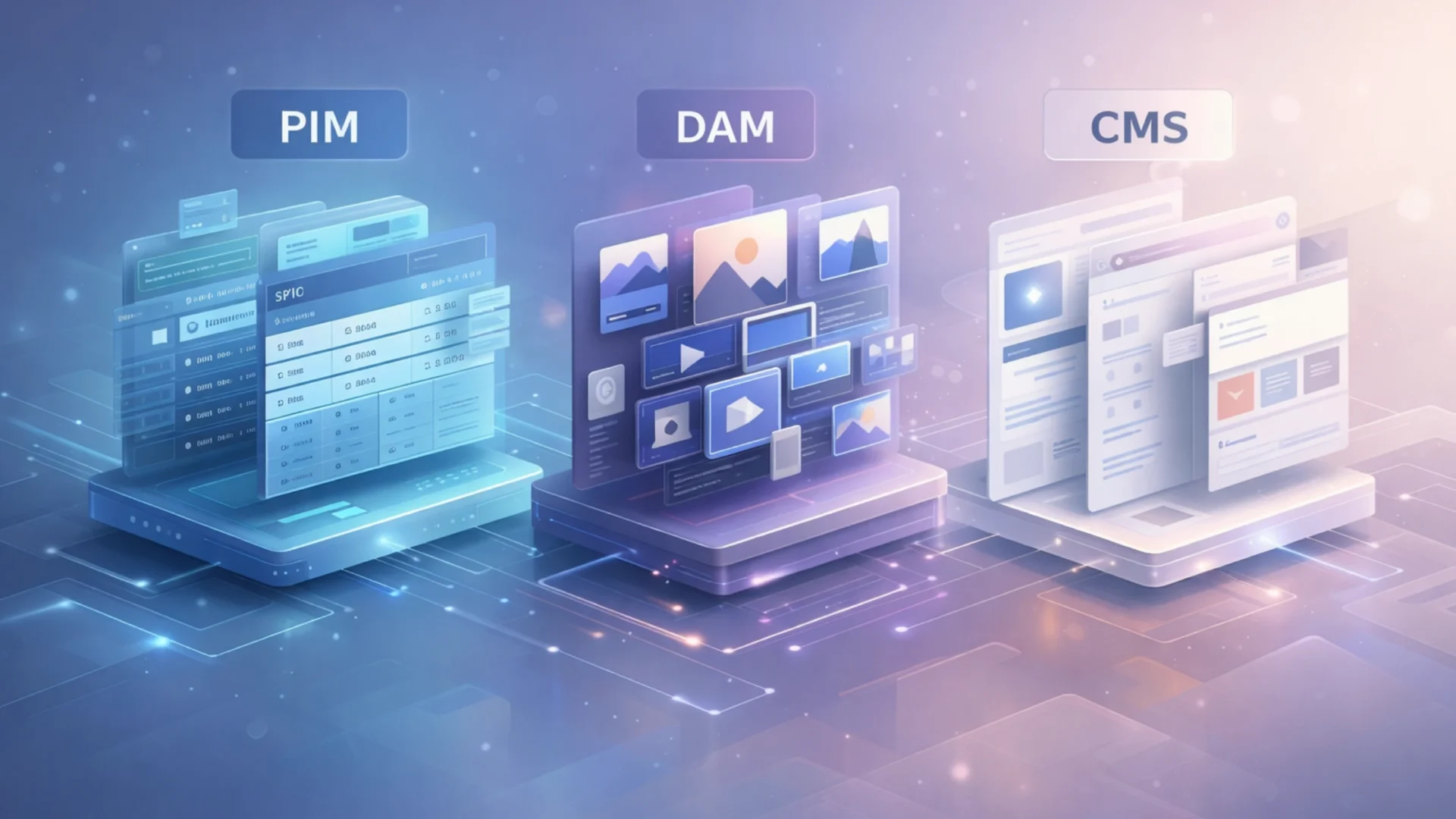
In simple terms:
PIM manages product data (like specs, SKUs, pricing)
DAM manages media files (like images, videos, brand assets)
CMS manages website content (like pages, blogs, and SEO content)
If you remember just this, you’ll never confuse these three again.
Understanding the difference between PIM and DAM becomes much easier when you look at the type of data each system handles.
|
Feature |
PIM | DAM |
CMS |
|
Primary Purpose |
Manage product data and attributes | Manage digital files and brand assets |
Manage website content and pages |
|
Data Type |
Structured product data: SKUs, specs, attributes | Unstructured media files: images, videos, PDFs |
Web content: text, HTML, pages, blogs |
|
Primary Users |
Product managers, eCommerce teams | Marketing, creative, brand teams |
Web editors, content writers, marketers |
|
Core Use Case |
Multi-channel product catalog management | Brand asset storage and distribution |
Website publishing and content updates |
|
Integration Role |
Feeds data into CMS, marketplaces, ERP | Delivers assets to CMS, PIM, and campaigns |
Pulls data from PIM and assets from DAM |
|
Example Tools |
Akeneo, Salsify, inRiver | Bynder, Canto, Widen, Brandfolder |
WordPress, Drupal, Contentful, Shopify |
|
Content Complexity |
High: product hierarchies, variants, locales | Medium: file versions, metadata, usage rights |
Medium: page structure, SEO, publishing flow |
|
Best For |
eCommerce businesses with large catalogs | Teams managing large volumes of brand media |
Any business with a website and an active blog |
Each row tells a different part of the same story. Together, they paint a clear picture of which system belongs where in your business.
Difference Between PIM, DAM, and CMS Explained
Data type handled
The most telling difference between PIM, DAM, and CMS is in the kind of data each system is built to handle.
A PIM system handles structured, relational data. Product names, technical specifications, variant matrices, and pricing tiers are all examples. This data has relationships and dependencies. Change a product category and dozens of attributes may shift with it.
A DAM system handles unstructured binary files such as JPEGs, MP4s, AI files, and PDFs. These files carry metadata instead: keywords, usage rights, license expiry dates, and version tags.
A CMS handles semi-structured content such as web copy, headlines, SEO tags, and page layouts. It sits between the other two in terms of data complexity.
Business use
The difference between PIM and CMS comes up most often in eCommerce. A CMS can display product information, but it was not built to manage it. When a product has 40 attributes, 12 variants, and needs to be listed in five languages, a CMS struggles to handle that load. A PIM system handles it without slowing down.
A DAM adds the missing link for visual content. It ensures that when your PIM sends product data to your CMS, the matching approved image is already organized and accessible.
Integration role
Here is something most guides skip. These three systems are not competitors. They are teammates.
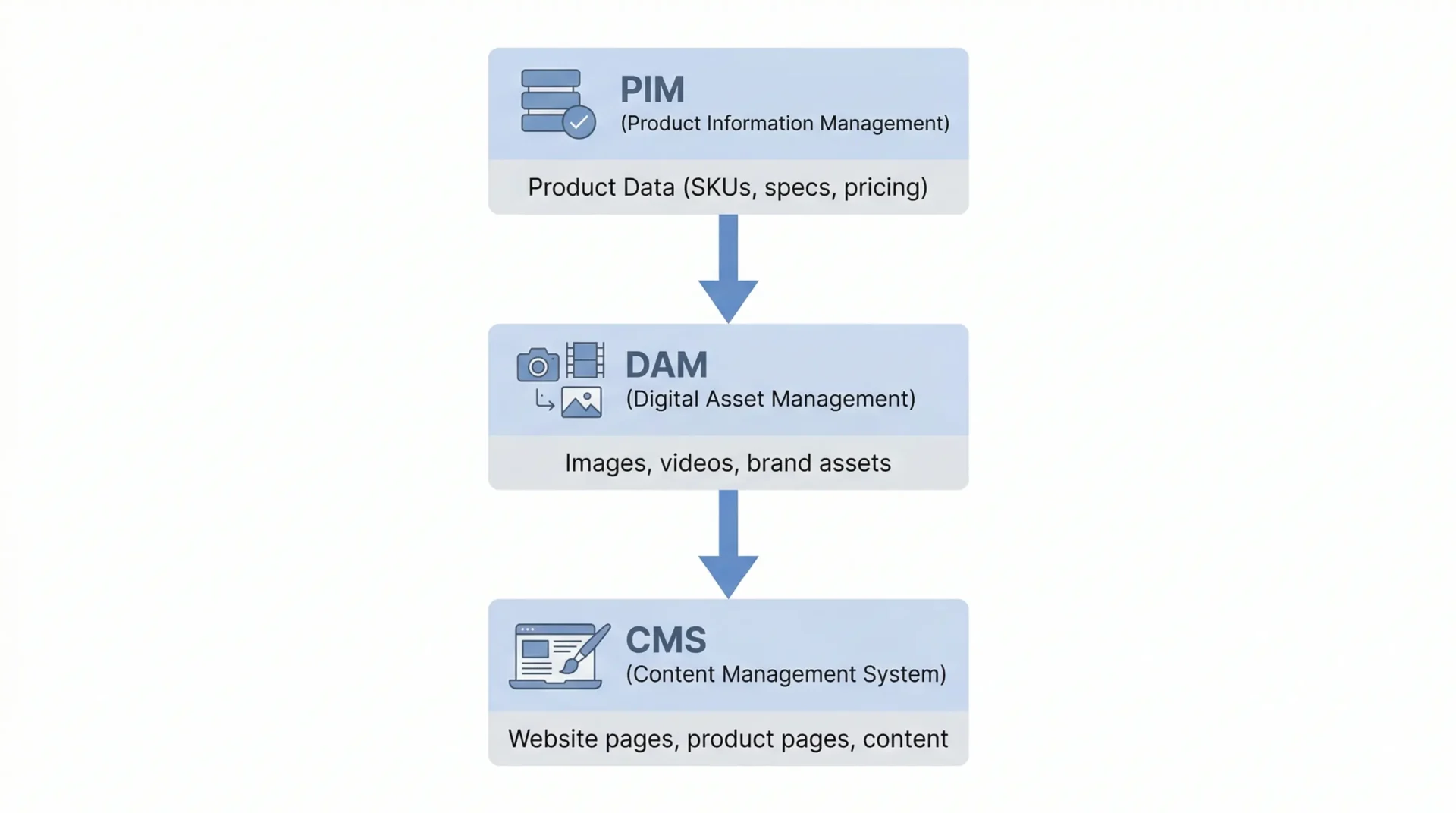
A PIM system is the source of truth for product data. A DAM is the source of truth for visual assets. A CMS is the delivery layer that presents both to the end user. When these three systems connect through proper integrations, your team stops duplicating work. That is where the real time savings show up.
Target users
PIM is used by product teams. DAM is used by creative teams. CMS is used by content and marketing teams. In some companies, one person wears all three hats. In those cases, using the right system for each job type makes a dramatic difference in how much time gets saved each week.
PIM manages structured product data, DAM manages digital assets like images and videos, and CMS delivers everything on your website. Each system has a different role, and using them together gives the best results.
When to Use PIM vs DAM vs CMS?
When to use PIM
You need a PIM system when:
- Your product catalog has more than a few hundred SKUs
- You sell across multiple channels such as your website, Amazon, wholesale portals, and retail partners
- Your products have complex attributes, variants, or specifications
- You manage product content in multiple languages or for multiple regions
- Your team spends hours manually updating product information across platforms
Scenario
: A U.S.-based outdoor gear brand sells 3,000 plus products on its Shopify store, Amazon, and through 15 wholesale distributors. Each channel needs slightly different product descriptions, image formats, and specification sets. A PIM for eCommerce centralizes all of that and distributes the right version to the right channel automatically.
When to use DAM
You need a DAM system when:
- Your marketing team manages hundreds or thousands of image and video files
- Multiple teams or external partners need access to brand-approved assets
- You spend time hunting for the right version of a file or logo
- Your assets expire, require usage licenses, or have regional restrictions
- Creative production is slowing down because no one can find what they need
Scenario: A consumer goods company running seasonal campaigns across five markets has over 50,000 image files spread across three different cloud storage systems. A DAM system brings all of it into one place with metadata tagging, version control, and permission-based access for agencies.
When to use CMS
You need a Content Management System (CMS) in these cases:
- You need a website or blog that non-technical team members can easily update.
- Your content team regularly publishes articles, guides or landing pages.
- You want control over Search Engine Optimization (SEO) metadata without touching code.
- Your site structure changes with new pages, sections or updated navigation.
If you sell products, start with PIM. If you manage a lot of media, you need DAM. If you run a website or blog, you need a CMS.
Can You Use PIM, DAM, and CMS Together?
Yes, you can. Successful eCommerce businesses use them together.Here’s how it works:
- Step 1: The product team adds a product to the Product Information Management (PIM) system with details like name, description, pricing, etc.
- Step 2: The creative team uploads product photos to the Digital Asset Management (DAM) system, tags them and marks them as approved.
- Step 3: The website team connects the CMS to both systems. The PIM provides product data, the DAM provides matching images and the CMS creates the product page.
- Step 4: When a price changes or a product gets a new image, the update happens in one place. This change then flows to every channel automatically.
Simple Workflow of PIM, DAM, and CMS Integration
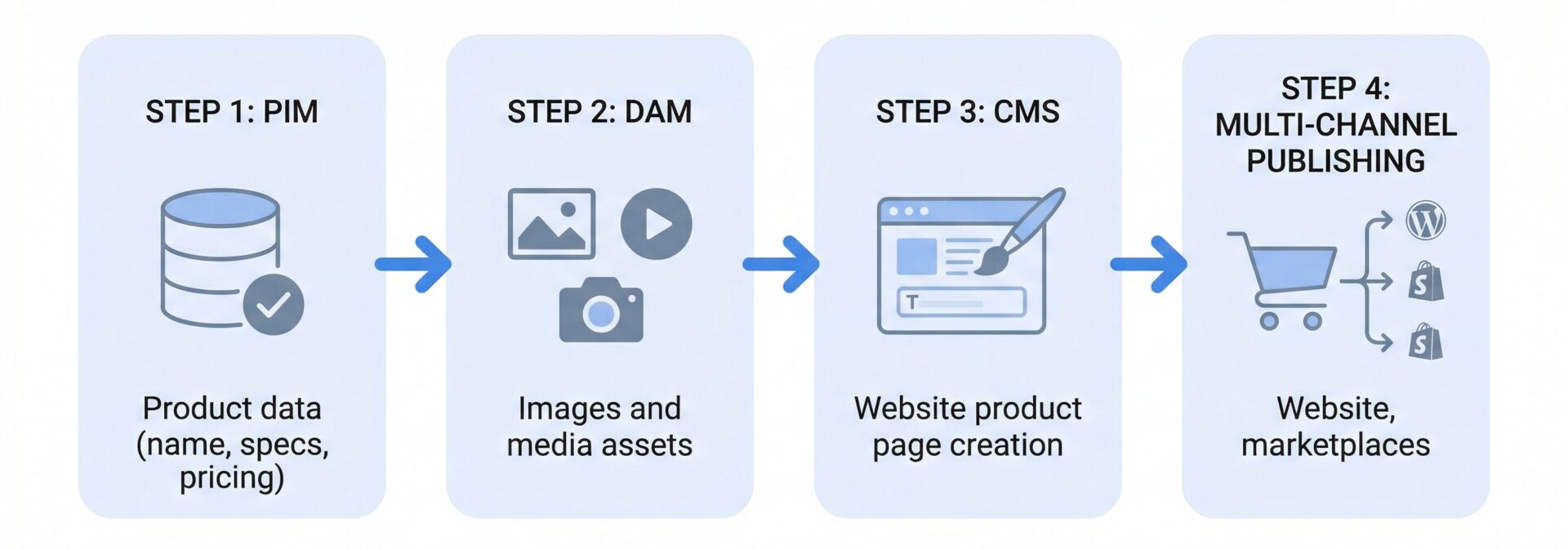
For businesses already running Magento, this workflow becomes even more powerful see how Pimcore and Magento 2 integration brings this exact stack to life.
This way your team stops copying and pasting product data from spreadsheets. The PIM vs DAM for eCommerce question really answers itself when you see this workflow. These systems are not interchangeable. They are complementary.
Benefits of Using PIM for Businesses
If you manage product data today through spreadsheets, shared drives, or a patched-together CMS setup, switching to a proper PIM system changes the day-to-day experience for your team significantly.
Centralized product data
Every product attribute lives in one system rather than scattered across Excel files and email threads. Your team always works from the same data. Therefore, the errors that come from outdated versions floating around simply stop happening.
Faster time to market
Adding a new product used to mean updating eight different platforms manually. With a PIM, you do it once and publish everywhere. Launches that once took a full week can happen in a single day.
Improved content consistency
When a product name or specification changes, it changes everywhere at once. No more mismatched descriptions between your website and your Amazon listing. Likewise, your sales team always has the right information without chasing someone down for an updated spec sheet.
Better eCommerce performance
Complete and accurate product information directly affects conversion rates. Customers who can see every specification, every variant, and every feature they need are far more likely to buy. A PIM system makes that level of completeness sustainable at scale.
Easier multi-channel selling
Each marketplace has its own required fields, character limits, and image specifications. A PIM lets you build channel-specific templates that apply the right format to the right destination automatically. That way, your team focuses on growing the catalog rather than reformatting it for every new channel.
At Elsner, we have seen businesses cut their product onboarding time by more than 60 percent after moving to a proper PIM setup. That time goes back into growing the catalog rather than maintaining it.
How to Settle on the Right System?
There is no single right answer here. The best system typically is dependent on your specific circumstance. Here is a straightforward framework that facilitates guiding your decision:
- Business type: If you sell products, start with PIM. If you produce content, start with CMS. If you manage a brand with heavy visual output, start with DAM.
- Data complexity: A business with 50 products and a simple website may not need a PIM right away. A business with 500 plus SKUs across three channels almost certainly does.
- Budget: PIM and DAM systems mainly carry higher setup costs when compared to a basic CMS. That said, the cost of not having them in wasted time, inconsistent data, and missed sales often far exceeds the cost of the tool itself.
- Integration needs: Think about the systems you already use. Your ERP, eCommerce platform and marketing automation tools should all connect easily to the system you pick. Elsner hold specialization in building these integrations so your systems work together smoothly.
- Team size and structure: If your product and marketing teams are always waiting for each other for information or files it’s a sign you need systems for each function.
FAQs
Do you need a DAM system for eCommerce?
Not every eCommerce business needs a dedicated DAM from day one. Once you are managing thousands of product images across multiple teams and channels, a DAM becomes extremely valuable.
It removes the problem of teams hunting for the right approved file entirely. That problem costs more time than most businesses realize, and it slows down every campaign, every launch, and every product update.
Can a PIM system replace a CMS?
No. A PIM and a CMS are not interchangeable. A PIM stores and distributes product data. It does not build web pages or manage editorial content.
A CMS publishes content to your website. It does not manage product hierarchies or multi-channel data distribution. Likewise, using one in place of the other creates gaps that are expensive to fix later. You need both, and ideally they should be connected.
Which system is best for managing product data?
A PIM system is built specifically for product data management. It handles attributes, variants, specifications, and multi-channel publishing in a way that spreadsheets and CMS platforms simply cannot.
Therefore, if your product data is your biggest operational challenge, a PIM is the right tool to start with.
Do you need PIM, DAM, and CMS together?
Not always. It depends on the size and complexity of your operations.
A small business with a basic website and a handful of products may only need a CMS. A mid-sized eCommerce brand with hundreds of SKUs and active marketing campaigns will benefit from all three working together. Start by identifying where your team loses the most time each week. That answer usually points directly to the system you need first.
What is the best system for multi-channel product selling?
A PIM system is the foundation for multi-channel selling. It lets you manage product data in one place and distribute it to every channel with the right format for each destination.
Pair it with a DAM for image management and a CMS for your website content. This way, you have complete omnichannel content operations that your team can manage without burning out.
What is the difference between PIM and CMS?
A PIM manages structured product data like specifications, SKUs, and attributes, while a CMS is used to create and publish website content like pages and blogs. A CMS can display product data, but it is not built to manage complex product information at scale.
Can PIM replace a DAM system?
No, a PIM cannot replace a DAM. A PIM manages product data, while a DAM manages media files like images and videos. Both systems serve different purposes and work best when integrated.
Final Thoughts
The difference between PIM, DAM, and CMS is simpler than it first appears. A PIM manages your product data. A DAM manages your digital assets. A CMS manages your website content. Each one does its job well. When all three work together, your entire content operation gets faster, cleaner, and more scalable.
Choosing the wrong system means your team spends time fighting the tool instead of using it. Choosing the right one means your catalog grows without your workload growing with it.
PIM = product data
DAM = media assets
CMS = website contentTogether, they create a complete content system for your business.
If your team is still managing product data in spreadsheets, struggling to find the right images, or updating the same content across multiple platforms, the problem isn’t your team. It’s your system.
The right setup with PIM, DAM, and CMS can save hours every week, reduce errors, and make your entire content workflow smoother.
At Elsner, we help businesses figure out exactly what they need and build systems that actually work in real-world conditions, not just on paper.
If you’re planning to improve your current setup or starting from scratch, let’s talk and map out the right solution for your business.
About Elsner
Elsner is a full-service IT and software development company with 19 plus years of experience delivering eCommerce and web development solutions to businesses worldwide. With 6,200 plus global clients and 250 plus developers on board, Elsner brings technical depth and real-world expertise to every project. From PIM implementation to Magento development and beyond, we help businesses build systems that grow with them.