- What Are WordPress AI Plugins?
- Why Does WordPress Need AI in 2026?
- Key Benefits of Using AI Plugins for WordPress
- How We Selected These WordPress AI Plugins?
- Top Best WordPress AI Tools for 2026
- Jetpack AI Assistant
- Elementor AI
- Divi AI
- Rank Math AI SEO
- Yoast AI SEO
- AI Engine (Meow Apps)
- Bertha AI
- Tidio AI Chatbot
- ChatBot AI for WP
- AI Image Generator Plugins
- Woo AI / AI for WooCommerce
- How to Install an AI Plugin in WordPress?
- Real Use Cases of AI Plugins
- 1. Automated Blog Creation (Without Killing Quality)
- 2. AI-Powered SEO Optimization
- 3. Chatbots That Handle Real Questions
- 4. WooCommerce Product Automation
- 5. AI-Assisted Design & Layout Work
- 6. Image Generation for Content & Commerce
- Get a Free Consultation
- Challenges & Limitations of AI Plugins
- Over-Dependence on AI Content
- Accuracy Isn’t Guaranteed
- Plugin Compatibility Issues
- Rising Costs Over Time
- Performance & Speed Impact
- Best Practices for Using AI on WordPress
- Use AI as an Assistant, Not an Author
- Build Repeatable Workflows
- Don’t Overload Your Stack
- Monitor Output Quality Regularly
- Combine AI with Analytics
- Conclusion
- FAQs
- What are the best AI plugins for WordPress in 2026?
- How to use AI on WordPress?
- What are WordPress AI assistant plugins?
- Can I use AI plugins to automate WordPress tasks?
A few years ago, using AI on a WordPress website felt optional. Today, it’s becoming a practical necessity. From generating blog drafts and improving SEO to automating product descriptions and handling customer queries, AI is changing how WordPress sites are built and managed.
This shift isn’t about replacing people. It’s about reducing repetitive work and improving efficiency. Bloggers, agencies, ecommerce brands, and developers are increasingly relying on WordPress AI plugins to scale their workflows without expanding their teams.
This guide breaks down the best WordPress AI plugins for 2026, focusing on what actually matters for real websites and real businesses.
You’ll learn what these plugins do well, where they fall short, how much they cost, and which use cases they genuinely support. No hype. No vague promises. Just practical insight into AI-powered WordPress plugins you can realistically use.
Many businesses also work with a WordPress development company to implement and customize AI plugins properly, especially when performance and scalability matter.
What Are WordPress AI Plugins?
In simple terms, AI plugins for WordPress are tools that use machine learning or large language models to automate or enhance tasks on your website.
Instead of doing everything manually, these AI automation tools WordPress help you:
- Generate content faster
- Improve on-page SEO
- Automate repetitive admin tasks
- Power chatbots and customer support
- Assist with design, layouts, and images
- Personalize user experiences
They exist because WordPress users face the same recurring problems:
- Content takes too long to create
- SEO optimization is inconsistent
- Chatbots feel robotic or useless
- Too many tasks are still manual
- Design workflows slow teams down
- Engagement and conversions plateau
AI-powered WordPress plugins don’t replace people. They reduce friction. That distinction matters.
Why Does WordPress Need AI in 2026?
WordPress has always been flexible. AI makes it efficient.
Here’s why adoption has accelerated across blogs, agencies, and businesses.
Key Benefits of Using AI Plugins for WordPress
- Faster content creation: AI content plugins help generate outlines, drafts, FAQs, and meta descriptions in minutes, not hours.
- Stronger on-page SEO: AI SEO plugins WordPress analyze keywords, readability, internal links, and schema suggestions in real time.
- Automated website tasks: From bulk product descriptions to internal linking, WordPress automation plugins reduce repetitive work.
- Smarter chatbots: Modern AI chatbot WordPress plugins understand intent better and improve support response times.
- Higher conversions: Personalized content, product recommendations, and faster support directly impact engagement.
- Better user experience: AI helps sites feel responsive instead of static.
- Time and cost efficiency: Smaller teams can now manage bigger workloads without burning out.
How We Selected These WordPress AI Plugins?
Not every AI plugin deserves space on your site.
Our selection is based on:
- Feature depth and real-world usefulness
- Accuracy and output quality
- Stability and update frequency
- Compatibility with popular themes and builders
- Transparent pricing
- Consistent user feedback
- Minimal performance impact
These WordPress plugin recommendations 2026 list represent tools people actually use.
Top Best WordPress AI Tools for 2026
Below is a practical list of AI-powered WordPress plugins that stand out this year.
Jetpack AI Assistant

What it does:
Jetpack AI Assistant brings content generation directly into the WordPress editor.
Ideal for:
Bloggers and content teams who want fast drafts without switching tools.
Key Features
- Blog post and page generation
- Tone adjustment and rewriting
- Grammar and clarity improvements
- Built-in WordPress editor integration
Pros:
- Seamless UX
- Good for short and medium-length content
Cons:
- Limited advanced SEO control
- Usage limits on lower plans
Pricing:
Starts around $8–$10/month
Why it’s good for 2026:
It reduces friction. No dashboards. No learning curve.
Elementor AI

What it does:
Elementor AI assists with content, layout suggestions, and code snippets inside the Elementor builder.
Ideal for:
Designers, agencies, and site builders.
Features:
- AI-generated copy for sections
- Custom CSS and HTML generation
- Layout suggestions
- Image text prompts
Pros:
- Deep Elementor integration
- Useful for rapid prototyping
Cons:
- Elementor-only
- Requires a paid Elementor plan
Pricing:
Included with Elementor Pro plans
Why it’s good for 2026:
Design speed matters more than ever.
Divi AI

What it does:
Divi AI generates content, images, and layouts inside the Divi ecosystem.
Ideal for:
Divi users building multiple client sites.
Features:
- AI text generation
- AI image generation
- Layout content optimization
Pros:
- Consistent with the Divi workflow
- Saves time on client drafts
Cons:
- Not builder-friendly
Pricing:
Included in Divi plans
Why it’s good for 2026:
All-in-one builder + AI workflow.
Rank Math AI SEO

What it does:
Rank Math’s AI helps optimize SEO content directly inside WordPress.
Ideal for:
SEO professionals and content marketers.
Features
- AI content suggestions
- Keyword optimization
- Schema recommendations
- Content scoring
Pros:
- Strong SEO accuracy
- Easy to scale
Cons:
- AI credits can add up
Pricing:
Free + paid plans starting ~$6/month
Why it’s good for 2026:
SEO is no longer optional—or manual.
Yoast AI SEO

What it does:
Yoast AI assists with SEO titles, meta descriptions, and readability.
Ideal for:
Beginners and small site owners.
Features:
- AI meta descriptions
- Readability improvements
- SEO guidance
Pros:
- Beginner-friendly
- Trusted SEO framework
Cons:
- Limited automation
Pricing:
Available in Yoast Premium
Why it’s good for 2026:
Simple SEO support without complexity.
AI Engine (Meow Apps)

What it does:
A flexible AI framework that connects WordPress with OpenAI-style APIs.
Ideal for:
Developers and advanced users.
Features:
- Custom AI prompts
- Chatbot creation
- Content generation
- API integrations
Pros:
- Extremely flexible
- Developer-friendly
Cons:
- Requires configuration
Pricing:
Free + paid add-ons
Why it’s good for 2026:
Customization beats one-size-fits-all.
Bertha AI
What it does:
Content-focused AI writing assistant for WordPress.
Ideal for:
Marketers and bloggers.
Features:
- Blog drafts
- Product descriptions
- FAQs and CTAs
Pros:
- Clean UI
- Marketing-friendly tone
Cons:
- Needs human editing
Pricing:
Starts around $20/month
Why it’s good for 2026:
Great for marketing workflows.
Tidio AI Chatbot

What it does:
AI-powered live chat and chatbot solution.
Ideal for:
Ecommerce and service websites.
Features
- AI chat responses
- Live chat
- Automation flows
Pros:
- Improves support speed
- Easy setup
Cons:
- Advanced features are paid
Pricing:
Free + paid plans
Why it’s good for 2026:
Customer experience is everything.
ChatBot AI for WP

What it does:
Standalone AI chatbot plugin for WordPress.
Ideal for:
Support-heavy websites.
Features:
- Knowledge-based chatbot
- Custom training data
- Lead capture
Pros:
- Focused chatbot use case
Cons:
- Limited non-chat features
Pricing:
Varies by provider
AI Image Generator Plugins

What they do:
Generate images from text prompts.
Ideal for:
Content creators and designers.
Use Cases
- Blog visuals
- Featured images
- Social previews
Pricing:
Varies by plugin and credits
Woo AI / AI for WooCommerce
What it does:
Automates product descriptions and categorization.
Ideal for:
Online store owners.
Features:
- Bulk product content
- SEO-friendly descriptions
- Attribute generation
Why it’s good for 2026:
Scaling stores without scaling teams.
|
Plugin Name |
Best For | Core AI Use | Key Features | Pricing (Approx.) |
Difficulty Level |
|
Jetpack AI Assistant |
Bloggers, content teams | Content writing | Draft generation, rewriting, grammar fixes | $8–$10/month |
Easy |
|
Elementor AI |
Designers, agencies | Design + copy | Section copy, layout help, CSS/HTML generation | Included in Elementor Pro |
Medium |
|
Divi AI |
Divi users | Design + visuals | AI text, AI image generation, layout content | Included in Divi plans |
Medium |
|
Rank Math AI SEO |
SEO professionals | SEO optimization | Keyword analysis, content scoring, schema suggestions | Free + ~$6/month |
Medium |
|
Yoast AI SEO |
Beginners, small sites | SEO assistance | AI meta titles, descriptions, readability help | Yoast Premium |
Easy |
|
AI Engine (Meow Apps) |
Developers, advanced users | Custom AI workflows | Chatbots, custom prompts, API integrations | Free + paid add-ons |
Advanced |
|
Bertha AI |
Marketers, bloggers | Marketing content | Blogs, product descriptions, CTAs | ~$20/month |
Easy |
|
Tidio AI Chatbot |
Ecommerce, service sites | Customer support | AI chatbot, live chat, automation flows | Free + paid plans |
Easy |
|
ChatBot AI for WP |
Support-heavy sites | Chat automation | Knowledge-based chatbot, lead capture | Varies by provider |
Medium |
|
AI Image Generator Plugins |
Content creators | Image generation | Text-to-image generation | Credit-based |
Easy |
|
Woo AI / AI for WooCommerce |
Online stores | Ecommerce automation | Bulk product descriptions, SEO-friendly content | Plugin-dependent |
Medium |
How to Install an AI Plugin in WordPress?
- Go to Plugins → Add New
- Search for the plugin in the page’s search bar.
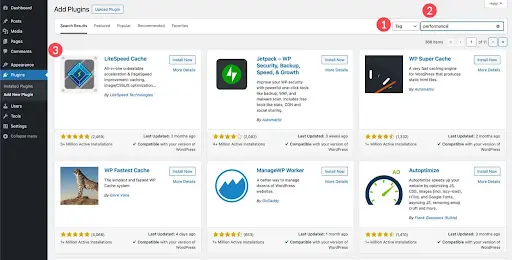
- Click Install: Click Install Now only once. Multiple clicks can cause database errors.
- Activate

- Configure settings: The newly installed plugin will appear on your list. Configure according to your requirements.
Real Use Cases of AI Plugins
AI plugins sound impressive in feature lists. Their real value shows up in everyday workflows.
1. Automated Blog Creation (Without Killing Quality)
Many WordPress AI content plugins are now used as drafting partners rather than full writers. A common workflow looks like this:
- AI generates an outline based on keywords
- Draft sections are filled in quickly
- A human editor refines tone, structure, and accuracy
This cuts content creation time by half while keeping brand voice intact. The sites that struggle are usually the ones publishing raw AI output without oversight.
2. AI-Powered SEO Optimization
AI SEO plugins for WordPress don’t magically guarantee rankings. What they do well is consistency.
They:
- Catch missing metadata
- Suggest internal links
- Flag weak headings
- Improve readability scores
For large blogs or ecommerce sites, this kind of automation prevents small SEO mistakes from piling up over time.
3. Chatbots That Handle Real Questions
Older chatbots followed scripts. Modern AI chatbot WordPress plugins work more like trained assistants.
They can:
- Answer FAQs based on site content
- Route complex queries to humans
- Capture leads outside business hours.
For service businesses and online stores, this often reduces support tickets rather than replacing support teams.
4. WooCommerce Product Automation
Store owners are using AI automation tools for WordPress to:
- Generate bulk product descriptions
- Rewrite manufacturer content
- Optimize titles for search intent
This is especially useful for stores with hundreds (or thousands) of SKUs where manual editing isn’t realistic.
5. AI-Assisted Design & Layout Work
Tools like Elementor AI and Divi AI don’t design entire websites on their own—but they speed up the boring parts:
- Placeholder copy
- Section descriptions
- Layout suggestions
Designers still make decisions. AI just removes the blank-page problem.
6. Image Generation for Content & Commerce
AI image generator WordPress plugins are increasingly used for:
- Blog headers
- Concept visuals
- Ecommerce placeholders
They’re not always brand-perfect, but they reduce dependency on stock libraries for non-critical visuals.
Get a Free Consultation
Need custom plugins or AI workflows aligned for your business?
Challenges & Limitations of AI Plugins
AI plugins are useful. They’re not flawless. Ignoring the downsides usually creates more work later.
Over-Dependence on AI Content
The biggest risk isn’t bad writing—it’s lazy publishing.
Search engines and readers can both spot content that hasn’t been reviewed or contextualized.
Fix:
Use AI for structure and speed. Keep humans responsible for the final output.
Accuracy Isn’t Guaranteed
AI can confidently produce outdated or incorrect information, especially in:
- Technical topics
- Legal or medical niches
- Pricing or feature comparisons
Fix:
Fact-check anything that matters. Always.
Plugin Compatibility Issues
Stacking too many WordPress automation plugins can cause:
- Conflicts with caching tools
- Editor lag
- Unexpected layout issues
Fix:
Choose fewer, better-integrated tools instead of installing everything “AI-powered.”
Rising Costs Over Time
Many plugins rely on usage-based AI credits. Costs can quietly increase as content volume grows.
Fix:
Track usage monthly and set limits where possible.
Performance & Speed Impact
Some AI plugins load external scripts or APIs that affect page speed.
Fix:
Test performance after installation and avoid running AI tasks on the frontend unless necessary.
Best Practices for Using AI on WordPress
The most successful WordPress sites in 2026 aren’t the most automated—they’re the most intentional.
Use AI as an Assistant, Not an Author
AI works best when it supports decisions rather than makes them. Drafts, outlines, and suggestions are ideal. Final judgment stays human.
For more complex setups, many businesses choose to hire WordPress developers to ensure AI plugins are implemented correctly without impacting performance, security, or scalability.
Build Repeatable Workflows
Instead of random AI usage:
- Use AI for first drafts
- Use SEO AI for optimization checks
- Use chatbots for common queries only
Consistency matters more than novelty.
Don’t Overload Your Stack
More plugins don’t mean more productivity. Each new AI tool should replace something—not just add to it.
Monitor Output Quality Regularly
Review AI-generated content periodically to ensure it still matches your standards.
Combine AI with Analytics
AI tells you what to create. Analytics tell you what actually works. Use both.
Conclusion
The right WordPress AI plugins reduce friction, speed up workflows, and help teams focus on decisions that actually require human judgment.
Choose tools based on real needs. Test them properly. Keep humans in the loop. When AI is implemented with intention, WordPress becomes faster and smarter.
FAQs
What are the best AI plugins for WordPress in 2026?
The best plugin will depend on your requirements. Jetpack AI, Rank Math AI, Elementor AI, and Tidio are widely used.
How to use AI on WordPress?
Using AI on WordPress usually starts with:
- Installing an AI plugin,
- Configuring its basic settings, and
- Integrating it into your existing workflow.
What are WordPress AI assistant plugins?
WordPress AI assistant plugins are tools that work alongside you inside the dashboard or editor. They help with tasks like:
- writing content,
- optimizing SEO,
- generating layouts,
- answering customer queries, or
- suggesting improvements.
Can I use AI plugins to automate WordPress tasks?
Yes, particularly product content and descriptions.