- Why Does Checkout Experience Actually Matters?
- 8 Stellar Checkout Experiences You Can Build With BigCommerce Development Services
- 1. One-Page Checkout: Eliminate Every Unnecessary Click
- 2. Mobile-First Checkout: Build for Thumbs, Not Mice
- 3. Guest Checkout: Remove the Commitment Barrier
- 4. Multi-Payment Options: Meet Customers Where Their Wallet Is
- 5. Smart Returning Customer Recognition: Make Loyalty Effortless
- 6. Multi-Currency & Multi-Language Checkout: Go Global Without Friction
- 7. Trust Signals & Transparent Pricing: Kill Anxiety Before It Kills the Sale
- 8. Post-Purchase Upsell & Smart Recommendations: The Checkout Doesn’t End at “Place Order”
- Why Professional Bigcommerce Development Services Make the Difference?
- Choosing Your BigCommerce Developers
- Transform Your Checkout Experience Today
- The Checkout Mistakes That Are Quietly Killing Your Conversions
- Your Checkout Is Either Your Biggest Asset or Your Biggest Leak: Choose Which One
- Ready to turn your checkout into a conversion asset?
- FAQs
- What makes BigCommerce ecommerce platform perfect for checkout customization?
- What’s the investment for professional checkout optimization?
- Why choose a BigCommerce Ecommerce development company over freelance developers?
- Can BigCommerce integrate with existing business tools?
- How can I reduce cart abandonment on BigCommerce?
- Does BigCommerce support one-page checkout?
- What is the average cart abandonment rate for BigCommerce stores?
- Can BigCommerce support a fully customized one-page checkout?
- How many payment gateways does BigCommerce support natively?
- Is guest checkout available on BigCommerce, and should I use it?
- How can I tell where customers are dropping off in my checkout?
- What trust signals matter most during checkout?
- How long does it take to see results from checkout optimization?
- Should I hire a BigCommerce development company or use a freelancer?
You’ve built a solid BigCommerce store. Traffic is coming in. Products are good. But somewhere between “Add to Cart” and “Order Confirmed,” a significant chunk of customers vanish. And that loss is measurable.
Nearly 70% of online shoppers abandon their carts before completing a purchase. That’s not a marketing problem or a product problem. That’s a checkout problem.
BigCommerce gives merchants more room to fix this than most platforms do. B ut flexibility only matters if it’s applied correctly. The difference between a 1.5% conversion rate and a 3%+ one often comes down to a few friction points.
This guide covers 8 high-impact BigCommerce checkout strategies that development teams actually use to reduce abandonment and increase completed orders. Whether you’re working with a BigCommerce development company or managing things in-house, these are the fixes that move numbers.
Why Does Checkout Experience Actually Matters?
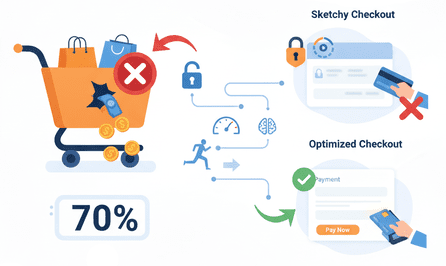
Numbers don’t lie. Seven out of ten shoppers abandon their carts before completing a purchase — that’s money walking out the door. According to cart abandonment statistics, nearly 70% of online shoppers leave before completing checkout, proving why optimization is crucial.
Speed matters, but security matters more. A slow, sketchy-looking checkout sends customers running to competitors.
Growth-focused businesses don’t leave this to chance. They hire BigCommerce developers who specialize in creating checkout experiences that work. These experts know the difference between a checkout that converts and one that kills sales.
8 Stellar Checkout Experiences You Can Build With BigCommerce Development Services
1. One-Page Checkout: Eliminate Every Unnecessary Click
Every additional checkout page is a moment where a customer might reconsider. One-page checkouts pull the entire purchase flow into a single view. No confusion about what step comes next. No “back” button temptation.
That said, one page doesn’t automatically mean a good experience. Cramming everything together without structure creates its own kind of friction. Experienced BigCommerce web development teams know how to handle this.
They use clean section breaks, logical field grouping, real-time inline validation, and auto-fill where possible. The result feels faster than it is.
What to implement:
- Accordion-style sections that expand on interaction
- Inline error messages (not after submission)
- Sticky order summary panel visible throughout
Reducing checkout to a single page can lift conversion rates by 20–35% for mid-market stores.
2. Mobile-First Checkout: Build for Thumbs, Not Mice
More than 60% of eCommerce traffic comes from mobile. Most cart abandonment also happens on mobile. T hat gap is exactly where checkout optimization earns its return.
Mobile-first checkout isn’t responsive design. It’s a different way of thinking about the experience. Buttons sized for thumbs. Minimal required fields. Load times under two seconds because anything beyond that loses people on cellular connections.
A BigCommerce development agency worth working with rebuild the mobile flow separately. They test across iOS, Android, and tablet sizes.
What to implement:
- Sticky CTA buttons that don’t disappear on scroll
- Apple Pay and Google Pay as primary mobile options
- Reduced field count on mobile specifically
- Input fields that pull up the right keyboard (numeric for phone numbers, email-type for email fields).
Optimized mobile checkout can cut mobile abandonment by up to 40% compared to desktop-adapted layouts.
3. Guest Checkout: Remove the Commitment Barrier
“Create an account to continue.” Four words responsible for a staggering amount of lost revenue.
First-time customers haven’t committed trust yet. Account creation before purchase signals that the checkout process exists to serve the merchant’s data interests, not the customer’s convenience. Guest checkout inverts that.
When you hire BigCommerce developers who understand conversion behavior, guest checkout becomes the default. Account creation is a prompt on the confirmation page. Social login (Google, Facebook) covers the middle ground for customers who want convenience without a full registration.
What to implement:
- Guest checkout as the prominent default option
- Post-purchase account creation prompt on confirmation page
- One-click social login as an alternative path
This alone typically recovers 25–35% of carts abandoned specifically due to forced registration.
4. Multi-Payment Options: Meet Customers Where Their Wallet Is
Payment preferences vary by age, geography, and purchase size. A millennial expects Apple Pay. A budget-conscious buyer wants to Buy Now, Pay Later. A B2B customer needs purchase order capability. An international buyer wants to pay in their currency through a gateway they recognize.
If the payment method a customer expects isn’t there, they leave. They rarely come back.
BigCommerce app development covers the full range: card processing, digital wallets, BNPL providers (Klarna, Afterpay, Sezzle), and regional gateways for international markets. The implementation matters as much as the options. Cluttered payment sections erode confidence rather than build it.
What to implement:
- Display payment logos visually near the payment step
- BNPL options featured prominently for higher-ticket products
- Regional gateways for any market representing meaningful revenue
Adding BNPL alone has been shown to increase average order value by 30–50% on qualifying purchases.
5. Smart Returning Customer Recognition: Make Loyalty Effortless
Returning customers have higher order values, lower acquisition costs, and higher lifetime value. Treating them like first-time visitors is a missed opportunity that costs real money.
Intelligent returning customer flows adapt without the customer having to ask. Saved addresses populate automatically. Preferred payment methods are pre-selected (tokenized, not stored in plain text). Order history informs smart defaults. The checkout communicates without saying anything: this experience was built for you.
Experienced BigCommerce developers build this into the checkout architecture rather than patching it on afterward.
What to implement:
- Persistent login sessions with secure token management
- Saved shipping addresses and payment preferences
- One-click reorder on account pages and post-purchase emails
Returning customers with frictionless checkout convert at 2–3x the rate of first-time buyers.
6. Multi-Currency & Multi-Language Checkout: Go Global Without Friction
International expansion is one of BigCommerce’s real competitive advantages — but it only delivers if the checkout actually supports it. Showing USD prices to a German customer, or serving an Arabic-speaking buyer with English-only copy, creates immediate distrust. Not confusion. Distrust.
Global checkout done well means currency conversion that updates in real-time (not just display conversion), localized copy beyond machine translation, regional payment gateways, and accurate international shipping rates shown at the right moment. A professional BigCommerce development company builds this so it feels native to each market — not like a layer added on top.
What to implement:
- Geolocation-based currency switching on page load
- RTL language support for Arabic, Hebrew, and Farsi markets
- Locally preferred payment methods per region
Localized checkout experiences can increase international conversion rates by 70% compared to English-only USD flows.
7. Trust Signals & Transparent Pricing: Kill Anxiety Before It Kills the Sale
The payment step is where buyer anxiety peaks. Customers are about to hand over financial information to a site they may have visited for the first time today. Unresolved doubts at this stage translate directly to abandonment.
Trust signals address the anxiety before it becomes a decision. SSL indicators. PCI compliance badges. Recognizable payment logos near payment fields. Customer review counts in the order summary. Clear return policy links that don’t require hunting.
Transparent pricing matters equally. Hidden shipping costs revealed at the final step are the single biggest driver of checkout abandonment. BigCommerce theme development that surfaces estimated shipping on the cart page removes the most common reason people leave.
What to implement:
- Trust badge clusters adjacent to payment fields
- Real-time shipping calculator on the cart page
- Return policy and money-back guarantee visible without clicking away
- Live chat accessible during checkout without navigating away
Visible trust signals have been shown to lift conversions by 10–15%. Transparent shipping pricing alone reduces “fee shock” abandonment by up to 23%.
8. Post-Purchase Upsell & Smart Recommendations: The Checkout Doesn’t End at “Place Order”
The confirmation page is the most underused real estate in eCommerce. A customer who just completed a purchase is in their highest-trust moment. That’s the right time for a relevant add-on, not mid-checkout when attention is split.
AI-powered recommendation engines, integrated by a skilled BigCommerce development company, pull from purchase history, cart contents, and browse behavior to surface useful products. “Customers who bought this also bought” works because it’s frequently accurate.
One-click add-on purchasing, using the payment method already on file, removes the friction. Confirmation page upsells don’t require a new checkout flow. That’s the key.
What to implement:
- AI-driven recommendation blocks on the confirmation page
- One-click purchasing using saved payment details
- Post-purchase email sequences surfacing complementary products
Post-purchase upsell strategies increase revenue per order by 10–30% with no additional acquisition cost.
Why Professional Bigcommerce Development Services Make the Difference?
BigCommerce eCommerce development requires specialized knowledge. Platform updates change regularly. Security requirements evolve constantly.
Professional experts often rely on a complete BigCommerce development guide to stay current with these changes. They understand:
- Platform-specific optimization techniques
- Security compliance requirements
- Performance optimization strategies
- Integration capabilities and limitations
DIY checkout optimization often creates more problems than it solves. Hiring dedicated BigCommerce app developers provides peace of mind and guaranteed results.
Choosing Your BigCommerce Developers
Not all development companies understand checkout optimization. Look for specific qualifications when you select a BigCommerce development company:
Experience That Matters
- Proven checkout customization projects
- Portfolio of successful implementations and BigCommerce app development
- Client testimonials focused on conversion improvements
Comprehensive Service Offerings
- End-to-end BigCommerce development services
- Ongoing support and maintenance
- Performance monitoring and optimization
Scalability Focus
- Experience with BigCommerce enterprise solutions
- Understanding of high-traffic requirements
- Growth-oriented development approaches
Transform Your Checkout Experience Today
Your checkout experience directly impacts business success. Poor checkout design costs money every single day. Excellent checkout experiences pay dividends for years.
The choice is simple: continue losing customers at checkout or invest in solutions that convert.
Ready to transform your checkout experience?
Ready to stop losing sales at checkout? Hire BigCommerce developers to optimize your checkout and recover lost revenue.
The Checkout Mistakes That Are Quietly Killing Your Conversions
These are the friction points that don’t show up obviously in revenue dashboards. But they appear clearly in funnel analytics when you look.
Revealing Shipping Costs Too Late
Customers who reach the payment page expecting $35 and see $49 after shipping don’t abandon quietly. They leave frustrated, and conversion data rarely captures how rarely they return. Surface estimated shipping on the product page, confirm it on the cart page. No final-step surprises.
Too Many Required Form Fields
Every unnecessary field is friction. Asking for a phone number you won’t use, separating billing and shipping address when they’re usually identical, adding “optional” fields that still feel mandatory: these compounds. Audit your checkout fields. If you don’t operationally need it, remove it.
No Visual Progress Indicator
Multi-step checkouts without a progress bar create uncertainty about how much remains. Uncertainty is a reason to leave. Even in a single-page flow, subtle section cues (“Shipping → Payment → Confirm”) keep customers committed rather than guessing.
Weak or Absent Error Messaging
Submitting a form and receiving a vague error with no indication of which field caused it is a conversion killer. Customers won’t investigate. Inline, real-time validation with specific messages reduces this friction significantly.
Checkout Pages That Don’t Match Your Brand
A polished storefront paired with a generic-looking checkout page breaks the trust built throughout the browse experience. BigCommerce supports full checkout customization. Typography, color, button styling, and logo presence should be consistent from the homepage through the confirmation page.
No Exit-Intent Recovery Strategy
Most stores watch customers leave the checkout with no response. A simple exit-intent trigger: “Your cart is saved. Here’s 10% off to complete your order” — recovers a meaningful percentage of those abandons. Combine it with a 2–3 email abandoned cart sequence over 24 hours.
Slow Checkout Page Load Times
A checkout page loading beyond 3 seconds loses customers at a measurable rate. Third-party script bloat, unoptimized assets, and missing CDN coverage are common causes. Performance matters most at the payment step, where impatience and anxiety are already elevated.
Ignoring Checkout Analytics
Revenue and traffic metrics are visible. Checkout funnel drop-off points often aren’t, unless you’re looking. Set up funnel tracking in Google Analytics 4 with specific checkout step events. The data will tell you where to focus optimization efforts instead of guessing.
Your Checkout Is Either Your Biggest Asset or Your Biggest Leak: Choose Which One
The gap between 1.5% and 3%+ conversion rates is rarely about products, pricing, or ad spend. It’s almost always a checkout.
BigCommerce gives merchants the technical flexibility to fix all of it. What determines whether that flexibility translates into actual revenue is the quality of implementation behind it.
Working with a specialized BigCommerce development company means the checkout has been tested on mobile, handles edge cases properly, and builds trust instead of quietly eroding it. Optimization isn’t a one-time project. It runs on data, iterated regularly as customer behavior shifts.
Ready to turn your checkout into a conversion asset?
Partner with an experienced BigCommerce development agency and start recovering orders that are currently slipping through.
FAQs
What makes BigCommerce ecommerce platform perfect for checkout customization?
BigCommerce ecommerce platform combines powerful APIs with built-in security features. The platform supports extensive customization including BigCommerce theme development while maintaining PCI compliance and performance standards.
What’s the investment for professional checkout optimization?
Checkout optimization projects typically range from $5,000 to $25,000. Investment depends on customization complexity and integration requirements.
Why choose a BigCommerce Ecommerce development company over freelance developers?
BigCommerce web development companies offer team expertise, ongoing support, and project management. Freelancers may cost less initially but often lack comprehensive long-term support capabilities.
Can BigCommerce integrate with existing business tools?
Absolutely. BigCommerce’s API ecosystem supports extensive third-party integrations, including CRM systems, email marketing platforms, and analytics tools.
How can I reduce cart abandonment on BigCommerce?
Shorten the checkout to one page, enable guest checkout, display shipping/tax upfront, use trusted payment options, show trust badges, and optimize for mobile.
Does BigCommerce support one-page checkout?
Yes, BigCommerce supports customizable checkouts via its Checkout SDK and theme development — one-page layouts can be implemented through theme customization or apps.
What is the average cart abandonment rate for BigCommerce stores?
The industry average sits around 70%. BigCommerce stores that have invested in checkout optimization consistently outperform that. Abandonment rates in the 55–60% range are achievable with deliberate implementation. The platform supports it. Most stores just haven’t fully used what’s available.
Can BigCommerce support a fully customized one-page checkout?
Yes. BigCommerce’s Open Checkout framework allows significant developer customization:
- custom field arrangements,
- brand-consistent styling,
- third-party integrations, and
- modified UX flows.
For more substantial changes beyond what the native checkout supports, the Checkout SDK lets development teams build nearly any experience from the ground up while keeping payment processing PCI-compliant. It’s one of the platform’s genuine technical advantages.
How many payment gateways does BigCommerce support natively?
Over 65, covering PayPal, Stripe, Square, and regional gateways across international markets. BNPL providers( Klarna, Afterpay, Sezzle) are included. A BigCommerce development company can help identify which gateways match your customer demographics and configure them without cluttering the checkout interface.
Is guest checkout available on BigCommerce, and should I use it?
It’s natively supported, and yes make it the default. Forced account creation before purchase is one of the leading causes of checkout abandonment. The better approach is guest checkout as the prominent option, with account creation surfaced as a convenience on the confirmation page. That’s where trust is highest, and opt-in rates reflect it.
How can I tell where customers are dropping off in my checkout?
Set up funnel tracking in Google Analytics 4 with event triggers at each checkout step:
- cart view,
- shipping entry,
- payment entry,
- order confirmation.
BigCommerce’s native analytics captures some abandonment data. But behavioral tools like Hotjar or Microsoft Clarity show where customers hesitate, scroll back, or exit. The combination of quantitative drop-off data and qualitative session recordings gives you something actionable.
What trust signals matter most during checkout?
The ones with the highest impact at the payment step:
- Visible SSL/HTTPS indicators
- Recognizable payment logos (Visa, Mastercard, PayPal, Apple Pay) near payment fields
- A concise, accessible return/refund policy link
- A security or PCI compliance badge
- Real customer review counts visible near the order summary
These address buyer anxiety at the moment it’s most likely to cause abandonment.
How long does it take to see results from checkout optimization?
Most well-executed changes show measurable conversion improvements within 30–60 days. Larger structural changes (one-page checkout rebuilds, mobile redesigns) typically reflect fully within one to two sales cycles. The timeline depends partly on traffic volume, since lower-traffic stores need longer to accumulate statistically meaningful data.
Should I hire a BigCommerce development company or use a freelancer?
For checkout specifically, a development agency is the stronger choice.. An agency brings cross-disciplinary depth and ongoing accountability. The ROI on professional implementation typically justifies the investment within the first quarter.